FireBeetle 2 ESP32-C5 IoT Development Board

SKU: DFR1222

FireBeetle 2 ESP32-C5 is a low-power IoT development board equipped with Espressif's ESP32-C5 module. Targeting smart home and a wide range of IoT scenarios, it integrates high-performance computing, multi-protocol support, and intelligent power management, providing a highly reliable, flexible, and long-lasting solution for various deployment needs.

Overhead shot of FireBeetle 2 ESP32-C5 IoT Development Board
  • Docs
  • Tech Specs
  • Tutorials
  • Projects
  • Specification

    Basic Parameters

    Parameter Details
    Operating voltage 3.3V
    Type-C input voltage 5V DC
    VIN input voltage 5V DC or 4.5-6V solar panel
    Maximum charging current 0.5A
    Sleep current 21μA (deep sleep mode, battery-powered)
    Module size 25.4x60mm

    Hardware Information

    Parameter Details
    Processor RISC-V single-core processor
    Main frequency 240 MHz
    SRAM 384KB
    ROM 320KB
    Flash 4MB
    LP SRAM 16KB

    WIFI

    Parameter Details
    WIFI frequency bands 2.4 GHz and 5 GHz, 1T1R
    WIFI protocols IEEE 802.11a/b/g/n/ac/ax
    > IEEE 802.11a/b/g/n (data rate up to 150Mbps)
    > IEEE 802.11ax (20 MHz-only non-AP mode)
    WIFI modes Station mode, SoftAP mode, SoftAP+Station mode, and promiscuous mode

    Bluetooth

    Parameter Details
    Bluetooth protocols Bluetooth 5, Bluetooth mesh
    Bluetooth frequencies 125 Kbps, 500 Kbps, 1 Mbps, 2 Mbps

    IEEE 802.15.4

    Parameter Details
    Frequency band 125 Kbps, 500 Kbps, 1 Mbps, 2 Mbps
    Data rate Bluetooth 5, Bluetooth mesh
    Support Thread 1.3, Zigbee 3.0
    Compatible IEEE 802.15.4-2015 protocol

    Interface Pins

    Interface Details
    Digital I/O x18
    LED PWM controller 6 channels
    SPI x1
    UART x3 (LP UART x1)
    I2C x2 (LP I2C x1)
    I2S x1
    Infrared transceiver 5 transmit channels, 5 receive channels
    SAR ADC 1x 12-bit with 7 channels
    DMA controller 3 receive channels and 3 transmit channels

    Pinout

    Board Overview

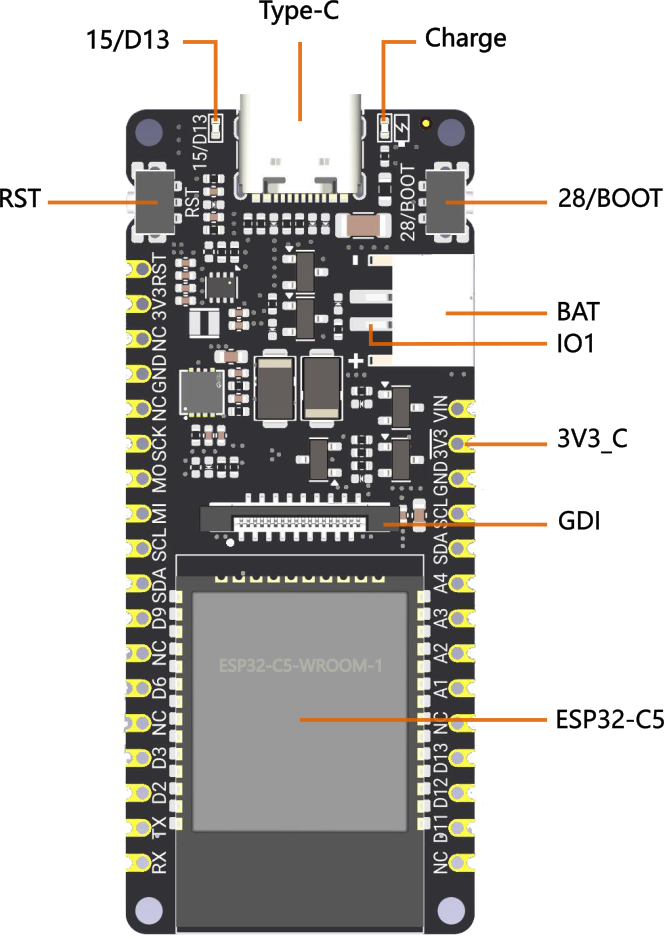
    On-board Function Diagram

    Name Details
    Type-C Type-C USB port
    Charge Charging indicator light
    > Off: No power connected or fully charged
    > Steady on: Charging in progress
    15/D13 onboard LED pin
    RST Reset button
    28/BOOT GPIO28 pin/BOOT button
    BAT Lithium battery interface, supporting 3.7~4.2V
    IO1 Battery voltage detection pin
    3V3_C IO0 controls 3.3V power output, default off, can be turned on with high level.
    GDI GDI display interface
    ESP32-C5 Module model is ESP32-WROOM-1-N4

    Pin Definition

    Pin Definition

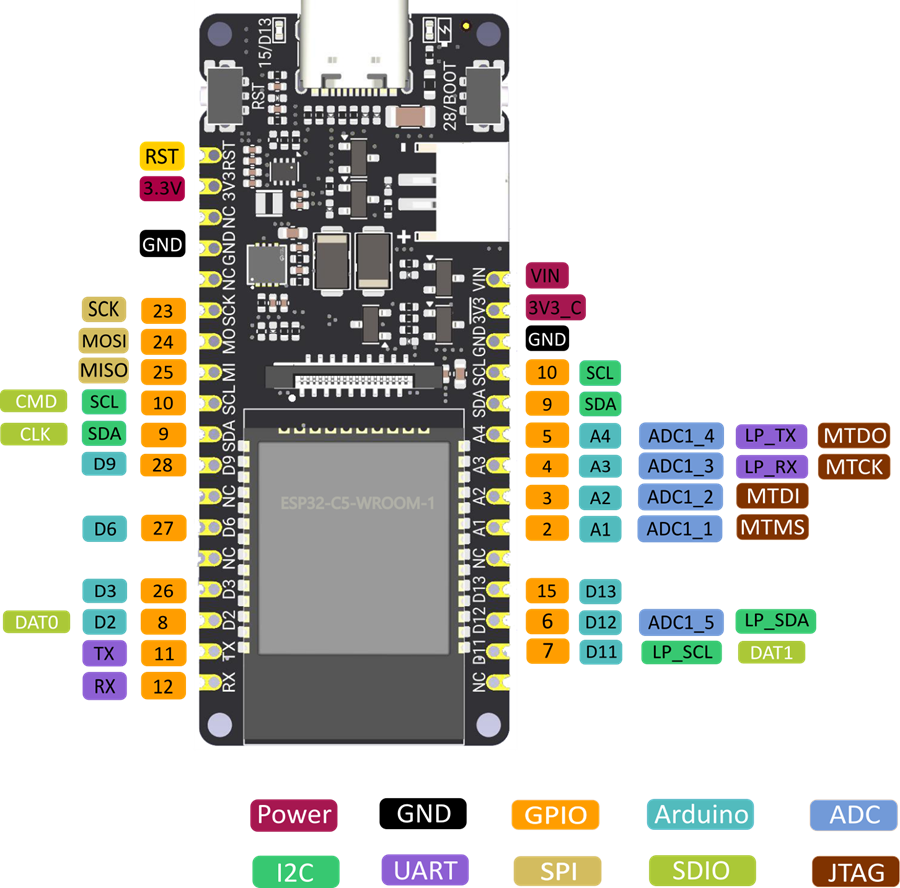
    Pin overview is as follows:

    Pin Type Description
    Power Power pins
    > VIN: 5V DC input or 5V solar panel
    > 3.3V: 3.3V regulated power output
    > 3V3_C: IO0 programmably controls 3.3V power output, default off, turns on with high level
    GND Common ground pin
    GPIO ESP32 default GPIO number
    Arduino GPIO mapping of FireBeetle 2 ESP32-C6 in Arduino
    ADC ESP32 default analog-to-digital conversion pin
    I2C I2C interface
    > SDA/SCL: I2C mapping of FireBeetle 2 ESP32-C5 in Arduino
    > LP_SDA/SCL: Low-power I2C pins
    UART UART interface
    > LP_TX/RX: Low-power UART pins
    SPI SPI mapping of FireBeetle 2 ESP32-C5 in Arduino
    SDIO ESP32 default SDIO pins
    JTAG Debug interface

    GPIO Configuration

    GDI Display Interface

    This interface is a DFRobot-specific GDI display interface, which uses an 18pin-FPC cable to connect to the screen, making screen connection more convenient.

    The pin mapping is as follows:

    FPC PINS Firebeetle 2 ESP32-C5 PINS Description
    VCC 3V3 3V3
    LCD_BL 15/D13 Backlight
    GND GND GND
    SCLK 23/SCLK SPI clock
    MOSI 24/MOSI Master output, slave input
    MISO 25/MISO Master input, slave output
    LCD_DC 8/D2 Data/Command
    LCD_RST 26/D3 Reset
    LCD_CS 27/D6 TDT chip select
    SD_CS 3/A2 SD card chip select
    FCS NC Font library chip select
    TCS 6/D12 Touch chip select
    SCL 10/SCL I2C clock
    SDA 9/SDA I2C data
    INT 7/D11 INT
    BUSY NC Tear-proof pin
    X1 NC Custom pin 1
    X2 NC Custom pin 2

    When connecting the screen with an FPC cable, you only need to configure the corresponding pin numbers according to the GDL demo, usually only three pins need to be configured according to different main controllers.

    Displays supporting GDI:

    1. ESP32 Arduino Tutorial

    The ESP32 Arduino General Tutorial helps users master various ESP32 APIs from basic to advanced in the Arduino environment, enabling development and debugging of ESP32 applications.

    2. ESP32 MicroPython Tutorial

    This tutorial offers a comprehensive guide on installing MicroPython on ESP32, including firmware download, board compatibility, and practical coding examples, along with a detailed exploration of LVGL for interactive UI creation.

    3. ESP32 ESP-IDF Tutorial

    This tutorial provides a detailed guide on using ESP-IDF for ESP32 development, covering installation methods, compiling and flashing projects, and utilizing components and libraries.

    4. Connecting FireBeetle 2 ESP32-C5 Development Board to Home Assistant Using MQTT

    ESP32-C5 integration with Home Assistant using MQTT enhances IoT communication and device control. Follow the tutorial for efficient setup.

    5. ESP32 PlatformIO Tutorial

    The tutorial guides you through using PlatformIO with ESP32, covering installation, project setup, and code upload, highlighting its efficiency over Arduino IDE.

    6. FLASH Download Tool

    This tutorial offers a detailed guide on using Flash Download Tools for firmware burning on ESP32 chips, covering tool download, module connection, controller selection, and bin file burning.

    FAQ

    Explore More Related Questions >

    Was this article helpful?

    TOP