
Example Code for micro:bit-Answering Machine
This article provides detailed instructions and example code for creating an answering machine using the micro:bit, focusing on hardware setup, software preparation, and sample code using Mind+ and MakeCode. It includes wiring diagrams, program flowcharts, and step-by-step guidance for both non-programming and programming projects, enabling users to record and playback audio with connected modules.
Hardware Preparation
 |
 |
 |
|---|---|---|
| BOS0002 Push Button Module | BOS0022 Voice Recorder Module | BOS0035 Mainboard-3IO |
 |
 |
|
| MBT0039 micro:bit | BOS0040 micro:bit BOSON Expansion Board |
Tip: micro:bit and its expansion board will be used in programming projects.
Wiring Diagram
Non-programming Project
Connection Diagram:

Programming Project
Connection Diagram:

Other Preparation Work
micro:bit and its expansion board will be used in programming projects.
Sample Code
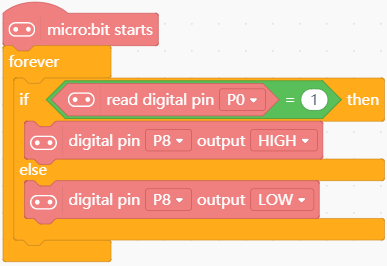
Mind+ Sample Code:
Result
Press the button on the recorder to record up to 10s of audio, then control the speaker to play the audio by the button.
Additional Information
Program Flowchart:

Was this article helpful?