
Example Code for Arduino-EEPROM Read Write
Last revision 2026/01/08
This article provides a hands-on guide to using Arduino for reading and writing data on an EEPROM module through the I2C protocol, specifically focusing on the 24LC256 chip for string storage and retrieval.
Hardware Preparation
| Name | Model/SKU | Quantity | Purchase Link |
|---|---|---|---|
| EEPROM Data Storage Module | DFR0117 | 1 | DFRobot |
| Arduino UNO | - | 1 | Arduino |
Software Preparation
- Development Tool: Arduino IDE (download link: Arduino IDE)
- Library: Wire library (included with Arduino IDE, no additional installation required)
Wiring Diagram
Other Preparation Work
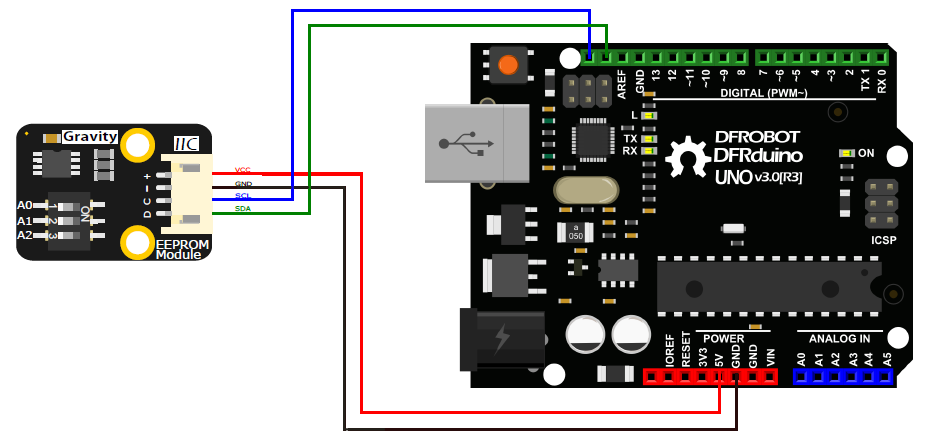
Connect the EEPROM Data Storage Module to Arduino UNO via I2C:
- VCC (+) to Arduino 5V
- GND (-) to Arduino GND
- SCL (C) to Arduino A5
- SDA (D) to Arduino A4
Sample Code
/*
  *  Use the I2C bus with EEPROM 24LC64
  *  Sketch:    eeprom.pde
  *
  *  Author: hkhijhe
  *  Date: 01/10/2010
  *
  *
  */

  #include <Wire.h> //I2C library


  void i2c_eeprom_write_byte( int deviceaddress, unsigned int eeaddress, byte data ) {
    int rdata = data;
    Wire.beginTransmission(deviceaddress);
    Wire.write((int)(eeaddress >> 8)); // MSB
    Wire.write((int)(eeaddress & 0xFF)); // LSB
    Wire.write(rdata);
    Wire.endTransmission();
  }

  // WARNING: address is a page address, 6-bit end will wrap around
  // also, data can be maximum of about 30 bytes, because the Wire library has a buffer of 32 bytes
  void i2c_eeprom_write_page( int deviceaddress, unsigned int eeaddresspage, byte* data, byte length ) {
    Wire.beginTransmission(deviceaddress);
    Wire.write((int)(eeaddresspage >> 8)); // MSB
    Wire.write((int)(eeaddresspage & 0xFF)); // LSB
    byte c;
    for ( c = 0; c < length; c++)
      Wire.write(data[c]);
    Wire.endTransmission();
  }

  byte i2c_eeprom_read_byte( int deviceaddress, unsigned int eeaddress ) {
    byte rdata = 0xFF;
    Wire.beginTransmission(deviceaddress);
    Wire.write((int)(eeaddress >> 8)); // MSB
    Wire.write((int)(eeaddress & 0xFF)); // LSB
    Wire.endTransmission();
    Wire.requestFrom(deviceaddress,1);
    if (Wire.available()) rdata = Wire.read();
    return rdata;
  }

  // maybe let's not read more than 30 or 32 bytes at a time!
  void i2c_eeprom_read_buffer( int deviceaddress, unsigned int eeaddress, byte *buffer, int length ) {
    Wire.beginTransmission(deviceaddress);
    Wire.write((int)(eeaddress >> 8)); // MSB
    Wire.write((int)(eeaddress & 0xFF)); // LSB
    Wire.endTransmission();
    Wire.requestFrom(deviceaddress,length);
    int c = 0;
    for ( c = 0; c < length; c++ )
      if (Wire.available()) buffer[c] = Wire.read();
  }


  void setup()
  {
    char somedata[] = "this is data from the eeprom"; // data to write
    Wire.begin(); // initialise the connection
    Serial.begin(9600);
    i2c_eeprom_write_page(0x50, 0, (byte *)somedata, sizeof(somedata)); // write to EEPROM

    delay(10); //add a small delay

    Serial.println("Memory written");
  }

  void loop()
  {
    int addr=0; //first address
    byte b = i2c_eeprom_read_byte(0x50, 0); // access the first address from the memory

    while (b!=0)
    {
      Serial.print((char)b); //print content to serial port
      addr++; //increase address
      b = i2c_eeprom_read_byte(0x50, addr); //access an address from the memory
    }
    Serial.println(" ");
    delay(2000);

  }
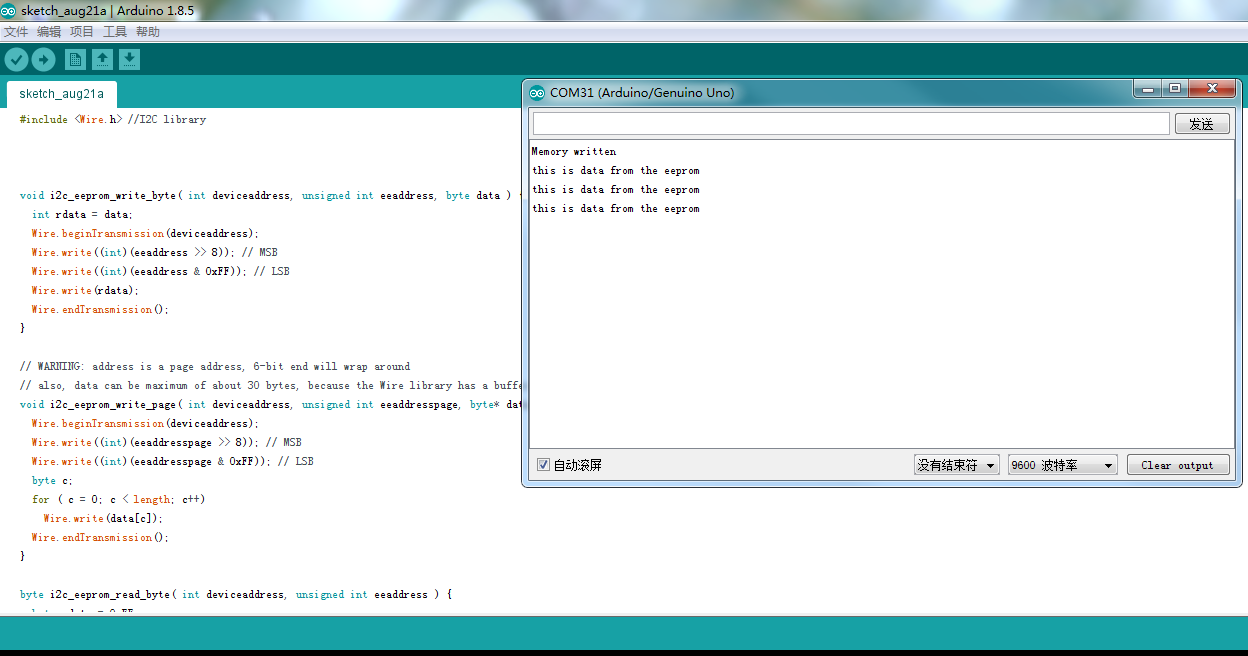
Result
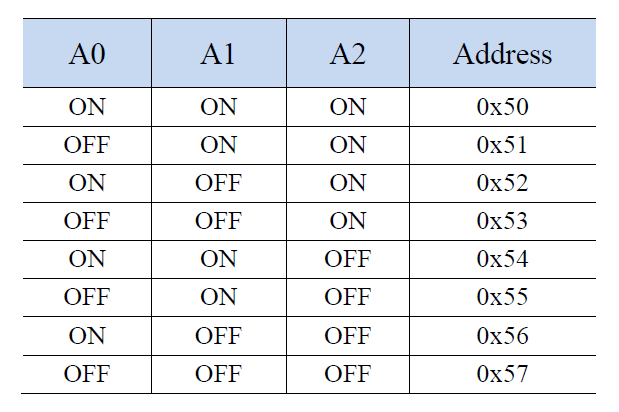
Address True Table
Was this article helpful?