DFRduino HJR4102 4-channel Relay Shield

SKU: DFR0144

The HJR4102 4-channel Relay Control Board features the Relay shield V2.1, capable of controlling four relays with a maximum switching power of DC 90W or AC 360VA. It can be controlled through Arduino/DFRduino using digital IOs with an external 7 to 12V supply. The built-in Xbee socket allows wireless control via Xbee/bluetooth/WPM, making it an ideal solution for automation and robotics.

Angled shot of 4 channel relay shield for Arduino UNO with header ports and power connectors-DFRobot product sku:DFR0144 image.
  • Docs
  • Tech Specs
  • Projects
  • 1. Example Code for Arduino-Basic Relay Switching

    This article offers a comprehensive guide on using Arduino for basic relay switching, detailing hardware and software requirements, wiring diagrams, and sample code for controlling appliances safely.

    2. Example Code for Arduino-Serial Controlled Relays

    This article offers a detailed guide on using Arduino to control relays, including hardware preparation, software setup, wiring diagrams, and sample code. It explains how to safely connect and control lamps or appliances through relays using serial inputs, emphasizing the importance of careful handling of live circuits.

    Reference

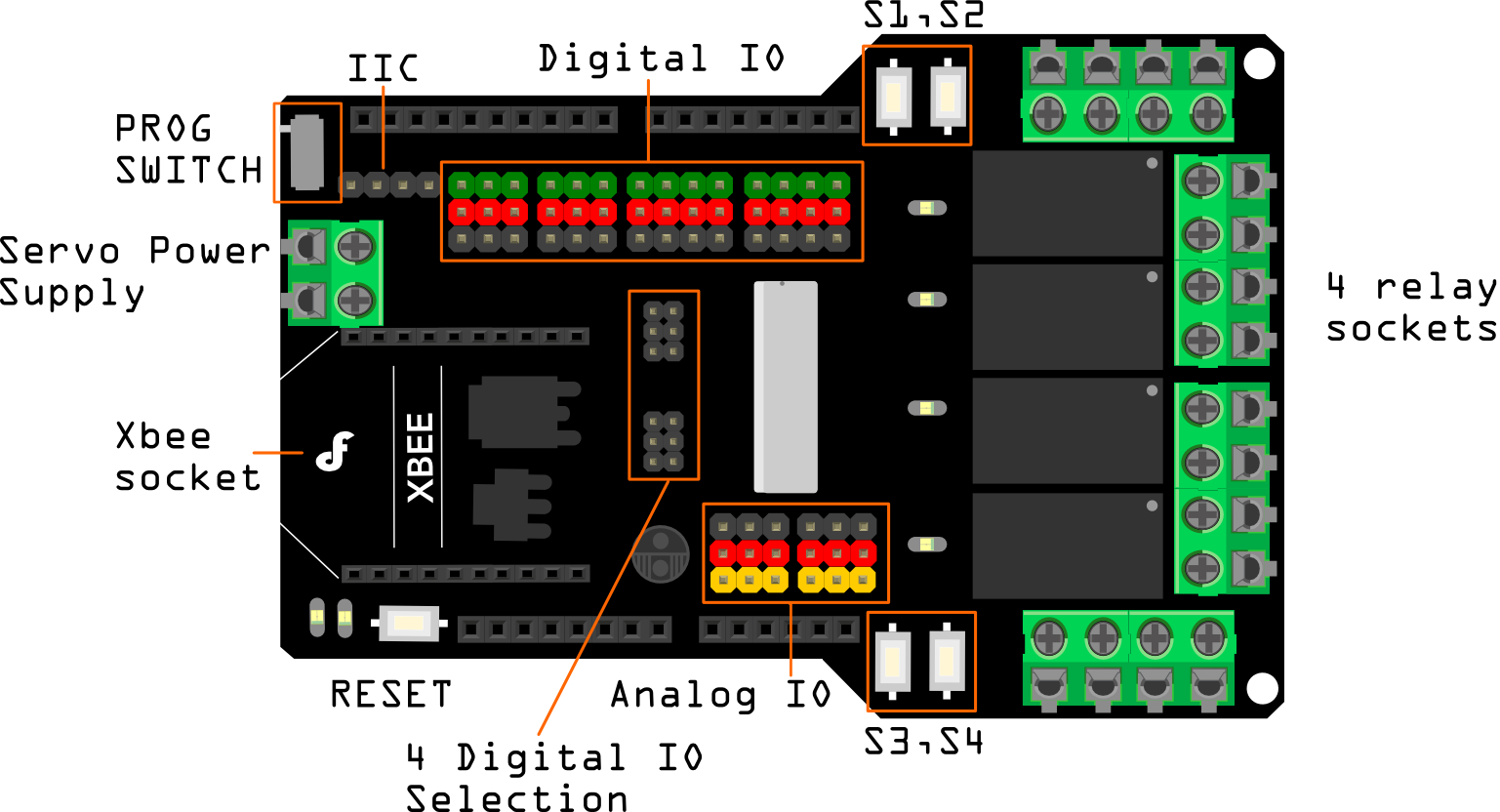
    This article offers an in-depth guide on programming and testing modules, highlighting the use of PROG SWITCH, relay buttons, servo power supply, and XBee interface for versatile wireless communication capabilities.

    Specification

    • Compatible with Arduino Rev3
    • 4 buttons to test module
    • LED status indicator of relay
    • Support Xbee IO directly control
    • Xbee socket for wireless communication
    • Selectable digital IO pin for control(Default digital 2,7,8,10)
    • 6 channels Analog IO & 13 channels Digital IO
    • Up to 4 Relay with photo-coupled circuit
    • Relay information:
    Parameter Specification
    Contact Rating 3A AC 120V / DC 24V
    Max Switching Voltage AC 240V / DC 60V
    Max Switching Current 5A
    Max Switching Power AC 360VA / DC 90W
    Electrical Life (Min) 100,000 Operations
    Mechanical Life (Min) 10,000,000 Operations
    Safety Standard(relay) UL cUL TUV CQC
    Coil Working Voltage 9VDC
    Working temperature -30℃ to +85℃
    Working temperature 40% - 85%
    • Size:95x65mm

    Pinout

    DFR0144_pin_out.png

    Pin Pin State:HIGH Pin State:LOW
    Digital 2 NC1 is disconnected with COM1 NC1 is connected with COM1
    NO1 is connected with COM1 NO1 is disconnected with COM1
    Digital 7 NC2 is disconnected with COM2 NC2 is connected with COM2
    NO2 is connected with COM2 NO2 is disconnected with COM2
    Digital 8 NC3 is disconnected with COM3 NC3 is connected with COM3
    NO3 is connected with COM3 NO3 is disconnected with COM3
    Digital 10 NC4 is disconnected with COM4 NC4 is connected with COM4
    NO4 is connected with COM4 NO4 is disconnected with COM4
    Note: NC: Normally Closed; NO: Normally Open.

    Instruction of Digital Pin State

    FAQ

    • I got te shield working with several types of code but need to have both 9V power and USB cable conected. This can't be right.?


      Please check if your power supply was working correctly.

    • With your relay shield v2.1 is it possible for the Arduino to read the status of some of the digital I/O pins of an XBee? Because the XBee is 3.3 volt there would need to be a logic level converter on the board, I believe.

      It is OK. 3.3V will be recognized as high level.

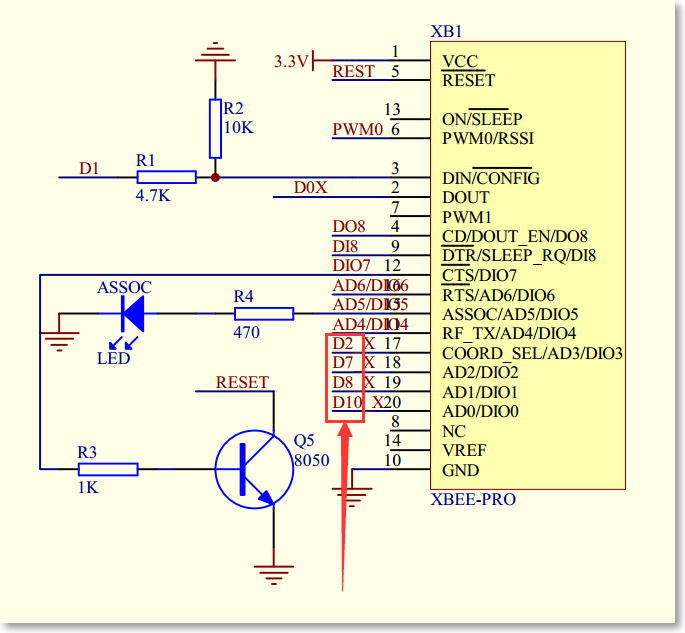
    • Is it possible to use Arduino D4 to control Relay 1?

      It's easy to make it just by removing the jumper on the board and then connect the pin of Relay1 to any Digital pin you need.

      For A4. Xbee pin attached with Relay control pinFor A4. Xbee pin attached with Relay control pinFor A4. Xbee pin attached with Relay control pinFor A4. Xbee pin attached with Relay control pin

      https://raw.githubusercontent.com/DFRobot/DFRobotMediaWikiImage/master/Image/Relay_Shield_DFR0144_sch_for_xbee.png


      For A4. Xbee pin attached with Relay control pin
      For A4. Xbee pin attached with Relay control pin
    • I uploaded the first sketch to arduino, the 4 relays should be turned on and off every second, but nothing happened. What did I miss?

      It needs an external power supply to drive the xbee module and relays. Suggested: 7-12V.

    • I uploaded the first sketch to arduino, the 4 relays should be turned on and off every second, but nothing happened. What did I miss?
      It needs an external power supply to drive the xbee module and relays. Suggested: 7-12V.

    Explore More Related Questions >

    Was this article helpful?

    TOP