
Example Code for Arduino-Number Display and RGB Backlight Breathing
Drive the Nixie module to change the number. Also control the backlight to show a colorful breathing effect.
Hardware Preparation
- DFRduino UNO R3 (or similar) x 1
- Nixie Module -Limited (Arduino Compatible) x 1
Software Preparation
- Arduino IDE
- Download and install the [NixieTube v2 Library]. (About how to install the library?)
Wiring Diagram
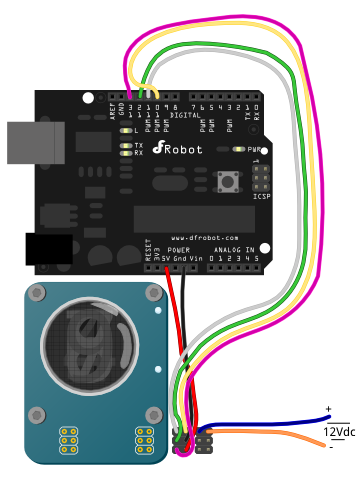
Sample Code
// #
// # Editor     : Lauren from DFRobot
// # Date       : 21.08.2012
// # E-Mail : Lauren.pan@dfrobot.com

// # Product name: Nixie Module For Arduino
// # Product SKU : DFR0206
// # Version     : 1.1

// # Drive the Nixie module to change the number
// # Also control the backlight to show a colorful breathing effect
// # Add the sample command for controlling the colon LEDs(Colon:None/Upper/Lower/Both)
// #

#include "NixieTube.h"

NixieTube tube(11, 12, 13, 10, 1);  // NixieTube(DIN,ST,SH,OE,NUM)
    //  DIN(D11) - PIN1
    //  ST(D12)  - PIN2
    //  SH(D13)  - PIN3
    //  OE(D10)  - PIN4
    //  GND      - PIN5
    //  5v       - PIN6
    //  The pin number of the module is defined in the datasheet


void setup(){
  tube.setColon((Colon)None);            // Turn off the two colon LEDs
}

unsigned long backgroundCtrl_Timer = 0;  // the timer for managing backlight
unsigned long numCtrl_Timer = 0;         // the timer for managing number displayed

void loop(){

  static int dispVal = 0;
  static boolean dir = true;
  static byte brightness = 0;
  static int colorNum = 0;    // the number of color in array of the library

  if(millis() - backgroundCtrl_Timer > 5){ // Manage the backlight controlling flash rate

    if(dir)  tube.setBrightness(++brightness);    // Set the brightness of the background
    else tube.setBrightness(--brightness);

    if(brightness > 250)  dir = false;
    else if(brightness < 5)  dir = true,colorNum++;

    if(colorNum > 6)  colorNum = 0;
    tube.setBackgroundColor((Color)colorNum); //set the background color. Call the element from the color array
    backgroundCtrl_Timer = millis();
  }

  if(millis() - numCtrl_Timer > 500){ // Manage the number controlling flash rate
    tube.setNumber(++dispVal);        // set the number to display
    tube.display();                   // Show the number
    numCtrl_Timer = millis();
  }

}
Was this article helpful?