
Example Code for Arduino-Bluno Data Transmission
Last revision 2025/12/26
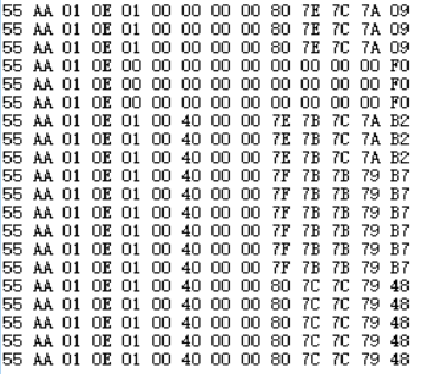
In this section, we use DFRobot Bluno with gamepad as an example. Set Bluno as the peripheral device, upload the code to the Bluno, put the gamepad and the Bluno together (\<10cm), so it will setup KISS connection. Open the serial port of Bluno and change to HEX display (Arduino IDE doesn't support! Please use the third part Serial assistant) then you can check the output data.
Hardware Preparation
Software Preparation
- Download Arduino IDE: Click to download Arduino IDE
Other Preparation Work
Set Bluno as the peripheral device. Put the gamepad and the Bluno together (<10cm) to establish KISS connection. Open the serial port of Bluno and change to HEX display (Arduino IDE doesn't support! Please use the third part Serial assistant).
Sample Code
String inData;
byte Data[14];

void setup() {
  Serial.begin(115200);
  //Serial.println("Waiting for Raspberry Pi to send a signal...\n");
}

void loop()
{
  if(Serial.available());  //if there is any data in the Serial port
  {
    for (int i=0; i<14; i++)
    {
      while (Serial.available() == 0)
      {
        // do nothing
      }
      Data[i] = Serial.read();
    }
  }
  for (int i=0; i<14; i++)
  {
    Serial.write(Data[i]);  //print received data
  }
}
Result
Was this article helpful?