
Example Code for Arduino-Barcode Reading via RS232-TTL
Last revision 2026/01/24
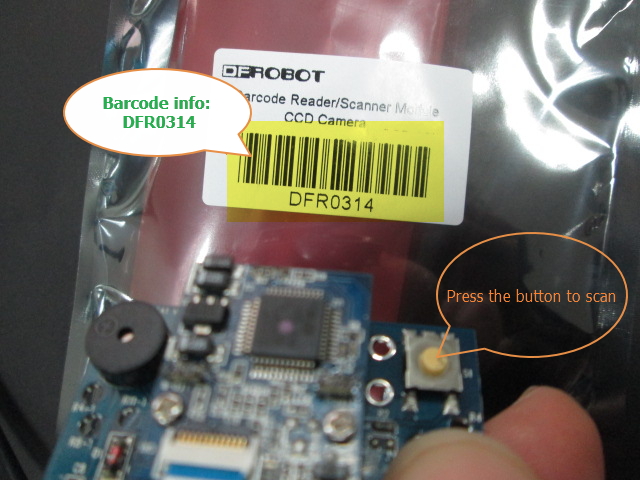
The article provides comprehensive instructions on setting up an Arduino board to read barcodes through an RS232-TTL converter, including necessary hardware, software, wiring diagrams, and example code.When you press the Switch over 10us, it will read two-dimension code, until it reads success or you release the button.
Hardware Preparation
- Barcode Reader/Scanner Module-CCD Camera (SKU: DFR0314), Quantity: 1, Purchase Link: DFRobot
- RS232-TTL converter (SKU: DFR0509), Quantity: 1, Purchase Link: DFRobot
- Arduino board, Quantity: 1
Software Preparation
- Arduino IDE (with serial monitor function), Download Link: Arduino Software
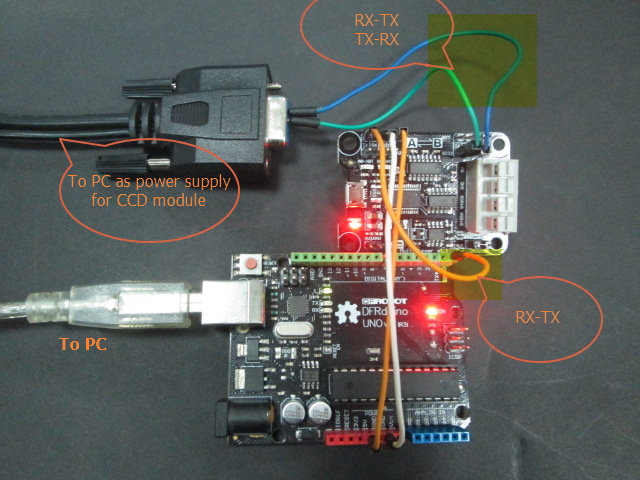
Wiring Diagram
Other Preparation Work
By using a RS232-TTL converter with the module and Arduino, and please upload the sketch above to Arduino card. Then you can open your serial monitor, choosing 9600bps.
Sample Code
/*
  description:
  The sample code is used to read the barcode value using RS232-TTL Converter
  This Module will transmit the barcode value in ASCⅡ and end up with 0D
  VCC -- VCC
  GND -- GND

*/
String code = "";           //initialize the output string
boolean endbit = 0;            //a flag to mark 0D received
char temp;

void setup() {
  Serial.begin(9600);       //initialize the Serial port
}

void loop() {
  if (Serial.available() > 0)     {
    temp = char( Serial.read());    //read the input data
    code += temp;
  }
  if (temp == 0x0D){           // Or temp == '\r'
    Serial.println(code);
    code = "";
    endbit = 0;
    temp = 0;
  }

}
Result
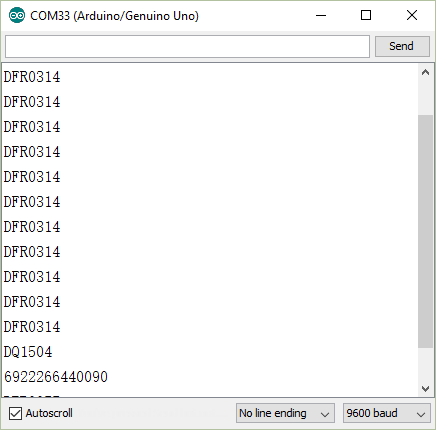
After scanning a barcode, you will see the barcode info in the serial monitor.
Additional Information
Was this article helpful?