
Reference
This document is a reference guide for using the SIM7000C module and BME280 sensor library with Arduino boards. It explains core communication protocols including SoftwareSerial, AT commands and I2C, and also introduces a variety of API functions that facilitate the efficient development of IoT projects. The paper also elaborates on the core principles of NB-IoT technology and the technical specifications of the SIM7000C module, and illustrates the application of the BME280 sensor in measuring temperature, humidity and atmospheric pressure.
Library
- DFRobot General SIM library
- NB-IoT SIM7000 Shield Library
- DFRobot_BME280 library
- Installation instructions: How to install Libraries in Arduino IDE
Communication Protocol Description
- SoftwareSerial: Used for communication between Arduino and SIM7000. Default pins: TX > D8, RX > D7. Baud rate: 19200 (reset from default 115200 to avoid garbled text).
- AT Commands: Used to control the SIM7000. Commands must end with CR&LF. AT command list
- I2C: Used for communication with the BME280 sensor. Default address: 0x76.
API Description
- SIM7000 Library Functions:
begin(Stream &s_): Set software serial port.turnON(): Turn ON SIM7000 in software. Returns true if successful.turnOFF(): Turn OFF SIM7000 in software.setBaudRate(int rate): Set baud rate of software serial port. Returns true if successful.checkSIMStatus(): Initialize AT commands. Returns true if successful.setNet(Net net): Set network mode (GPRS/GPRS-NB/NB-IOT). Returns true if successful.checkSignalQuality(): Check signal strength (0-30; 99 = no signal).attacthService(): Start connection service. Returns true if successful.connect(Protocol ptl, const char *host, int port): Connect to network using TCP/UDP. Returns true if successful.send(const char *str)/send(void* buf, size_t len): Send data over TCP/UDP.recv(char* buf, int maxlen, int timeout): Receive data from server. Returns number of characters received.close(): Disconnect from network. Returns true if successful.initPos(): Initialize positioning function. Returns true if successful.getPosition(): Get current position. Returns true if successful.getLongitude(): Get longitude (east = positive, west = negative).getLatitude(): Get latitude (north = positive, south = negative).
- BME280 Library Functions:
begin(): Initialize BME280 sensor. Returns true if successful.temperatureValue(): Get temperature in °C.pressureValue(): Get pressure in Pa.humidityValue(): Get humidity in %RH.altitudeValue(float seaLevelPressure): Get approximate altitude in m (requires sea level pressure).
Principle
- NB-IoT Technology: Narrow Band-Internet of Things, a low-power wide-area network (LPWAN) technology operating in authorized spectrum. Supports deployment on GSM, UMTS, LTE networks with 180KHz bandwidth.
- SIM7000C Module: Based on SIMCom SIM7000C chip, supports multi-frequency LTE-FDD, dual-frequency GPRS/EDGE, NB-IoT, and onboard GNSS (GPS, GLONASS, Galileo, QZSS, BeiDou).
- BME280 Sensor: Measures temperature, humidity, and pressure using I2C communication.
Other Supplementary Information
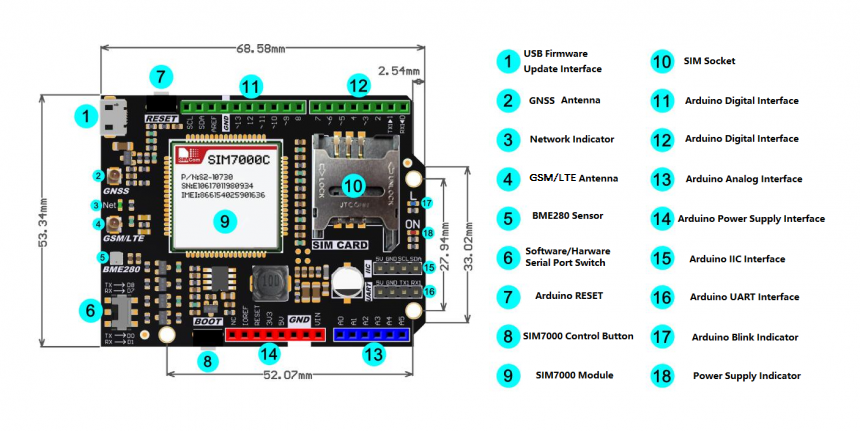
- Board Overview:
- Compatibility Test:
MCU Pass Failed Not Tested Remark Arduino Uno √ Arduino Leonardo √ Arduino Mega1280 √ Connect D8 to D10 Arduino Mega2560 √ Connect D8 to D10
Was this article helpful?