
Example Code for Arduino-Generate Triangular Waves
This tutorial generates two triangular waves out of phase by the dual digital pot to demonstrate its basic usage. The two internal digital pot POT0 and POT1 server as voltage divider with terminal A connected to VCC and terminal B connected to GND. We use Arduino UNO R3 to control the terminal W0 of POT0 to change it from min to max (Dn: 0 -> 255) every 1 ms and then in reverse, from max to min (Dn: 255 -> 0). On the contrary, the terminal W1 of POT1 will be changed from max to min (Dn: 255 -> 0) every 1 ms and then in reverse, from min to max (Dn: 0 -> 255). Two channels CH1 and CH2 of the oscilloscope will be used to observe the voltage of W0 and W1 respectively to check whether all the possible taps are available.
Hardware Preparation
- DFRduino UNO Mainboard (or similar) x 1
- Bread board x 1
- IO Expansion Shield for Arduino V7.1 (optional) x 1
- Analog Cable (5Pin male to male) x 1
Software Preparation
- Arduino IDE (Version requirements: V1.8.x), Click to Download Arduino IDE from Arduino®
Wiring Diagram
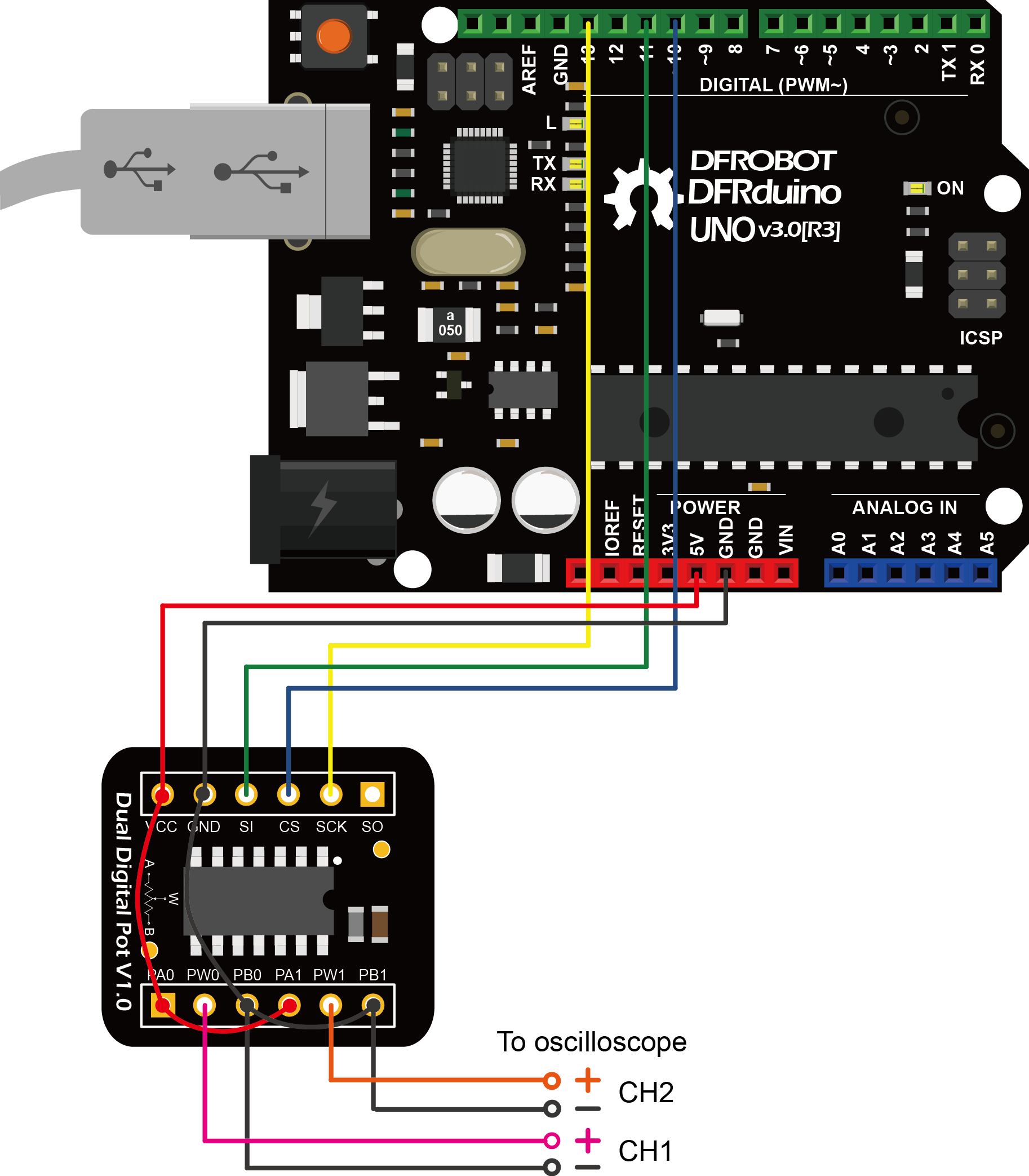
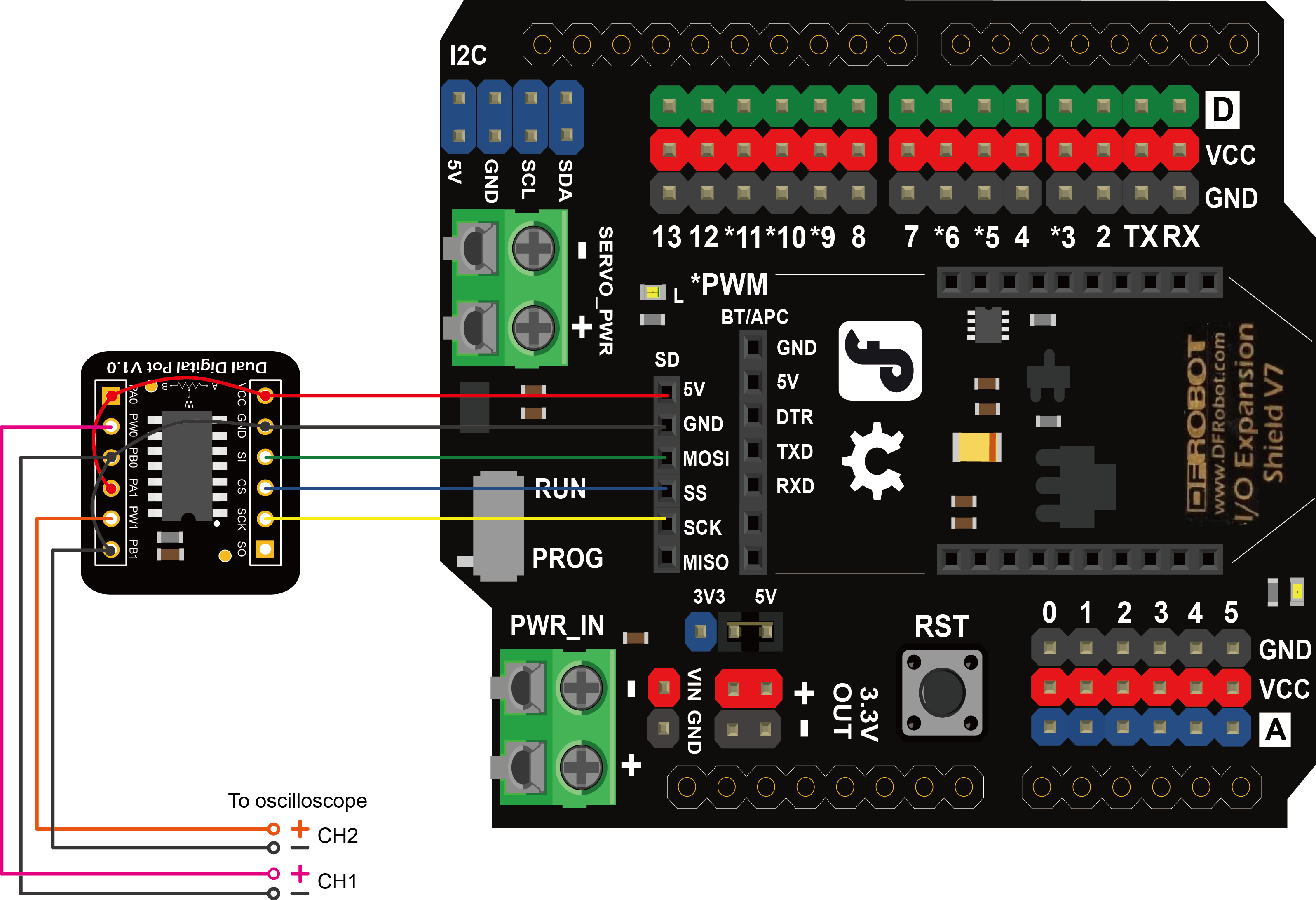
The module can be connected to Arduino with the attached 5 pin male-to-male cable (one end bonded together and the other end separated ). Insert the breakout into the breadboard and plug the cable with the bonded end to the breadboard where pin VCC, GND, SI, CS, SCK lie on (leave pin SO unconnected). The individual end inserts into Arduino shown as follow.
Other Preparation Work
If the IO Expansion Shield is used for connection, the sentence "const int CS_PIN = 10;" should be change to "const int CS_PIN = 4;" in the sample code. Because the SS pin in the SPI interface of the shield connects to D4 internally.
- Resistor terminals A, B and W have no restrictions on polarity with respect to each other.
- Current through terminals A, B and W should not excceed ±1mA.
- Voltages on terminals A, B and W should be within 0 - VCC.
Sample Code
/*************************************************************
    Dual Digital Pot(100K)
     <https://www.dfrobot.com/wiki/index.php/Dual_Digital_Pot_(100K)_SKU:_DFR0520>
 *************************************************************
   This example generates two triangular waves to demonstrate
   the basic usage of dual digital pot.

   Created 2017-8-31
   By Henry Zhao <Henry.zhao@dfrobot.com>

   GNU Lesser Genral Public License.
   See <http://ww.gnu.org/licenses/> for details.
   All above must be included in any redistribution.
 ************************************************************/

/***********************Circuit Connections*******************
      Digital Pot  |   Arduino UNO R3    |   Oscilloscope
          CS       |     D10 (SS)        |
          SI       |     D11 (MOSI)      |
          CLK      |     D13 (SCK)       |
      VCC,PA0,PA1  |       VCC           |
      GND,PB0,PB1  |       GND           |     CH1- CH2-
          W0       |                     |       CH1+
          W1       |                     |       CH2+
 ************************************************************/

/***********************Notice********************************
   1.Resistor terminals A, B and W have no restrictions on
     polarity with respect to each other.
   2.Current through terminals A, B and W should not excceed ±1mA.
   3.Voltages on terminals A, B and W should be within 0 - VCC.
************************************************************/

#include <SPI.h>

/***********************PIN Definitions*************************/
// set pin 4 as the slave select (SS) for the digital pot:
// for using the SD SPI interface of Gravity IO Expansion Shield for Arduino V7.1
//const int CS_PIN = 4;

// set pin 10 as the slave select (SS) for the digital pot
// for using Arduino UNO
const int CS_PIN = 10;

/***********************MCP42XXX Commands************************/
//potentiometer select byte
const int POT0_SEL = 0x11;
const int POT1_SEL = 0x12;
const int BOTH_POT_SEL = 0x13;

//shutdown the device to put it into power-saving mode.
//In this mode, terminal A is open-circuited and the B and W terminals are shorted together.
//send new command and value to exit shutdowm mode.
const int POT0_SHUTDOWN = 0x21;
const int POT1_SHUTDOWN = 0x22;
const int BOTH_POT_SHUTDOWN = 0x23;

/***********************Customized Varialbes**********************/
//resistance value byte (0 - 255)
//The wiper is reset to the mid-scale position upon power-up, i.e. POT0_Dn = POT1_Dn = 128
int POT0_Dn = 128;
int POT1_Dn = 128;
int BOTH_POT_Dn = 128;

//Function Declaration
void DigitalPotTransfer(int cmd, int value);     //send the command and the wiper value through SPI

void setup()
{
  Serial.begin(115200);
  pinMode(CS_PIN, OUTPUT);   // set the CS_PIN as an output:
  SPI.begin();     // initialize SPI:
}

void loop()
{
      // change the resistance on the POT0 from min to max:
    for (int POT_Dn = 0; POT_Dn < 256; POT_Dn++) {
      DigitalPotWrite(POT0_SEL, POT_Dn);
      delay(1);
    }

    // change the resistance on the POT0 from max to min:
    for (int POT_Dn = 0; POT_Dn < 256; POT_Dn++) {
      DigitalPotWrite(POT0_SEL , 255 - POT_Dn);
      delay(1);
    }
}

void DigitalPotWrite(int cmd, int val)
{
  // constrain input value within 0 - 255
  val = constrain(val, 0, 255);
  // set the CS pin to low to select the chip:
  digitalWrite(CS_PIN, LOW);
  // send the command and value via SPI:
  SPI.transfer(cmd);
  SPI.transfer(val);
  // Set the CS pin high to execute the command:
  digitalWrite(CS_PIN, HIGH);
}
Result
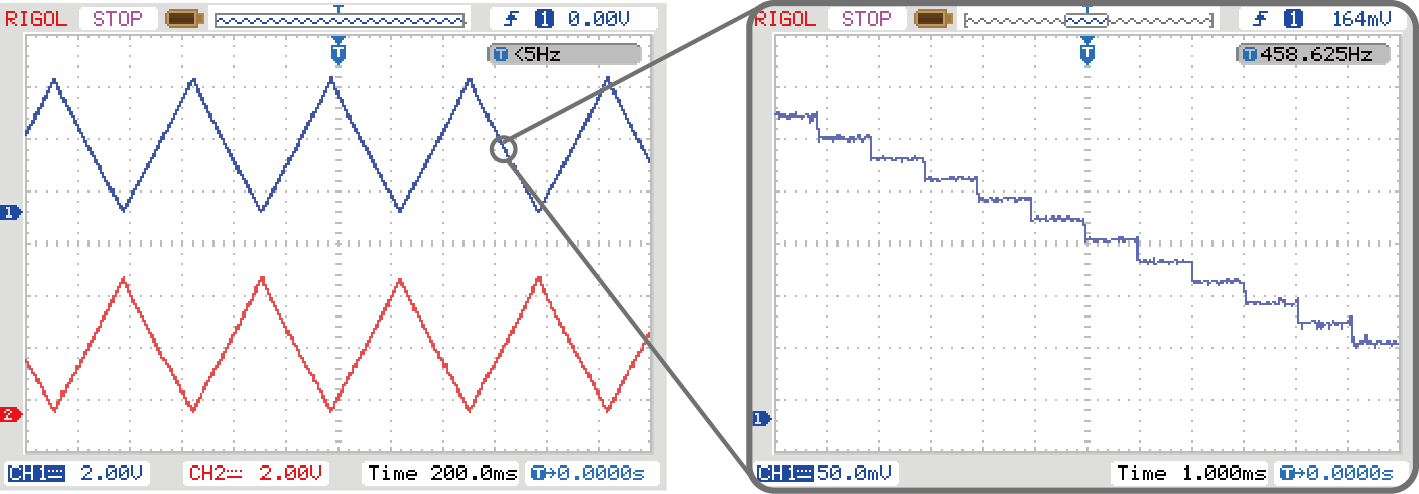
Two triangular waves out of phase can be observed from the oscilloscope. If we zoom in a section of the wave, the triangular wave is actually made up of many steps. Each steps correspond to one wiper position. The width of the step is about 1ms, because the program delay for 1ms between every wiper changes. The upstairs half cycle and the downstairs half cycle consist of 256 steps each, therefore the period of the triangular wave is 256*2=512ms. The digital pot can quickly change the wiper position and the settling time can up to micro seconds (18μs, typical).
Additional Information
This breakout employs MCP42100, which has two individual digital potentiometer POT0 and POT1 corresponding to two groups of terminals A0, B0, W0 and A1, B1, W1. Similar to the mechanical potentiometer, terminal A and B can be taken as two pins of a resistor (the nominal resistance is Rab=100KΩ) while terminal W is the wiper. The wiper can be changed to one of the 256 positions evenly distributed between A and B. The wiper is reset to the mid-scale position (Dn=128,0x80) upon power-up.
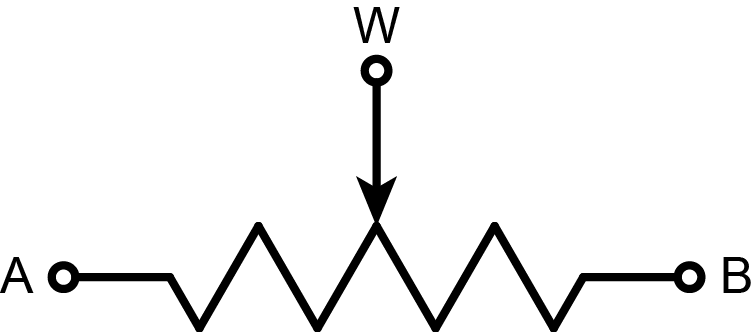
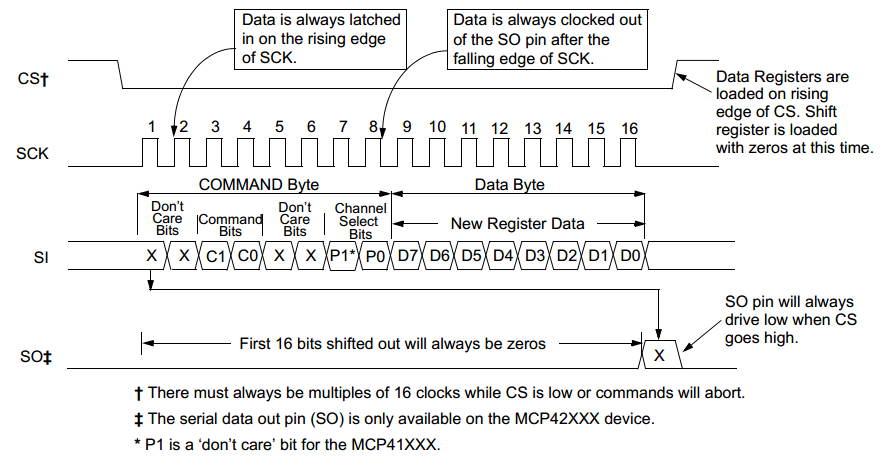
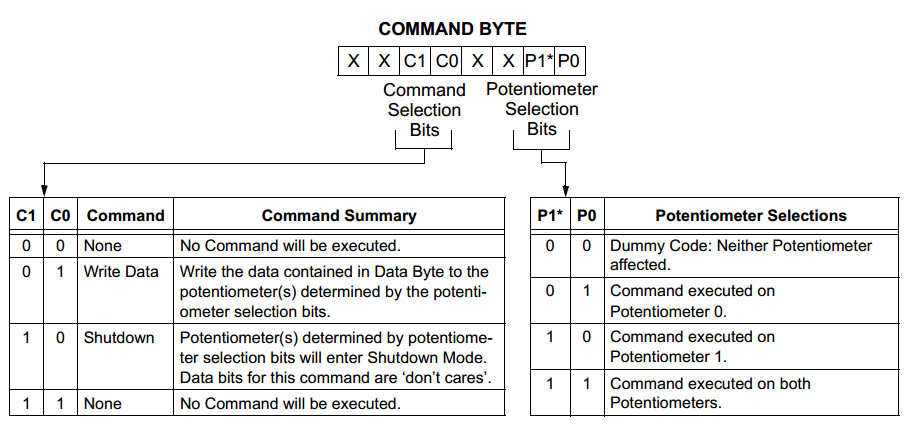
To change the position of the wiper W, two byte should be sent. The first byte is the command to determine which pot to be selected. The second byte is the data to determine the position of the wiper. This byte is also denoted as Dn. When Dn=0, terminal B is connected to W. When Dn=255, W is changed to the closest position to A. For example, to set W0 of POT0 to the position of 100, Arduino should first sends 0x11 (Write data, select POT0) and then 0x64 (=100, decimal) through the SPI.
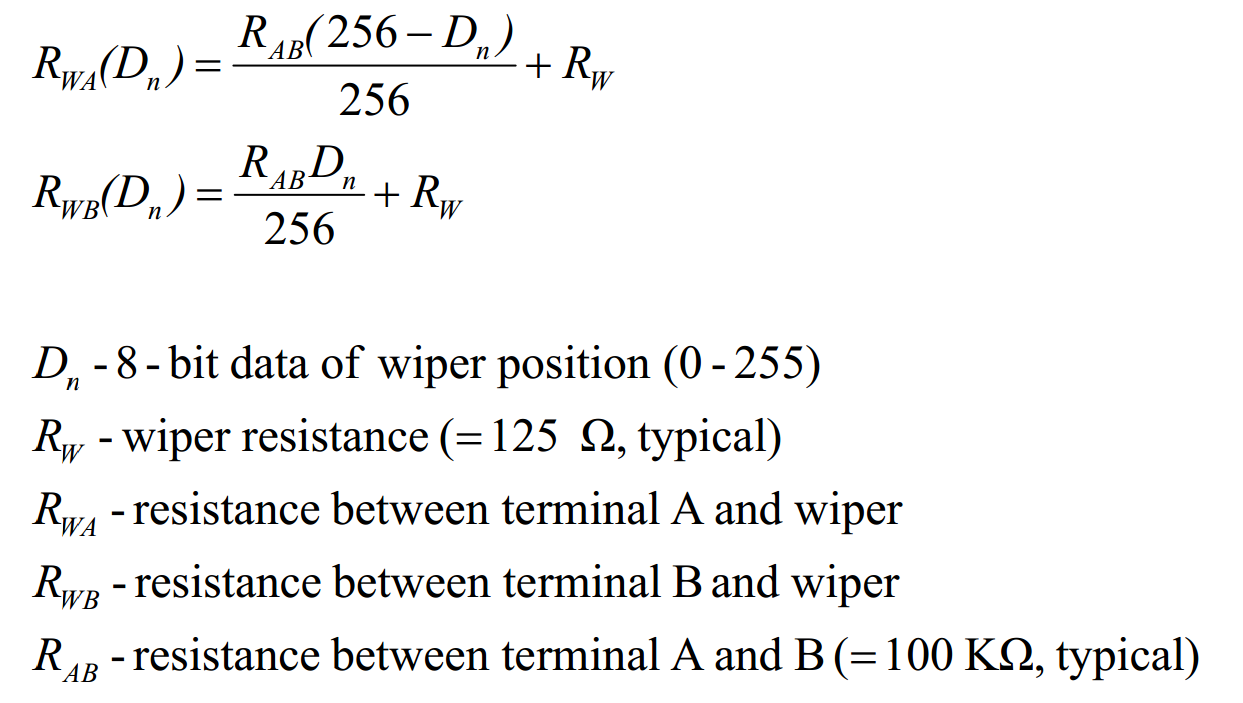
- The resistance of each digital pot can be calculate by the equations below.
Was this article helpful?