
Example Code for Arduino-Common Icon Display
Last revision 2026/01/18
This article provides step-by-step instructions for displaying common icons on a 1.51" OLED display using Arduino. It includes hardware requirements, software preparations, and a sample code with a wiring diagram to help users set up and run their projects efficiently.
Hardware Preparation
- ESP32-E (or similar) x 1
- 1.51" Transparent OLED Display Module x1
- Dupont Wires
Software Preparation
- Arduino IDE
- Download and install the U8g2 Arduino Library. (About how to install the library?)
Wiring Diagram

Wiring Detail Diagram:


Note: You can refer to the FPC cable color to access the correct position.
Other Preparation Work
- Demos are stored in
U8g2_Arduino-master > DFRobot_Demo > 1.51 inch OLED12864-SSD1309.

- Ensure the correct U8G2 function is enabled in the code.
- select the library
Sample Code
/*!
 * @file CommonIcon.ino
 * @brief Display of several common icons supported in U8G2
 * @n U8G2 supports multiple sizes of icons, this demo selects several for display
 * @n U8G2 GitHub Link:https://github.com/olikraus/u8g2/wiki/fntlistall
 *
 * @copyright  Copyright (c) 2010 DFRobot Co.Ltd (http://www.dfrobot.com)
 * @licence     The MIT License (MIT)
 * @author [Ivey](Ivey.lu@dfrobot.com)
 * @maintainer [Fary](feng.yang@dfrobot.com)
 * @version  V1.0
 * @date  2019-10-15
 * @url https://github.com/DFRobot/U8g2_Arduino
*/

#include <Arduino.h>
#include <U8g2lib.h>
#include <SPI.h>

#if defined ARDUINO_SAM_ZERO
#define OLED_DC  7
#define OLED_CS  5
#define OLED_RST 6
#elif defined(ESP32)
#define OLED_DC  D2
#define OLED_CS  D6
#define OLED_RST D3
#elif defined(ESP8266)
#define OLED_DC  D4
#define OLED_CS  D6
#define OLED_RST D5
#else
#define OLED_DC  2
#define OLED_CS  3
#define OLED_RST 4
#endif
U8G2_SSD1309_128X64_NONAME2_1_4W_HW_SPI u8g2(/* rotation=*/U8G2_R0, /* cs=*/ OLED_CS, /* dc=*/ OLED_DC,/* reset=*/OLED_RST);

void setup(void)
{
  u8g2.begin();
  u8g2.setFontPosTop();
}

void loop(void)
{
   u8g2.firstPage();
   for(int i = 64 ; i <287; i++){
   u8g2.clear();
   do
   {
      u8g2.setFont(u8g2_font_open_iconic_all_4x_t );
      u8g2.drawGlyph(4, 16, i);
      u8g2.drawGlyph(44, 16, i+1);
      u8g2.drawGlyph(84, 16, i+2);
   } while ( u8g2.nextPage() );
   i +=3;
   delay(2000);
  }
}
Result
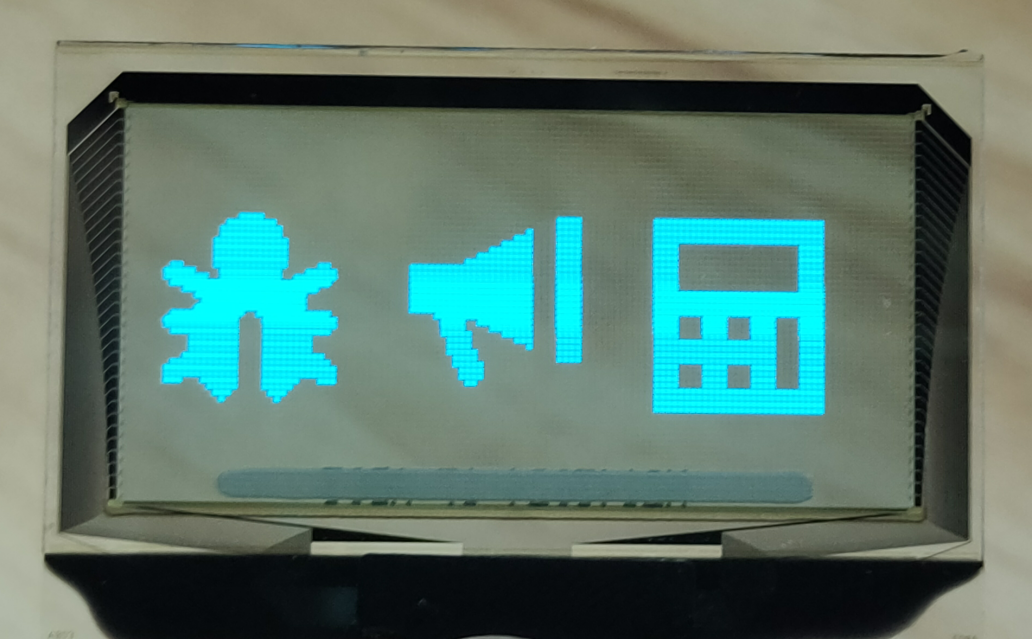
Result(There are many demo screens in this example. The following are some pictures in the demo screen ):
Was this article helpful?