
Example Code for Arduino-Obtain Accelerometer and Gyro Data from Two BMI160 Sensors
This article guides readers through obtaining accelerometer and gyro data from two BMI160 sensors using Arduino, including hardware/software setup, wiring, and sample code execution.
Hardware Preparation
- DFRduino UNO + Gravity: IO expantion board (SKU:DFR0216-2) ×1
- Gravity: BMI160 6-axis Inertial Motion Sensor(SKU:SEN0250)×2
- Fermion I2C Address shifter(SKU:DFR1185)×1
- Jumper wire(F/F)
Software Preparation
- Arduino IDE: Download Arduino IDE
- Library:DFRobot BMI160 Github
- Arduino IDE V1.8.19 (or below) installation library files:How to install library
- Arduino IDE V2.0.0 (or above) can be installed by searching for the ‘DFRobot_BMI160’ library in the library manager.
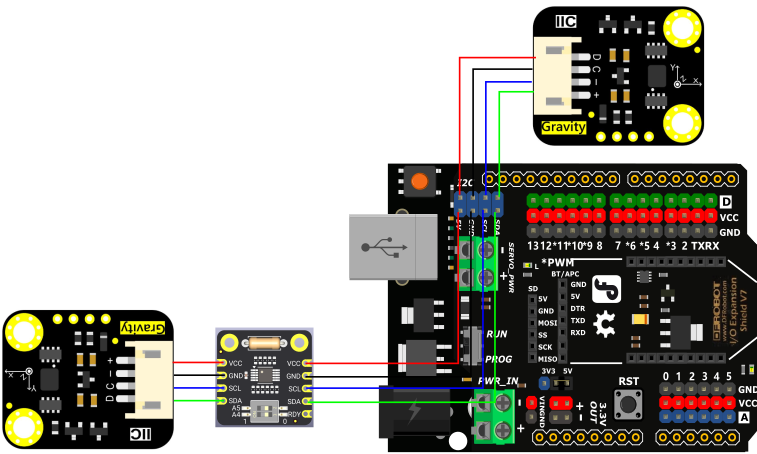
Wiring Diagram
Other Preparation Work
Check the on-board dip switch is set to A5=0,A4=0, connect according to the wiring diagram above.
Sample Code
/*
@file accelGyroscope.ino
@brief Obtain accelerometer data in both BMIs.
@copyright Copyright (c) 2010 DFRobot Co.Ltd (http://www.dfrobot.com)
@license The MIT License (MIT)
@author [thdyyl](yuanlong.yu@dfrobot.com)
@version V0.1
@date 2024-08-05
*/
#include "DFRobot_BMI160.h"
DFRobot_BMI160 bmi160_1, bmi160_2;
const int8_t i2c_addr_1 = 0x69, i2c_addr_2 = 0x29;

void setup(){
  Serial.begin(115200);
  delay(100);

  //init the default bmi160
  if(bmi160_1.softReset() != BMI160_OK){
    Serial.println("bmi160_1 reset false");
    while(1);
  }

  if(bmi160_2.softReset() != BMI160_OK){
    Serial.println("bmi160_2 reset false");
    while(1);
  }

  //set and init the bmi160 i2c address
  if(bmi160_1.I2cInit(i2c_addr_1) != BMI160_OK){
    Serial.println("bmi160_1 init false");
    while(1);
  }

  if(bmi160_2.I2cInit(i2c_addr_2) != BMI160_OK){
    Serial.println("bmi160_2 init false");
    while(1);
  }
}

void showAccelGyroData(DFRobot_BMI160 bmi160){
  int i = 0;
  int rslt;
  int16_t accelGyro[6] = {0};

  //get both accel and gyro data from bmi160
  //parameter accelGyro is the pointer to store the data
  rslt = bmi160.getAccelGyroData(accelGyro);

  if(rslt == 0){
    for(i = 0; i < 6; ++i){
      if(i < 3){
        //the first three are gyro datas
        Serial.print(accelGyro[i] * 3.14 / 180);
        Serial.print("\t");
      }else{
        //the following three data accel datas
        Serial.print(accelGyro[i] / 16384.0);
        Serial.print("\t");
      }
    }
    Serial.println();
  }
  else{
    Serial.println("err");
  }
}

void loop(){
  Serial.print("bmi160_1:\t");
  showAccelGyroData(bmi160_1);
  Serial.print("bmi160_2:\t");
  showAccelGyroData(bmi160_2);
  Serial.println();
  delay(500);
}
Result
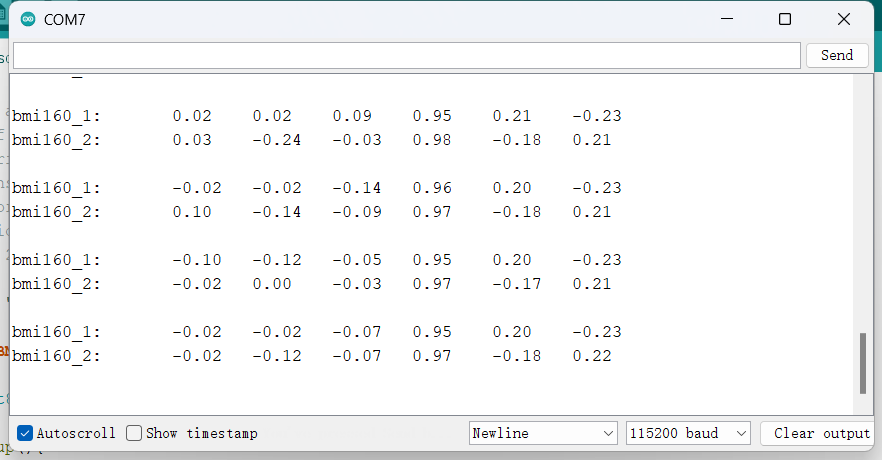
Serial monitor outputs the data of two Gravity: BMI160 6-axis Inertial Motion Sensor。
Was this article helpful?