
Example Code for Arduino-Testing 2 Stepper Motors
This sample code is for testing the 2 stepper motors The rotation velocity can be adjusted by the code switch Microcontroller: Arduino UNO
Wiring Diagram
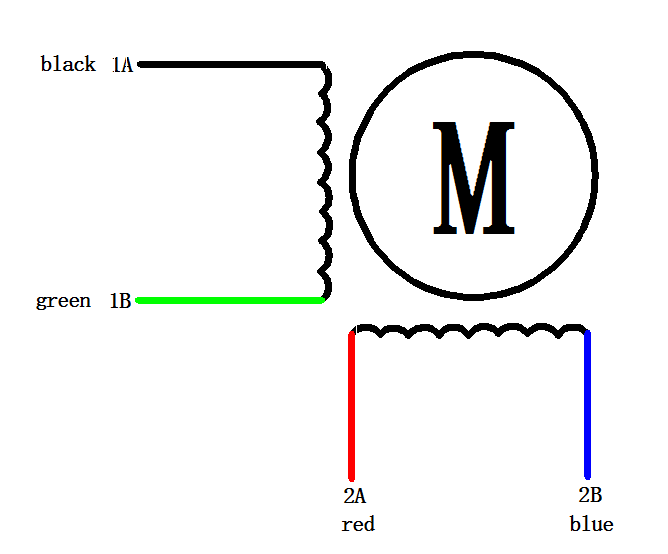
Other Preparation Work
The new version expand two enable pins, you can enable/disable the motor driver to save the power consumption, Motor X enable pin for the D8, Motor Y enable pin for the D12, low voltage enable, the following truth table:
| D8 | D12 | M1 | M2 |
| Low | Low | ENABLE | ENABLE |
| High | Low | DISENABLE | ENABLE |
| Low | High | ENABLE | DISENABLE |
| High | High | DISENABLE | DISENABLE |
*Dip switch settings for Microstep resolution:
| MS1 | MS2 | MS3 | Microstep Resolution |
| Low | Low | Low | Full step |
| High | Low | Low | Half step |
| Low | High | Low | 1/4 step |
| High | High | Low | 1/8 step |
| Low | Low | High | 1/16 step |
| High | Low | High | 1/32 step |
| Low | High | High | 1/32 step |
| High | High | High | 1/32 step |
*IO voltage select
-
Change the the position of the jumper cap according to your Main board operating voltage.

-
Squeeze connector makes connection easily and quickly.
-
The other form of connector for XH2.54 or female headers
Sample Code
/*
This sample code is for testing the 2 stepper motors
The rotation velocity can be adjusted by the code switch
Microcontroller: Arduino UNO
*/
int M1dirpin = 7;  //Motor X direction pin
int M1steppin = 6; //Motor X step pin
int M1en=8;  //Motor X enable pin
int M2dirpin = 4;  //Motor Y direction pin
int M2steppin = 5; //Motor Y step pin
int M2en=12;  //Motor Y enable pin

void setup()
{
  pinMode(M1dirpin,OUTPUT);
  pinMode(M1steppin,OUTPUT);
  pinMode(M1en,OUTPUT);
  pinMode(M2dirpin,OUTPUT);
  pinMode(M2steppin,OUTPUT);
  pinMode(M2en,OUTPUT);

  digitalWrite(M1en,LOW);// Low Level Enable
  digitalWrite(M2en,LOW);// Low Level Enable

}
void loop()
{
    int j;
  delayMicroseconds(2);
  digitalWrite(M1dirpin,LOW);
  digitalWrite(M2dirpin,LOW);
  for(j=0;j<=5000;j++){
    digitalWrite(M1steppin,LOW);
    digitalWrite(M2steppin,LOW);
    delayMicroseconds(2);
    digitalWrite(M1steppin,HIGH); //Rising step
    digitalWrite(M2steppin,HIGH);
    delay(1);
  }
}
Was this article helpful?