
Example Code for Arduino-All Vibration Patterns
Upload the following code, the LRA motor will start work, and switch a vibration mode every two second. The vibration mode could be check in the serial monitor.
This driver is specifically designed for LRA motors and is not compatible with ERM (Eccentric Rotating Mass) motors.
Hardware Preparation
- DFRduino UNO+IO Expansion Shield (SKU:DFR0216-2) ×1
- Gravity: Haptic Motor Driver(SKU:DRI0056)×1
Software Preparation
- Download Arduino IDE: Click to download Arduino IDE
- Download DFRobot_TM6605 library:DFRobot TM6605 Github
- Arduino IDE V1.8.19 (or below) can download .zip file and unzip into the library folder in the Arduino IDE installation path.
- Arduino IDE V2.0.0(or above) can search and install the library in the library manager.
Wiring Diagram
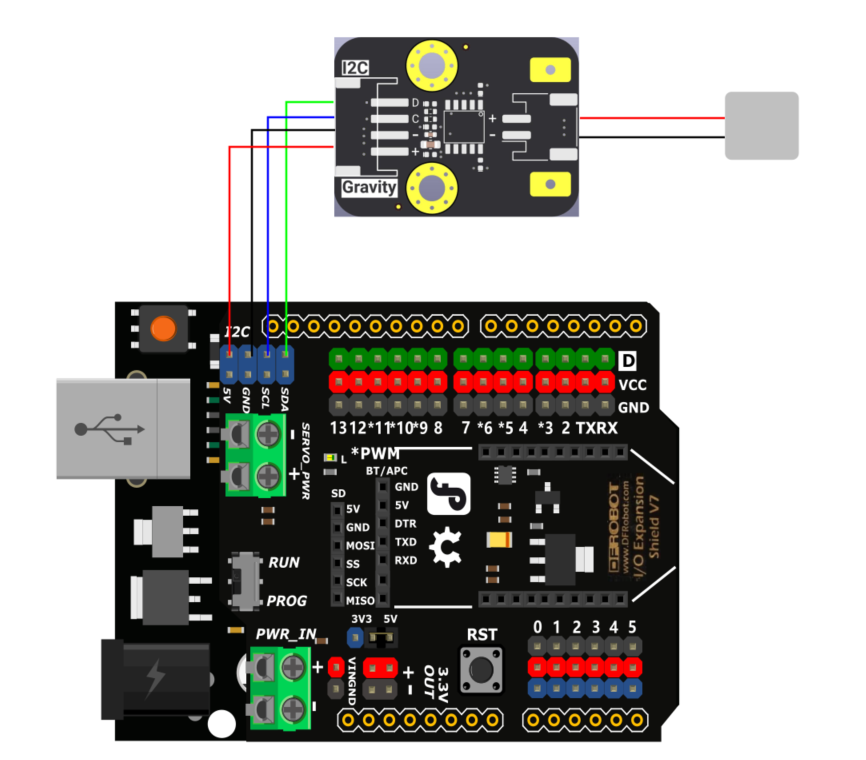
Sample Code
/*!
 * @file demo.ino
 * @brief This demo showcases all the vibration effects of the TM6605.
 * @copyright	Copyright (c) 2025 DFRobot Co.Ltd (http://www.dfrobot.com)
 * @license The MIT License (MIT)
 * @author [fary](feng.yang@dfrobot.com)
 * @version V1.0
 * @date 2025-04-08
 * @url https://github.com/DFRobot/DFRobot_TM6605
 */
#include "DFRobot_TM6605.h"
DFRobot_TM6605 TM6605;
DFRobot_TM6605::eEffect_t effects[] = {
   DFRobot_TM6605::eSharpClick,  DFRobot_TM6605::eInstantClick,  DFRobot_TM6605::eLightTap,  DFRobot_TM6605::eDoubleClick,
   DFRobot_TM6605::eLightPulse,  DFRobot_TM6605::eStrongAlert,  DFRobot_TM6605::eMediumDurationAlert,  DFRobot_TM6605::eSharpClick2,
   DFRobot_TM6605::eMediumClick,  DFRobot_TM6605::eFlashStrike,  DFRobot_TM6605::eDoubleHighClickShort,  DFRobot_TM6605::eDoubleMediumClickShort,
   DFRobot_TM6605::eDoubleFlashStrikeShort, DFRobot_TM6605::eDoubleInstantClickLong,  DFRobot_TM6605::eDoubleMediumInstantClickLong,
   DFRobot_TM6605::eDoubleFlashStrikeLong,  DFRobot_TM6605::eAlert,  DFRobot_TM6605::eToggleClick,  DFRobot_TM6605::eLongSlowFadeTransition1,
   DFRobot_TM6605::eLongSlowFadeTransition2,  DFRobot_TM6605::eMediumSlowFadeTransition1,  DFRobot_TM6605::eMediumSlowFadeTransition2,
   DFRobot_TM6605::eShortSlowFadeTransition1, DFRobot_TM6605::eShortSlowFadeTransition2,  DFRobot_TM6605::eLongFastFadeTransition1,
   DFRobot_TM6605::eLongFastFadeTransition2,  DFRobot_TM6605::eMediumFastFadeTransition1,  DFRobot_TM6605::eMediumFastFadeTransition2,
   DFRobot_TM6605::eShortFastFadeTransition1, DFRobot_TM6605::eShortFastFadeTransition2,  DFRobot_TM6605::eLongSlowBoostTransition1,
   DFRobot_TM6605::eLongSlowBoostTransition2, DFRobot_TM6605::eMediumSlowBoostTransition1, DFRobot_TM6605::eMediumSlowBoostTransition2,
   DFRobot_TM6605::eShortSlowBoostTransition1,DFRobot_TM6605::eShortSlowBoostTransition2,  DFRobot_TM6605::eLongFastBoostTransition1,
   DFRobot_TM6605::eLongFastBoostTransition2, DFRobot_TM6605::eMediumFastBoostTransition1, DFRobot_TM6605::eMediumFastBoostTransition2,
   DFRobot_TM6605::eShortFastBoostTransition1,DFRobot_TM6605::eShortFastBoostTransition2,  DFRobot_TM6605::eLongAlert, DFRobot_TM6605::eSoftNoise,
   DFRobot_TM6605::eSleepCommand
};
void setup() {
	Serial.begin(115200);
	while(!Serial);
	Serial.print("TM6605 init...");
	while(TM6605.begin()!=0){
		Serial.print("failed,Not found TM6605!");
	}
	Serial.println("successed");
	TM6605.play();
}

void loop() {
  // Traverse all effects
  for (auto effect  : effects) {
    Serial.print("Playing: ");
    Serial.print(getEffectName(effect));
    Serial.print(" (ID:");
    Serial.print(effect);
    Serial.println(")");
    if(effect==TM6605.eSleepCommand)
			continue;
    TM6605.selectEffect(effect);
    TM6605.play();
    delay(2000); // Each effect is displayed for 2 seconds.
    if(effect==TM6605.eLongAlert)
			delay(8000);
    TM6605.stop(); // Stop the current effect.
    delay(500);   // The effect interval is 500ms.
  }
}

const char* getEffectName(uint8_t effect) {
	switch(effect) {
	  case TM6605.eSharpClick:                return "Sharp Click";
	  case TM6605.eInstantClick:              return "Instant Click";
	  case TM6605.eLightTap:                  return "Light Tap";
	  case TM6605.eDoubleClick:               return "Double Click";
	  case TM6605.eLightPulse:                return "Light Pulse";
	  case TM6605.eStrongAlert:               return "Strong Alert";
	  case TM6605.eMediumDurationAlert:       return "Medium Alert";
	  case TM6605.eSharpClick2:               return "Sharp Click2";
	  case TM6605.eMediumClick:               return "Medium Click";
	  case TM6605.eFlashStrike:               return "Flash Strike";
	  case TM6605.eDoubleHighClickShort:      return "Double High Click (Short)";
	  case TM6605.eDoubleMediumClickShort:    return "Double Medium Click (Short)";
	  case TM6605.eDoubleFlashStrikeShort:    return "Double Flash Strike (Short)";
	  case TM6605.eDoubleInstantClickLong:    return "Double Instant Click (Long)";
	  case TM6605.eDoubleMediumInstantClickLong: return "Double Medium Instant Click (Long)";
	  case TM6605.eDoubleFlashStrikeLong:     return "Double Flash Strike (Long)";
	  case TM6605.eAlert:                     return "Alert";
	  case TM6605.eToggleClick:               return "Toggle Click";
	  case TM6605.eLongSlowFadeTransition1:   return "Long Slow Fade 1";
	  case TM6605.eLongSlowFadeTransition2:   return "Long Slow Fade 2";
	  case TM6605.eMediumSlowFadeTransition1: return "Medium Slow Fade 1";
	  case TM6605.eMediumSlowFadeTransition2: return "Medium Slow Fade 2";
	  case TM6605.eShortSlowFadeTransition1:  return "Short Slow Fade 1";
	  case TM6605.eShortSlowFadeTransition2:  return "Short Slow Fade 2";
	  case TM6605.eLongFastFadeTransition1:   return "Long Fast Fade 1";
	  case TM6605.eLongFastFadeTransition2:   return "Long Fast Fade 2";
	  case TM6605.eMediumFastFadeTransition1: return "Medium Fast Fade 1";
	  case TM6605.eMediumFastFadeTransition2: return "Medium Fast Fade 2";
	  case TM6605.eShortFastFadeTransition1:  return "Short Fast Fade 1";
	  case TM6605.eShortFastFadeTransition2:  return "Short Fast Fade 2";
	  case TM6605.eLongSlowBoostTransition1:  return "Long Slow Boost 1";
	  case TM6605.eLongSlowBoostTransition2:  return "Long Slow Boost 2";
	  case TM6605.eMediumSlowBoostTransition1: return "Medium Slow Boost 1";
	  case TM6605.eMediumSlowBoostTransition2: return "Medium Slow Boost 2";
	  case TM6605.eShortSlowBoostTransition1: return "Short Slow Boost 1";
	  case TM6605.eShortSlowBoostTransition2: return "Short Slow Boost 2";
	  case TM6605.eLongFastBoostTransition1:  return "Long Fast Boost 1";
	  case TM6605.eLongFastBoostTransition2:  return "Long Fast Boost 2";
	  case TM6605.eMediumFastBoostTransition1: return "Medium Fast Boost 1";
	  case TM6605.eMediumFastBoostTransition2: return "Medium Fast Boost 2";
	  case TM6605.eShortFstBoostTransition1: return "Short Fast Boost 1";
	  case TM6605.eShortFastBoostTransition2: return "Short Fast Boost 2";
	  case TM6605.eLongAlert:                 return "Long Alert";
	  case TM6605.eSoftNoise:                 return "Soft Noise";
	  case TM6605.eSleepCommand:              return "Sleep Command";
	  default:                         return "Unknown Effect";
	}
}
Result
- The LRA motor will start working and switch to a new vibration mode every two seconds
- The name and ID of the current vibration mode will be displayed in the serial monitor (set to 115200 baud rate)
Vibration mode
| Effect | Duration(ms) | Effect | Duration(ms) | Effect | Duration(ms) |
|---|---|---|---|---|---|
| SharpClick | 65 | InstantClick | 45 | LightTap | 130 |
| DoubleClick | 200 | LightPulse | 215 | StrongAlert | 190 |
| MediumDurationAlert | 730 | SharpClick2 | 90 | MediumClick | 65 |
| FlashStrike | 20 | DoubleHighClickShort | 120 | DoubleMediumClickShort | 120 |
| DoubleFlashStrikeShort | 100 | DoubleInstantClickLong | 150 | DoubleMediumInstantClickLong | 150 |
| DoubleFlashStrikeLong | 100 | Alert | 240 | ToggleClick | 620 |
| LongSlowFadeTransition1 | 390 | LongSlowFadeTransition2 | 620 | MediumSlowFadeTransition1 | 400 |
| MediumSlowFadeTransition2 | 650 | ShortSlowFadeTransition1 | 410 | ShortSlowFadeTransition2 | 490 |
| LongFastFadeTransition1 | 340 | LongFastFadeTransition2 | 390 | MediumFastFadeTransition1 | 310 |
| MediumFastFadeTransition2 | 360 | ShortFastFadeTransition1 | 340 | ShortFastFadeTransition2 | 350 |
| LongSlowBoostTransition1 | 320 | LongSlowBoostTransition2 | 650 | ShortSlowBoostTransition2 | 460 |
| MediumSlowBoostTransition2 | 640 | ShortSlowBoostTransition1 | 320 | MediumFastBoostTransition11 | 320 |
| LongFastBoostTransition1 | 290 | LongFastBoostTransition2 | 615 | ShortFastBoostTransition2 | 470 |
| MediumFastBoostTransition2 | 590 | ShortFastBoostTransition1 | 330 | SleepCommand | |
| LongAlert | 10000 | SoftNoise | 480 |
Was this article helpful?