
Example Code for Arduino-Liquid Level Detection
Last revision 2026/01/06
This guide offers a complete walkthrough for setting up an Arduino-based liquid level detection system, including hardware and software requirements, wiring instructions, and sample code to facilitate accurate liquid level detection using a non-contact switch.
Hardware Preparation
- DFRduino UNO R3 + Gravity: IO Expansion Shield (or similar) x 1
- Non-contact Liquid Level Switch x 1
- M-M/F-M/F-F Jumper wires
Software Preparation
Wiring Diagram
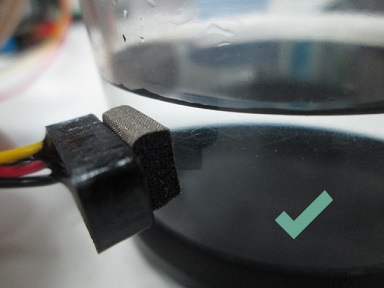
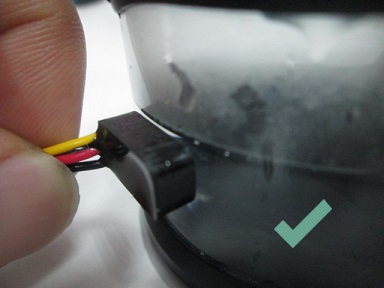
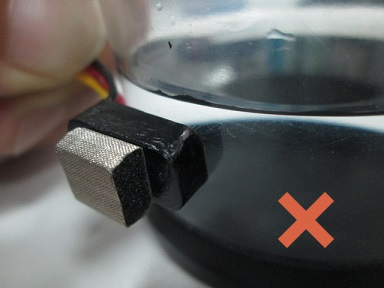
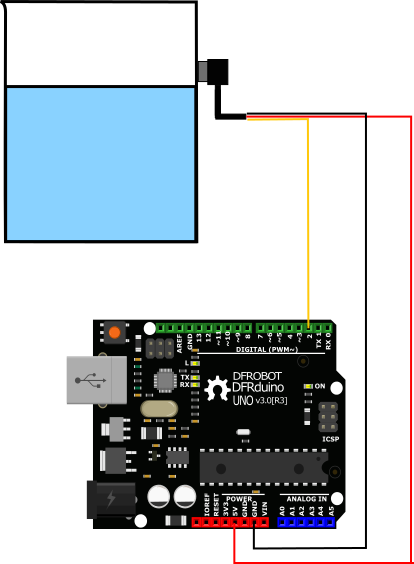
Other Preparation Work
NOTE: Please keep the container empty or keep the liquid level lower than the sensor installation place before supply power EVERY TIME. This sensor has a power-on zero calibration. It will detect liquid level Zero position once it gains the power supply. |
The sponge is to make it flexible to use most of the glue or a doble sided tape on the sponge to stick it to the non-metal container, if your container is too thick (over 8mm), you can remove the sponge and use a proper glue/ tape to fix it on the container.
Sample Code
void setup(){
  //start serial connection
  Serial.begin(9600);
  pinMode(2, INPUT);
  pinMode(13, OUTPUT);
}

void loop(){
  //read the switch value into a variable
  int sensorVal = digitalRead(2);
  //print out the value of the liquid level
  Serial.println(sensorVal);
  if (sensorVal == HIGH) {
    digitalWrite(13, LOW);
  }
  else {
    digitalWrite(13, HIGH);
  }
}
Result
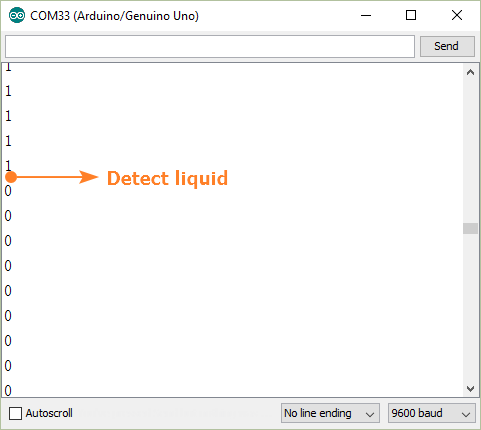
Was this article helpful?