
Example Code for Arduino-Reading Data via UART
Tutorial explains Arduino UNO UART GNSS RTK wiring, I2C baud rate configuration, and UART NMEA data reading. Includes sample code to get latitude, longitude, RTK fix status via UART using an RTK LoRa library.
Hardware Preparation
Software Preparation
- Arduino IDE Download Arduino IDE
- Download and install the RTK Library.
- How to install libraries?
Since the Uno R3 only supports a maximum baud rate of 57600, you'll need to adjust the baud rate in I2C mode before switching to UART mode after powering off.
Wiring Diagram( Change the baud rate)

- Connect the module to Arduino as shown
- Set the sensor's mode switch to I²C (for configuration only).
- Install the library.
- Upload the code below to Arduino UNO.
- Open the serial monitor to view the results.
- Note: Configuration mode only supports I²C.
Sample Code
/*!
 * @file  configParam.ino
 * @brief config moudle param
 * @copyright Copyright (c) 2010 DFRobot Co.Ltd (http://www.dfrobot.com)
 * @license The MIT License (MIT)
 * @author ZhixinLiu(zhixin.liu@dfrobot.com)
 * @version V0.5.0
 * @date 2024-04-24
 * @url https://github.com/DFRobot/DFRobot_RTK_LoRa
 */

#include "DFRobot_RTK_LoRa.h"

// must use iic config parameter
DFRobot_RTK_LoRa_I2C rtk(&Wire ,DEVICE_ADDR);
void setup()
{
  Serial.begin(115200);
  while(!rtk.begin()){
    Serial.println("NO Deivces !");
    delay(1000);
  }
  Serial.println("Device connected !");

  /**
   * | Support Baud | UNO/ESP8266 | Leonardo/Mega2560 | ESP32 |  M0 |
   * | eBaud9600    |      √      |         √         |   √   |  √  |
   * | eBaud14400   |      √      |         √         |   √   |  √  |
   * | eBaud19200   |      √      |         √         |   √   |  √  |
   * | eBaud38400   |      √      |         √         |   √   |  √  |
   * | eBaud56000   |      √      |         √         |   √   |  √  |
   * | eBaud57600   |      √      |         √         |   √   |  √  |
   * | eBaud115200  |             |         √         |   √   |  √  |
   * | eBaud256000  |             |                   |   √   |  √  |
   * | eBaud512000  |             |                   |   √   |  √  |
   * | eBaud921600  |             |                   |   √   |  √  |
   */
  rtk.setModuleBaud(eBaud57600);

  Serial.print("module mode = ");
  Serial.println(rtk.getModule());

  Serial.print("moudle buad = ");
  Serial.println(rtk.getModuleBaud());
}

void loop()
{
  // Reserved interface, direct communication with gnss firmware, use with the original factory data manual
  Serial.println(rtk.transmitAT("$PQTMVERNO*58\r\n"));
  delay(2000);
}
Result
Open Serial Monitor and press RESET to view current baud rate:
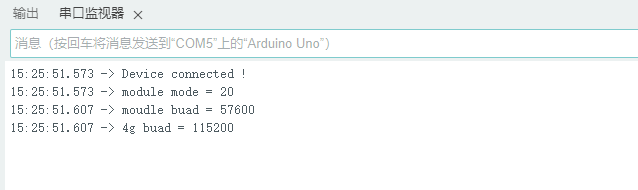
Obtaining Latitude, Longitude, and Positioning Status via UART Mode
Wiring Diagram

Sample Code
/*!
 * @file  getAllGNSS.ino
 * @brief read all gnss data
 * @copyright Copyright (c) 2010 DFRobot Co.Ltd (http://www.dfrobot.com)
 * @license The MIT License (MIT)
 * @author ZhixinLiu(zhixin.liu@dfrobot.com)
 * @version V0.5.0
 * @date 2024-04-23
 * @url https://github.com/DFRobot/DFRobot_RTK_LoRa
 */

#include "DFRobot_RTK_LoRa.h"

void callback(char *data, uint8_t len)
{
  for(uint8_t i = 0; i < len; i++){
    Serial.print((char)data[i]);
  }
}

// #define I2C_COMMUNICATION  //use I2C for communication, but use the serial port for communication if the line of codes were masked

#ifdef  I2C_COMMUNICATION
  DFRobot_RTK_LoRa_I2C rtk(&Wire ,DEVICE_ADDR);
#else
/* -----------------------------------------------------------------------------------------------------
 * |  Sensor  | Connect line | Leonardo/Mega2560/M0 |    UNO    | ESP8266 | ESP32 |  microbit  |   m0  |
 * |   VCC    |=============>|        VCC           |    VCC    |   VCC   |  VCC  |     X      |  vcc  |
 * |   GND    |=============>|        GND           |    GND    |   GND   |  GND  |     X      |  gnd  |
 * |   RX     |=============>|     Serial1 TX1      |     5     |   5/D6  |  D2   |     X      |  tx1  |
 * |   TX     |=============>|     Serial1 RX1      |     4     |   4/D7  |  D3   |     X      |  rx1  |
 * ----------------------------------------------------------------------------------------------------*/
/* Baud rate cannot be changed  */
  #if defined(ARDUINO_AVR_UNO) || defined(ESP8266)
    SoftwareSerial mySerial(4, 5);
    DFRobot_RTK_LoRa_UART rtk(&mySerial, 57600);
  #elif defined(ESP32)
    DFRobot_RTK_LoRa_UART rtk(&Serial1, 115200 ,/*rx*/D2 ,/*tx*/D3);
  #else
    DFRobot_RTK_LoRa_UART rtk(&Serial1, 115200);
  #endif
#endif

void setup()
{
  Serial.begin(115200);
  while(!rtk.begin()){
    Serial.println("NO Deivces !");
    delay(1000);
  }
  Serial.println("Device connected !");

  rtk.setModule(eMoudleLora);
  while(rtk.getModule() != eMoudleLora){\n    Serial.println("Module type is not lora!  please wait!");\n    delay(1000);\n  }
  rtk.setCallback(callback);
}

void loop()
{
  rtk.getAllGnss();
}
Result

| Name | meaning | remark |
|---|---|---|
| N | North | Latitude Hemisphere |
| E | East | Longitude Hemisphere |
| lat degree | Latitude | |
| lon degree | Longitude | |
| star | Number of satellites | Include GNSS,GPS,GLONASS,Galileo,BDS |
| alt high | Meters above Mean Sea Level | |
| sep | Geoid height above/below WGS84 ellipsoid (m) | Positive: the geoid is higher than the ellipsoid; Negative: The geoid is below the ellipsoid |
| hdop | Horizontal Dilution of Precision (lower = better) | |
| message mode | Positioning status | 0=Invalid, 1=GPS, 2=DGPS, 4=RTK Fixed, 5=RTK Float |
| siteID | Reference station ID | Only RTK fixed interpretations or floating-point solutions are valid |
| diftime | Age of RTK corrections (valid for RTK only) | Only RTK fixed interpretations or floating-point solutions are valid |
| $GNGGA | NMEA Message | Please refer to the NMEA Data Resolution section |
| $GNRMC | NMEA Message | Please refer to the NMEA Data Resolution section |
| $GNGLL | NMEA Message | Please refer to the NMEA Data Resolution section |
| $GNVTG | NMEA Message | Please refer to the NMEA Data Resolution section |
| $GNGGA | NMEA Message | Please refer to the NMEA Data Resolution section |
Additional Information
- Ensure the base station antenna is stationary for accurate RTK corrections.
- The result table explains key NMEA message fields.
Was this article helpful?