
Example Code for micro:bit-MindPlus-Security Alarm
This article offers a comprehensive guide to building a security alarm using micro:bit and MindPlus, including hardware setup, software installation, and sample code for seamless integration.
Hardware Preparation
- Components: two jumper wires, one buzzer.
- Pin P0 will be used in this project.
Software Preparation
- Mind+: Download and install Mind+ Software; install the driver (Refer to the built-in tutorials in mind+).
- Makecode: Click to enter makecode online programming environment: https://makecode.microbit.org/
Wiring Diagram
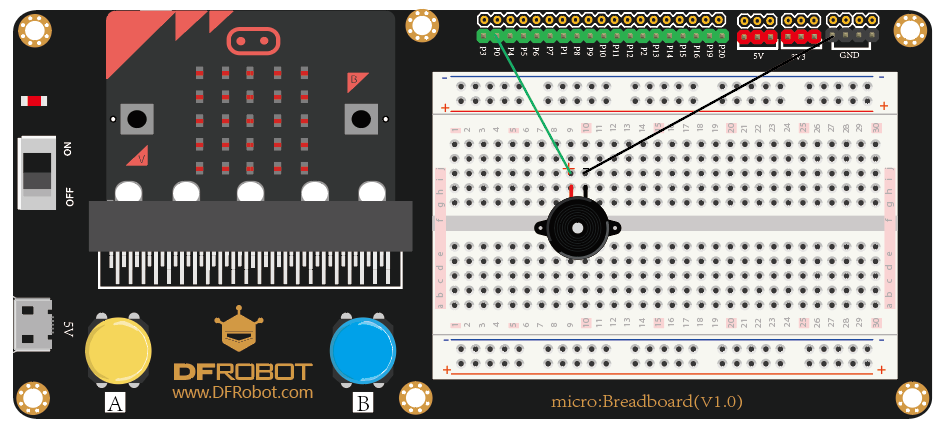
Other Preparation Work
- For Mind+: Click "Code" at the top right corner to switch to "code mode"; Drag and combine blocks to code; Connect micro:bit to the computer with USB; Select the related COM port in "Connect Device" Drop-down box; Click "Upload".
Sample Code
- Screenshot of mind+ graphical codes:

- Screenshot of makecode graphical codes:

Result
Turn on the power, the buzzer starts playing.
Was this article helpful?