
Reference
Last revision 2026/01/22
Communication Protocol Description
Serial setting:Port rate:9600; Parity: none; Stop bit:1
Command: Control command consists of four bits, command data0 data1 sum. Sum=Low8 bit of the sum of command data0 data1.
| Command Format | Function | Description |
|---|---|---|
| 0x11+NC+NC+Sum (Sample:0x11 0x00 0x00 0x11) | Enable16 bit temperature reading | Reading the temperature, the return data format will be:0x11 High(temperature) Low(temperature) SUM; If the temperature is above0, the first four bits of High will be all0. If the temperature is below0, the first four bits of High will be all1; The last4 bits of High together with the Low bits stands for12bits temperature. The resolution is0.1. When the reading is invalid, it returns 0x11 0xFF 0xFF SUM |
| 0x22+Degree+NC+SUM (Sample:0x220x000x000x22 ) | Enable16 bit distance reading | The degree in the command is used to control a servo motor to rotate corresponding degree; Degree:0-46 stands for0-270 degrees, for example,3 stands for18 degrees; Return data format will be:0x22+High(distance)+Low(distance) SUM. When the reading is invalid, it returns0x220xFF0xFF SUM |
| 0x33+Add+NC+SUM | Enable internal EEPROM reading | Return data will be0x33+Add+Data+SUM. |
| 0x44+Add+Data+SUM (Sample:0x440x020xbb0x01) Enable PWM mode | Enable internal EEPROM writing | Written data can only from0-255. Address0x00-0x02 is used to configure the mode.0x00 – threshold distance (Low)0x01 – threshold distance (High)0x02 – Operation Mode (0xaa for autonomous mode) (0xbb for PWM passive control mode);The return data format will be:0x44+Add+Data+SUM |
NOTE: NC stands for any data,SUM stands for sum, Add stands for address.
1. PWN_ON must be set to High to enable sensor.
Examples: Function to calculate the temperature:
IF(HightByte>=0xF0)
{
Temperature= ((HightByte-0xF0)*256-LowByte)/10
 }
Else
{
Temperature= ((HightByte)*256-LowByte)/10
}
Library
Other Supplementary Information
Test on Software
This feature is only available for Rev2 and after. If there are no jumpers, or no button on the back of the sensor, the sensor should be Rev1 and hence not supporting this feature.
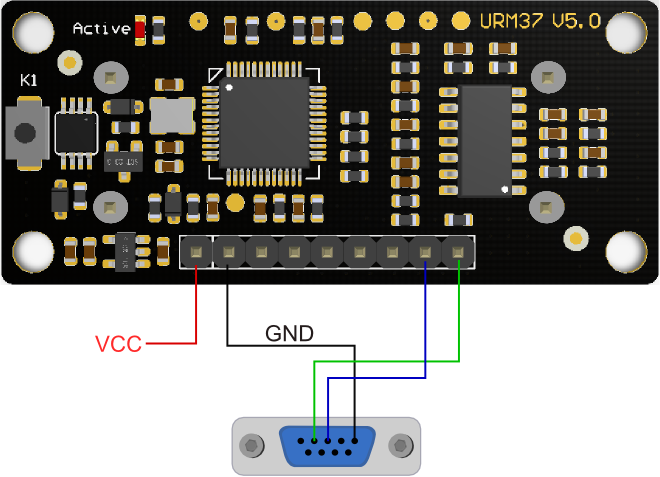
Power on the sensor, read the blink of the LED(active) to get the serial level(see above), wire according to the above picture. After this, you can use our "URMV3.2HelpMate" to test the module.
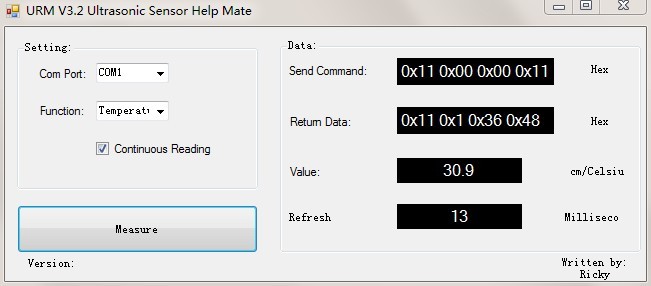
The usage of the software is very simple: ensure that there is no other software on the computer occupying the serial port, and then run Mate.exe, select the COM Port, and choose the parameter what you want to measure, and choose the "Continuous Reading ". Click "Measure" it will measure the temperature and the distance.
Other Setting address in EEPROM
Here, we are talking about the meaning of the data in EEPROM several addresses.(For more details, can be found in the Serial control protocol part)
| Address | Meaning |
| 0x00 | larger than set distance |
| 0x01 | less than set distance |
| 0x02 | measure mode(write0xaa present automatically measure mode, other data except0xaa present PWM Passive measurement mode ) |
| 0x03 | Serial level mode(TTL/RS232)(write0x00 present TTL mode,0x01 present RS232 mode, other data will be modified to0x00) |
| 0x04 | automatically measure time span(minimum value:70ms; maximum value:255ms; default value:100ms. Witting format is8-bit16 binary,and its unit is ms. e.g. Write6E means110ms) |
| 0x05 | measure sensitivity(the range of writing data is0x0a-0xc8(equivalent to decimal10-200), the smaller the value, the higher the sensivity. The default value is0x0a, and the sensitivity is the highest.) |
The factory default settings
- Serial TTL level
- Measure mode: PWM trigger
- Comparison of distance :0
- Automatically measure interval time:25ms
- Internal EEPROM Data are all0x00
- the EEPROM address are unavailable:0x00~0x04, please do not try to modify the data.
The delineation of detection angles and sensitivity levels
The physical attributes of ultrasonic sensors inherently beget irregular detection zones. Consequently, the precise definition of the detection angle for ultrasonic ranging sensors poses a challenge. We conducted tests on various sample products using two distinct reference obstacles, and the respective reference detection zones for these targets are as illustrated in the diagrams below:
Was this article helpful?