
Example Code for Arduino-TTL Mode Distance Measurement
Last revision 2025/12/08
This sample demonstrates using the URM05 v2 in TTL mode with Arduino to measure distance and control an LED based on the measured distance.
Software Preparation
Arduino IDE (compatible with versions 1.0 and earlier)
Wiring Diagram
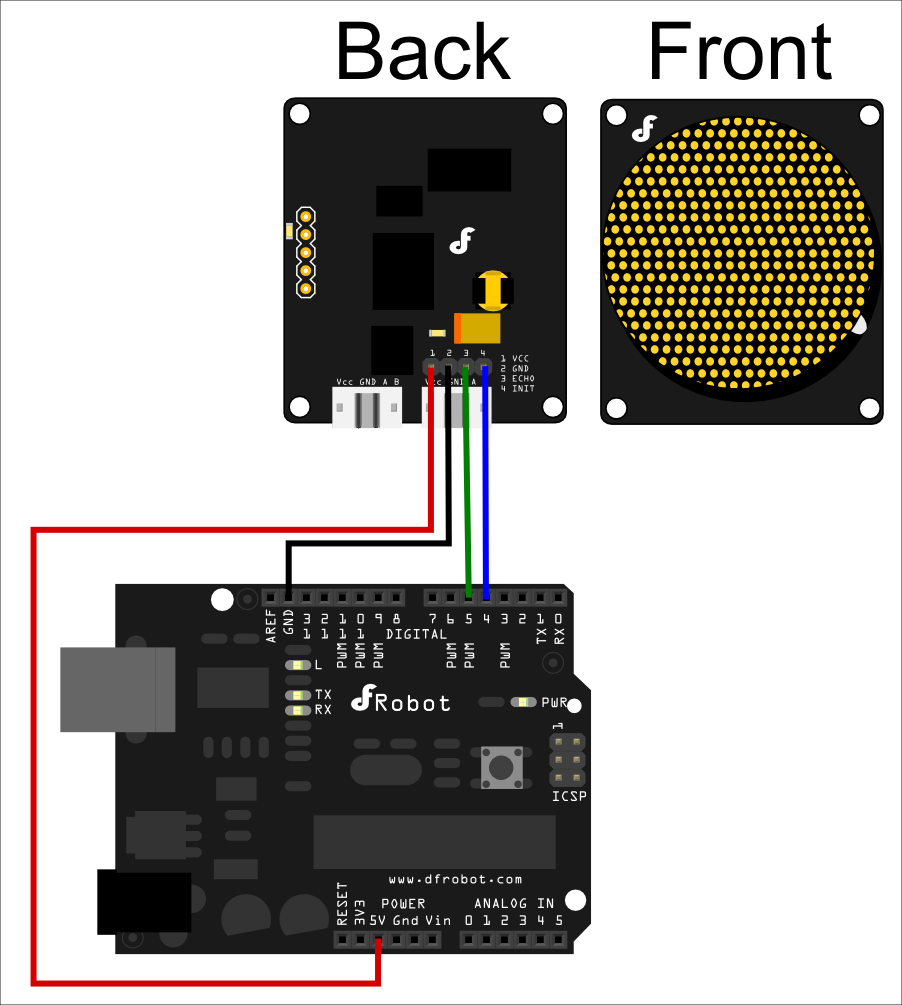
Other Preparation Work
Connect the URM05 v2 to Arduino as per the wiring diagram. Ensure the INIT pin is connected to Arduino pin 4, ECHO to pin 5, and LED to pin 13.
Sample Code
/****************** www.DFRobot.com ***********************/
////////////URM05 v2 TTL Module arduino Sample /////////////////////////

#define  INIT   4  // Trigger the measurement
#define  ECHO   5  // Receive the ultrasonic signal feedback
#define  LED    13 // state display

void setup()
{
  Serial.begin(9600);
  pinMode(LED,OUTPUT);//init digital pins
  pinMode(INIT, OUTPUT);
  pinMode(ECHO, INPUT);

  digitalWrite(INIT, HIGH); // turn off the sensor
}

void loop()
{
  digitalWrite(INIT, LOW); // trigger the sensor to measure distance
  delayMicroseconds(10);
  digitalWrite(INIT, HIGH); // finish trigger
  delayMicroseconds(10);

  int distance = pulseIn(ECHO,HIGH);  // Read the signal feedback
  Serial.println(distance);  //Display the distance value in the Serial monitor
  delay(50);

  if (distance >=300)
    digitalWrite(LED,LOW); //100cm > distance >= 30cm Turn on the led
  else
    digitalWrite(LED,HIGH);//10cm < distance < 30cm Turn off the led
}
Result
- The measured distance value is displayed in the Arduino Serial Monitor.
- The LED turns on when the distance is less than 30cm and turns off when the distance is 30cm or greater.
Technical Notes
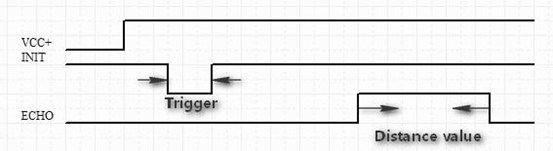
PWM mode information
VDC: 5v power supply @ Max 2A
GND: Connected to Ground
ECHO: PWM signal output pin – 25.4us high level means 2.54cm (1 inch)
INITL: Measurement trigger pin – The low level signal should be longer than 50us in order to trigger the distance measurement
Was this article helpful?