
Example Code for Arduino-3-axis Acceleration and Tilt Sensing
Last revision 2025/12/15
This article provides an example code for using Arduino to monitor 3-axis acceleration and tilt with the ADXL345 accelerometer, covering hardware setup, software preparation, wiring instructions, and sample code for capturing and displaying acceleration data for real-time roll and pitch angle calculations.
Hardware Preparation
- Triple Axis Accelerometer Breakout ADXL345 (SEN0032): 1, Purchase Link
- Arduino UNO: 1
Software Preparation
- Development Tool: Arduino IDE (Version ≥ 1.8.0), Download Link
- Library: Wire Library (Included in Arduino IDE by default)
Wiring Diagram
This diagram is an IIC connection method suitable with Arduino UNO. It would be differen if you use other Arduino Controllers which the SCL & SDA pin might be different.

Other Preparation Work
Connect the module to Arduino UNO according to the Wiring Diagram. Open Arduino IDE and select the correct board (Arduino UNO) and port from the Tools menu.
Sample Code
#include <Wire.h>

#define DEVICE (0x53)      //ADXL345 device address
#define TO_READ (6)        //num of bytes we are going to read each time (two bytes for each axis)

byte buff[TO_READ] ;        //6 bytes buffer for saving data read from the device
char str[512];              //string buffer to transform data before sending it to the serial port
int regAddress = 0x32;      //first axis-acceleration-data register on the ADXL345
int x, y, z;                        //three axis acceleration data
double roll = 0.00, pitch = 0.00;       //Roll & Pitch are the angles which rotate by the axis X and y
//in the sequence of R(x-y-z),more info visit
// https://www.dfrobot.com/wiki/index.php?title=How_to_Use_a_Three-Axis_Accelerometer_for_Tilt_Sensing#Introduction

void setup() {
  Wire.begin();         // join i2c bus (address optional for master)
  Serial.begin(9600);  // start serial for output

  //Turning on the ADXL345
  writeTo(DEVICE, 0x2D, 0);
  writeTo(DEVICE, 0x2D, 16);
  writeTo(DEVICE, 0x2D, 8);
}

void loop() {

  readFrom(DEVICE, regAddress, TO_READ, buff); //read the acceleration data from the ADXL345
                                              //each axis reading comes in 10 bit resolution, ie 2 bytes.  Least Significat Byte first!!
                                              //thus we are converting both bytes in to one int
  x = (((int)buff[1]) << 8) | buff[0];
  y = (((int)buff[3])<< 8) | buff[2];
  z = (((int)buff[5]) << 8) | buff[4];

  //we send the x y z values as a string to the serial port
  Serial.print("The acceleration info of x, y, z are:");
  sprintf(str, "%d %d %d", x, y, z);
  Serial.print(str);
  Serial.write(10);
  //Roll & Pitch calculate
  RP_calculate();
  Serial.print("Roll:"); Serial.println( roll );
  Serial.print("Pitch:"); Serial.println( pitch );
  Serial.println("");
  //It appears that delay is needed in order not to clog the port
  delay(50);
}

//---------------- Functions
//Writes val to address register on device
void writeTo(int device, byte address, byte val) {
  Wire.beginTransmission(device); //start transmission to device
  Wire.write(address);        // send register address
  Wire.write(val);        // send value to write
  Wire.endTransmission(); //end transmission
}

//reads num bytes starting from address register on device in to buff array
void readFrom(int device, byte address, int num, byte buff[]) {
  Wire.beginTransmission(device); //start transmission to device
  Wire.write(address);        //sends address to read from
  Wire.endTransmission(); //end transmission

    Wire.beginTransmission(device); //start transmission to device
  Wire.requestFrom(device, num);    // request 6 bytes from device

  int i = 0;
  while(Wire.available())    //device may send less than requested (abnormal)
  {
    buff[i] = Wire.read(); // receive a byte
    i++;
  }
  Wire.endTransmission(); //end transmission
}

//calculate the Roll&Pitch
void RP_calculate(){
  double x_Buff = float(x);
  double y_Buff = float(y);
  double z_Buff = float(z);
  roll = atan2(y_Buff , z_Buff) * 57.3;
  pitch = atan2((- x_Buff) , sqrt(y_Buff * y_Buff + z_Buff * z_Buff)) * 57.3;
}
Result
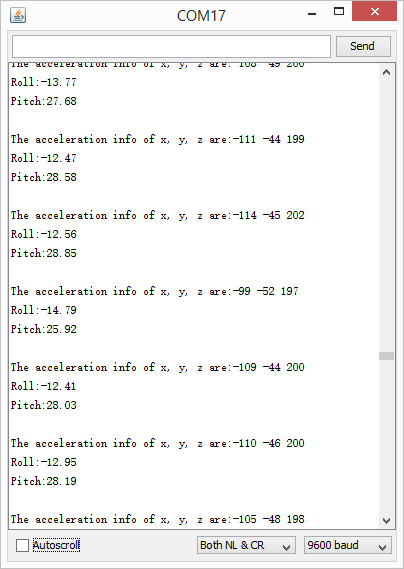
Open the Serial monitor to see the 3-axis acceleration data and Roll-Pitch angle. See changs as you sway the Accelerometer.
Additional Information
By the way, we have collected some useful 3-axis data processing methods: How to Use a Three-Axis Accelerometer for Tilt Sensing.
Was this article helpful?