
Example Code for Arduino-Light Intensity Reading
Sample code for the BH1750 Light sensor
Hardware Preparation
Wiring Diagram
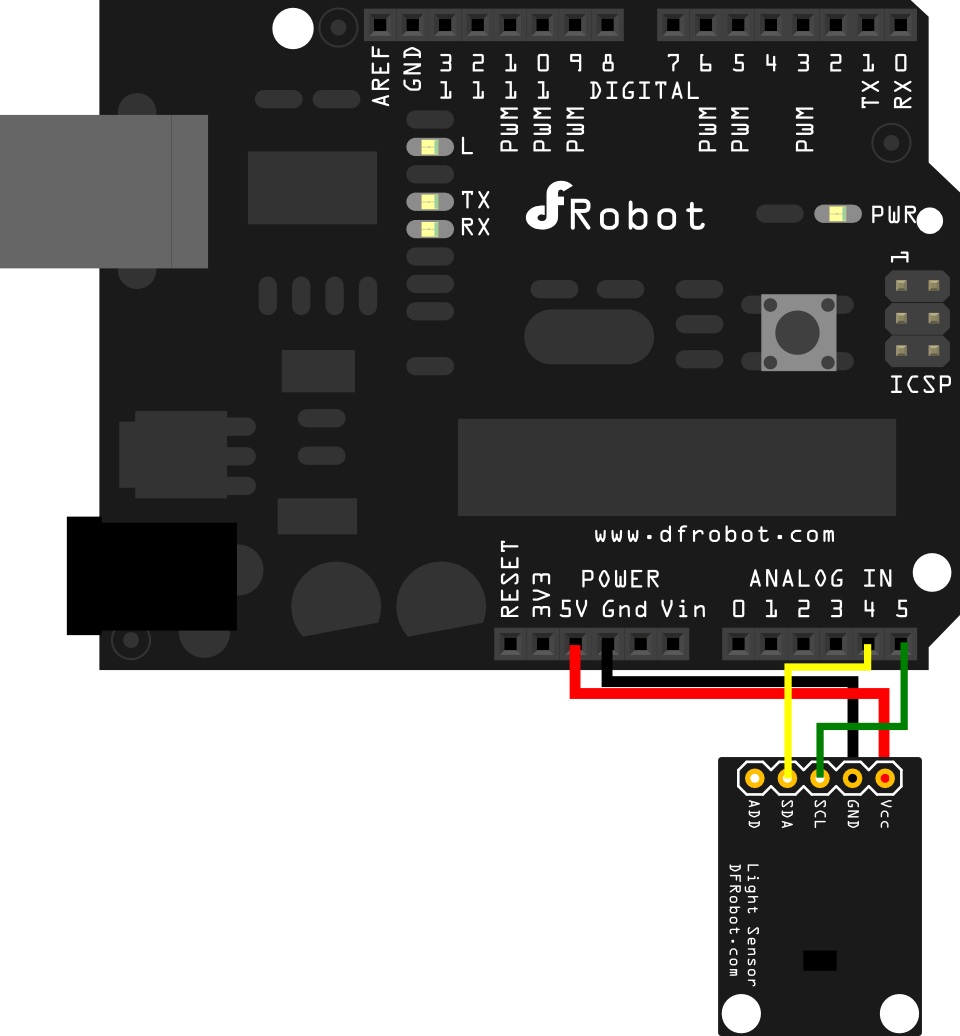
The ADD pin is used to assign a different I²C address to the sensor.
In the sample code provided, this pin is not used.
For more information about the I²C protocol, please refer to Wikipedia – I²C.
Sample Code
/*
 Sample code for the BH1750 Light sensor
 Version 0.1
 website:www.DFRobot.com

 Connection:

 VCC-5v
 GND-GND
 SCL-SCL(analog pin 5)
 SDA-SDA(analog pin 4)
 ADD-NC
 */
#include <Wire.h> //BH1750 IIC Mode
#include <math.h>
int BH1750address = 0x23; //setting i2c address

byte buff[2];
void setup()
{
  Wire.begin();
  Serial.begin(57600);//init Serail band rate
}

void loop()
{
  int i;
  uint16_t val=0;
  BH1750_Init(BH1750address);
  delay(200);

  if(2==BH1750_Read(BH1750address))
  {
    val=((buff[0]<<8)|buff[1])/1.2;
    Serial.print(val,DEC);
    Serial.println("[lx]");
  }
  delay(150);
}

int BH1750_Read(int address) //
{
  int i=0;
  Wire.beginTransmission(address);
  Wire.requestFrom(address, 2);
  while(Wire.available()) //
  {
    buff[i] = Wire.read();  // receive one byte
    i++;
  }
  Wire.endTransmission();
  return i;
}

void BH1750_Init(int address)
{
  Wire.beginTransmission(address);
  Wire.write(0x10);//1lx reolution 120ms
  Wire.endTransmission();
}
Was this article helpful?