
Example Code for Arduino-DC Current Measurement
Last revision 2025/12/08
This code shows you how to get raw datas from the sensor through Arduino and convert the raw datas to the value of the current according to the datasheet; Smoothing algorithm (http://www.arduino.cc/en/Tutorial/Smoothing) is used to make the outputting current value more reliable;
Wiring Diagram
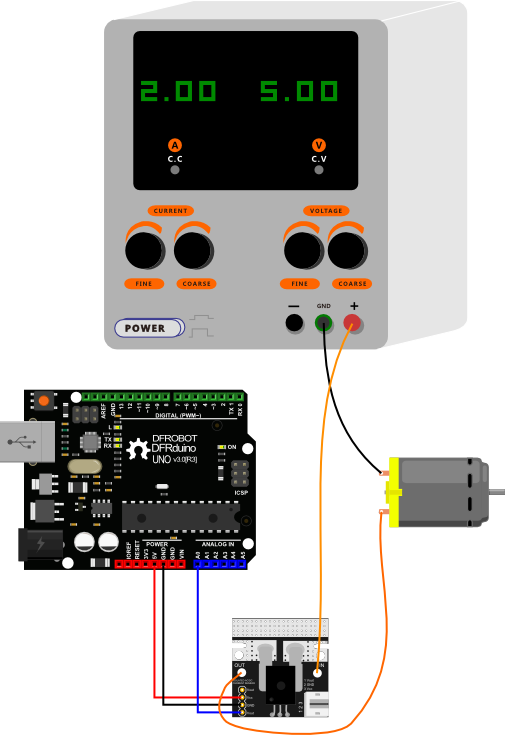
DANGER: This diagram can also be applied to AC current connection. But notice that the module should be cascaded on one electric wire ( +/- ). But if you connect it to two electric wires in parallel, you will short the circuit , which is dangerous.
Sample Code
/*
50A Current Sensor(DC)(SKU:SEN0098) Sample Code
This code shows you how to get raw datas from the sensor through Arduino and
convert the raw datas to the value of the current according to the datasheet;

Smoothing algorithm (http://www.arduino.cc/en/Tutorial/Smoothing) is used to
make the outputting current value more reliable;

Created 27 December 2011 @Barry Machine @www.dfrobot.com
*/

const int numReadings = 30;
float readings[numReadings];      // the readings from the analog input
int index = 0;                  // the index of the current reading
float total = 0;                  // the running total
float average = 0;                // the average

float currentValue = 0;

void setup()
{
  Serial.begin(115200);
  for (int thisReading = 0; thisReading < numReadings; thisReading  )
    readings[thisReading] = 0;
}
void loop()
{
    total= total - readings[index];
    readings[index] = analogRead(0); //Raw data reading
//Data processing:510-raw data from analogRead when the input is 0;
// 5-5v; the first 0.04-0.04V/A(sensitivity); the second 0.04-offset val;
    readings[index] = (readings[index]-512)*5/1024/0.04-0.04;

    total= total   readings[index];
    index = index   1;
    if (index >= numReadings)
      index = 0;
    average = total/numReadings;   //Smoothing algorithm (http://www.arduino.cc/en/Tutorial/Smoothing)
    currentValue= average;
    Serial.println(currentValue);
    delay(10);
}
Result
After uploading the sample sketch, open the serial monitor to monitor your results. You may find that when the current is 0A, you may found the reading is not 0A. In this case, you need to revise the code for some small calibrations.These are the steps:
1 Check the initial current value when the input is 0A:
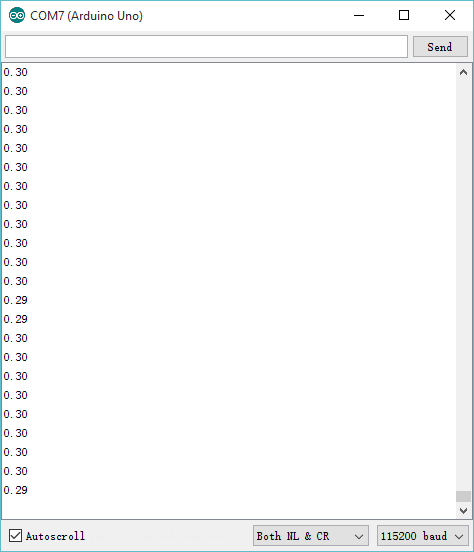
2 Caculate the initial current value:
-0.34 = -0.04 - ( 0.30 );
3 Revise the sample sketch:
readings[index] = (readings[index]-510)*5/1024/0.04-0.34;//
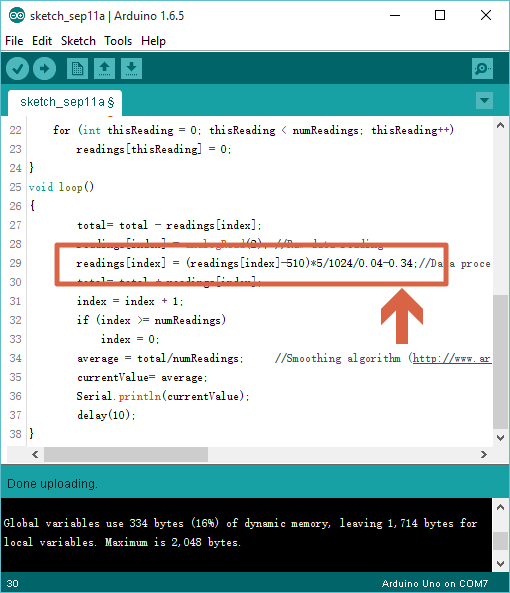
4 Upload your new sketch again, then you will found the readinga are around 0A, if not, please do the steps above several times to make it.
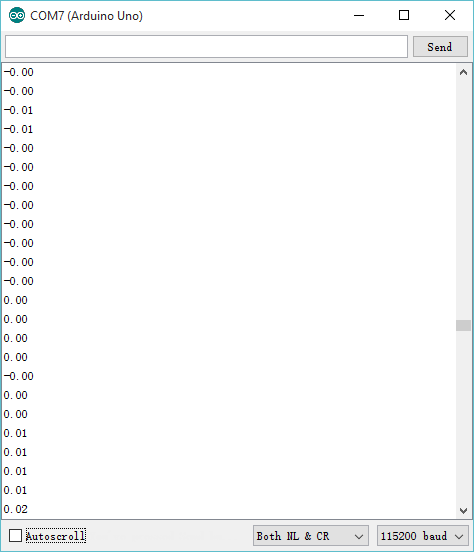
5 As shown above, it can be applied to detect the current value accurately, and output analog voltage signals.
Was this article helpful?