
Example Code for Arduino-Read Distance (Single)
Last revision 2025/12/17
Default Address: 0x11; Default Baudrate: 19200 bps Leonardo GPIO Power Supply. (40mA) Code Description: 20-750cm distance measurement, the received data is not verified
Hardware Preparation
- DFRduino UNO (or similar) x 1
- URM07-UART Ultrasonic Sensor xn
- M-M/F-M/F-F Jumper wires
Software Preparation
- Arduino IDE Click to Download Arduino IDE from Arduino®
Wiring Diagram
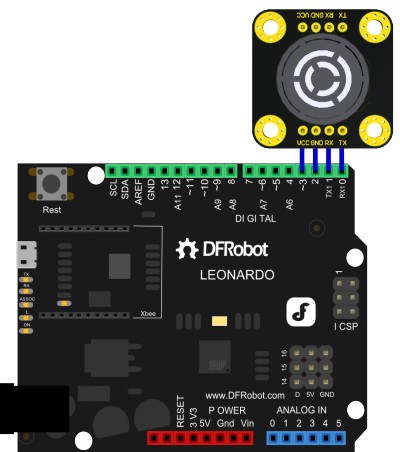
Other Preparation Work
- With a single URM07 module, a generic device address 0xAB can be used instead if the device address is unknown.
- Before the power on the URM07 module is not started, set the TX port to high and lower the RX port, and maintaining more than 1s can enable the module parameters to revert to factory settings.
- After the factory reset, the module can not start normally to enter a normal communication state, the on-board LED light flash with 10Hz. The module starts normally when powered back on.
- After the module is started, the module on-board LED only lights up the indication during the process of receiving the data and processing, and the LED goes out when in the standby state.
Sample Code
// # Author: Strictus.zhang@dfrobot.com
// # Date: 20.08.2016
// # Product Name: URM07-UART Ultrasonic Sensor
// # SKU: SEN0153
// # version number: 1.0
// # Code Description: 20-750cm distance measurement, the received data is not verified

// # Connection: Arduino LEonardo GPIO Power Supply
// # Pin VCC (URM07 V1.0) -> D3     (Arduino Leonardo)
// # Pin GND (URM07 V1.0) -> D2     (Arduino Leonardo)
// # Pin  RX (URM07 V1.0) -> TX1/D1 (Arduino Leonardo)
// # Pin  TX (URM07 V1.0) -> RX1/D0 (Arduino Leonardo)

#define header_H    0x55 //Header
#define header_L    0xAA //Header
#define device_Addr 0x11 //Address
#define data_Length 0x00 //Data length
#define get_Dis_CMD 0x02 //Command: Read Distance
#define checksum    (header_H+header_L+device_Addr+data_Length+get_Dis_CMD) //Checksum

unsigned char i=0;
unsigned int  Distance=0;
unsigned char Rx_DATA[8];
unsigned char CMD[6]={
  header_H,header_L,device_Addr,data_Length,get_Dis_CMD,checksum}; //Distance command package

void setup() {
  pinMode(2, OUTPUT);
  pinMode(3, OUTPUT);
  digitalWrite(3, HIGH);  //Ultrasonic VCC
  digitalWrite(2, LOW);   //Ultrasonic GND
  Serial1.begin(19200);  //Serial1: Ultrasonic Sensor Communication Serial Port, Buadrate: 19200
  Serial.begin(19200);   //Serial: USB Serial Data output, baudrate: 19200
}

void loop() {
  for(i=0;i<6;i++){
    Serial1.write(CMD[i]);
  }
  delay(150);  //Wait for the result
  i=0;
  while (Serial1.available()){  //Read the return data (Note: this demo is only for the reference, no data verification)
    Rx_DATA[i++]=(Serial1.read());
  }
  Distance=((Rx_DATA[5]<<8)|Rx_DATA[6]); //Read the distance value
  Serial.print(Distance);               //print distance value
  Serial.println("cm");
}
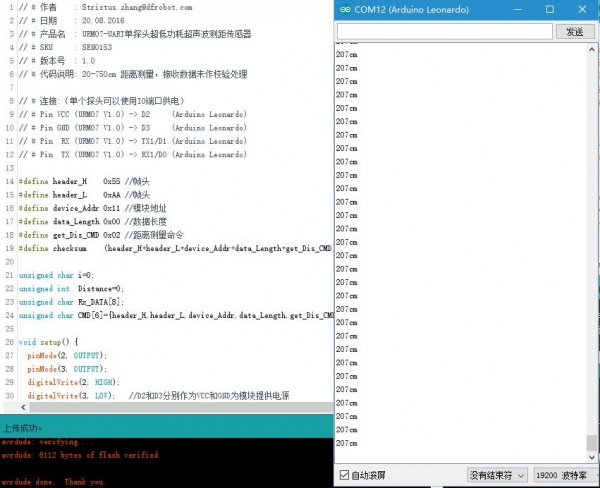
Result
Was this article helpful?