
Example Code for Arduino-UV Intensity Reading
Last revision 2026/01/15
This example reads UV intensity from UV Sensor v1.0-ML8511.
Hardware Preparation
- Arduino Board (Uno/Leonardo/Mega), Quantity: 1
- UV Sensor v1.0-ML8511 (SEN0175), Quantity: 1, Purchase Link: https://www.dfrobot.com/product-1195.html
Software Preparation
- Development Tool: Arduino IDE, Download Link: https://www.arduino.cc/en/software
- No additional libraries are required.
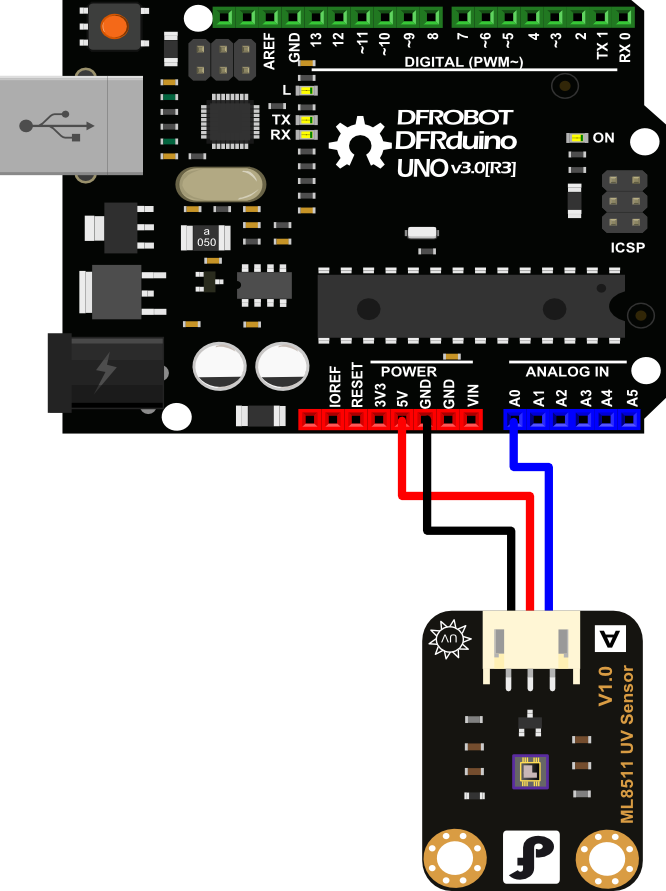
Wiring Diagram
Other Preparation Work
- Connect ML8511 UV Sensor to Arduino A0.
- This code is tested on Arduino Uno, Leonardo, Mega boards.
- Open Arduino IDE, select the correct board and port in Tools menu.
Sample Code
/***************************************************
 * UV Sensor v1.0-ML8511
 * <https://www.dfrobot.com/index.php?route=product/product&product_id=1195&search=uv&description=true>
 ***************************************************
 * This example reads UV intensity from UV Sensor v1.0-ML8511.
 *
 * Created 2014-9-23
 * By Phoebe <phoebe.wang@dfrobot.com>
 * Modified 2014-9-23
 * By Phoebe phoebe.wang@dfrobot.com>
 *
 * GNU Lesser General Public License.
 * See <http://www.gnu.org/licenses/> for details.
 * All above must be included in any redistribution
 ****************************************************/

/***********Notice and Trouble shooting***************
 * 1.Connect ML8511 UV Sensor to Arduino A0
   <https://www.dfrobot.com/wiki/index.php/File:SEN0175_Diagram.png>
 * 2.This code is tested on Arduino Uno, Leonardo, Mega boards.
 ****************************************************/


int ReadUVintensityPin = A0; //Output from the sensor

void setup()
{
  pinMode(ReadUVintensityPin, INPUT);
  Serial.begin(9600); //open serial port, set the baud rate to 9600 bps
  Serial.println("Starting up...");
}

void loop()
{
  int uvLevel = averageAnalogRead(ReadUVintensityPin);

  float outputVoltage = 5.0 * uvLevel/1024;
  float uvIntensity = mapfloat(outputVoltage, 0.99, 2.9, 0.0, 15.0);

  Serial.print("UVAnalogOutput: ");
  Serial.print(uvLevel);

  Serial.print(" OutputVoltage: ");
  Serial.print(outputVoltage);

  Serial.print(" UV Intensity: ");
  Serial.print(uvIntensity);
  Serial.print(" mW/cm^2");

  Serial.println();
  delay(100);
}

//Takes an average of readings on a given pin
//Returns the average
int averageAnalogRead(int pinToRead)
{
  byte numberOfReadings = 8;
  unsigned int runningValue = 0;

  for(int x = 0 ; x < numberOfReadings ; x++)
    runningValue += analogRead(pinToRead);
  runningValue /= numberOfReadings;

  return(runningValue);

}

//The Arduino Map function but for floats
//From: http://forum.arduino.cc/index.php?topic=3922.0
float mapfloat(float x, float in_min, float in_max, float out_min, float out_max)
{
  return (x - in_min) * (out_max - out_min) / (in_max - in_min) + out_min;
}
Result
Open the Arduino Serial Monitor (baud rate: 9600) to view the output. The serial monitor will display messages like:
UVAnalogOutput: [value] OutputVoltage: [value] UV Intensity: [value] mW/cm^2
Additional Information
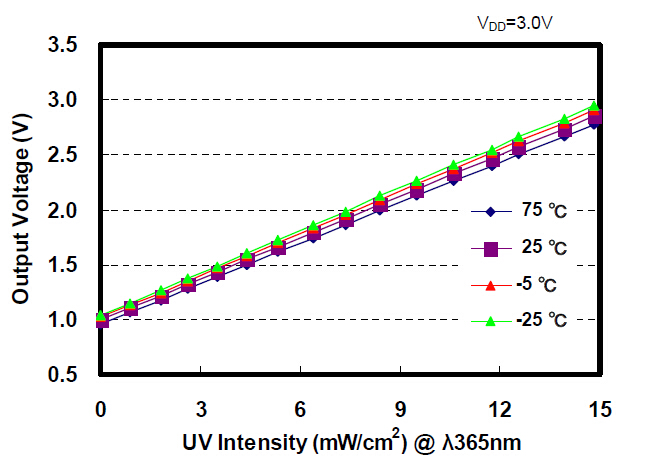
Mapping the outputVoltage to intensity is straight forward. No UV light starts at 1V with a maximum of 15mW/cm2 at around 2.8V. Arduino has a built-in map() function, but map() does not work for floats. Thanks to users on the Arduino forum, we have a simple mapFloat() function:
//The Arduino Map function but for floats
//From: http://forum.arduino.cc/index.php?topic=3922.0
float mapfloat(float x, float in_min, float in_max, float out_min, float out_max)
{
  return (x - in_min) * (out_max - out_min) / (in_max - in_min) + out_min;
}
The following line converts the voltage read from the sensor to mW/cm2 intensity:
float uvIntensity = mapfloat(outputVoltage, 0.99, 2.8, 0.0, 15.0); //Convert the voltage to a UV intensity level
Was this article helpful?