
Example Code for Arduino-CO2 Concentration Detection
Last revision 2025/12/17
Upload the code to Arduino Uno, open the serial monitor to check the CO2 concentration.
Hardware Preparation
- DFRduino UNO x 1.
- Gravity UART Infrared CO2 Sensor
- DuPont cables
Software Preparation
- Arduino IDE Click to Download Arduino IDE from Arduino.
Wiring Diagram
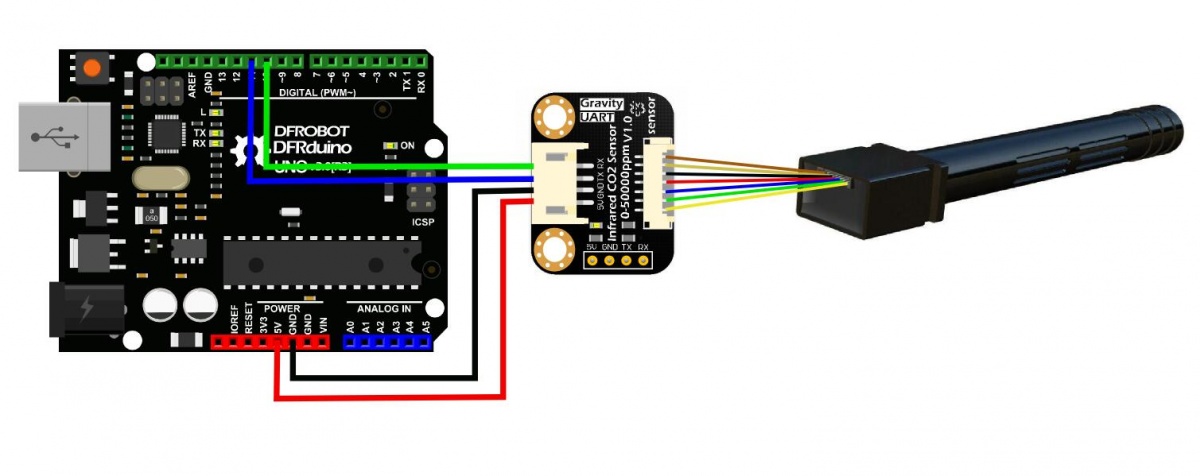
Other Preparation Work
The CO2 concentration during the preheating time in the serial monitor is not accurate, just ignore the result in the first 3 minutes (Preheating Time). |
Sample Code
/*!
 * @file  SEN0220.ino
 * @brief Infrared CO2 Sensor 0-50000ppm(Wide Range)
 * @n This example is used for detectting CO2 concentration.
 * @copyright  Copyright (c) 2010 DFRobot Co.Ltd (http://www.dfrobot.com)
 * @license  The MIT License (MIT)
 * @author  lg.gang(lg.gang@qq.com)
 * @version  V1.0
 * @date  2016-06-06
 */

#include <SoftwareSerial.h>

SoftwareSerial mySerial(10, 11); // RX, TX
unsigned char hexData[9] = {0xFF, 0x01, 0x86, 0x00, 0x00, 0x00, 0x00, 0x00, 0x79}; //Read the gas density command /Don't change the order

void setup()
{
  Serial.begin(9600);
  while (!Serial) {
  }
  mySerial.begin(9600);
}

void loop()
{
  mySerial.write(hexData, 9);
  delay(500);

  for (int i = 0, j = 0; i < 9; i++)
  {
    if (mySerial.available() > 0)
    {
      long hi, lo, CO2;
      int ch = mySerial.read();

      if (i == 2) {
        hi = ch;    //High concentration
      }
      if (i == 3) {
        lo = ch;    //Low concentration
      }
      if (i == 8) {
        CO2 = hi * 256 + lo; //CO2 concentration
        Serial.print("CO2 concentration: ");
        Serial.print(CO2);
        Serial.println("ppm");
      }
    }
  }
}
Result
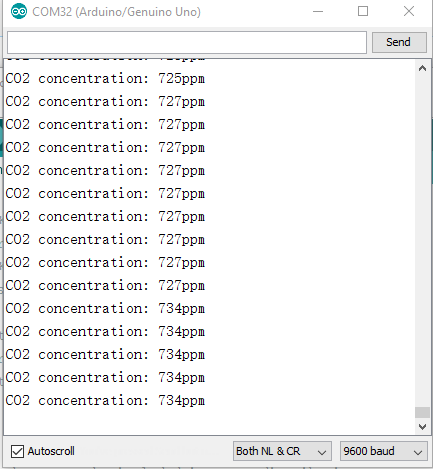
Open your IDE serial monitor and wait for about 3 minutes (preheat process), then you'll see the finial data. (Indoor Temperature: 25℃)
Was this article helpful?