
Example Code for Arduino-UART Mode
This example measures the HCHO concentration in air using UART mode, which provides higher accuracy and greater stability compared with DAC mode.
Hardware Preparation
| Name | Model/SKU | Quantity |
|---|---|---|
| DFRduino UNO (or similar) | DFRduino UNO | 1 |
| HCHO Sensor Module | SEN0231 | 1 |
| Gravity 3P Cable | Gravity PH2.0 3Pin Cable | 1 |
Software Preparation
- Development tool: Arduino IDE (Download Arduino IDE)
- Library: DFRobotHCHOSensor Arduino Library
- Library installation tutorial: How to install Libraries in Arduino IDE
Wiring Diagram
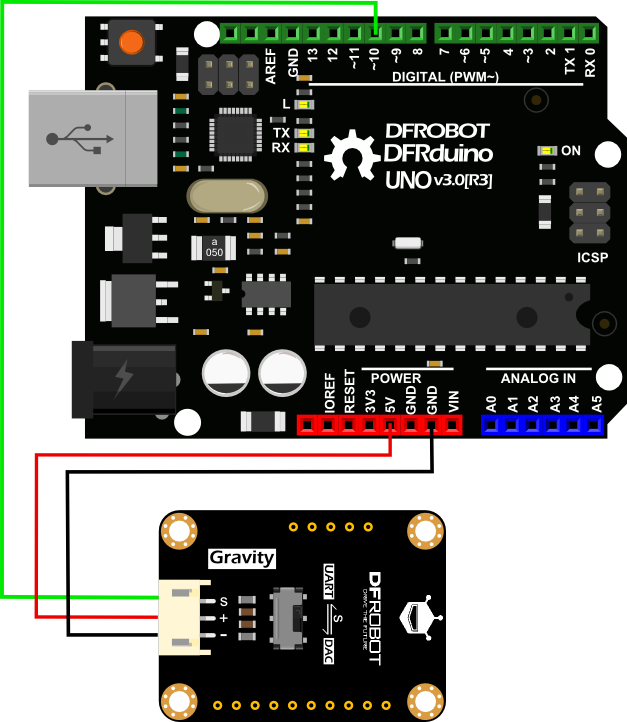
Other Preparation Work
Before using the sensor in UART mode, slide the switch on the module to the UART position. In this mode, data is transmitted through a SoftwareSerial port. The UART data format is shown below:
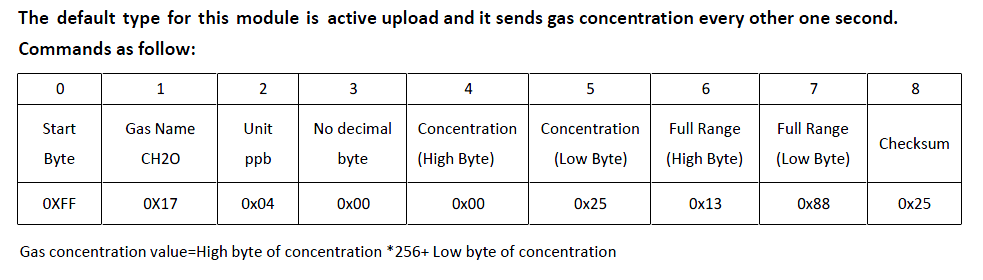
Next, install the DFRobot HCHO Sensor Arduino Library before uploading the example code.
If needed, refer to the official guide: How to Install Libraries in Arduino IDE
For best performance, allow the module to warm up for about 5 minutes during first-time use.
Sample Code
/***************************************************
 DFRobot Gravity: HCHO Sensor
 <https://www.dfrobot.com/wiki/index.php/Gravity:_HCHO_Sensor_SKU:_SEN0231>

 ***************************************************
 This example reads the concentration of HCHO in air by UART mode.

 Created 2016-12-15
 By Jason <jason.ling@dfrobot.com@dfrobot.com>

 GNU Lesser General Public License.
 See <http://www.gnu.org/licenses/> for details.
 All above must be included in any redistribution
 ****************************************************/

 /***********Notice and Trouble shooting***************
 1. This code is tested on Arduino Uno with Arduino IDE 1.0.5 r2.
 2. In order to protect the sensor, do not touch the white sensor film on the sensor module,
 and high concentration of Hydrogen sulfide, hydrogen, methanol, ethanol, carbon monoxide should be avoided.
 3. Please do not use the modules in systems which related to human being’s safety.
 ****************************************************/

#include <DFRobotHCHOSensor.h>
#include <SoftwareSerial.h>

#define SensorSerialPin 10  //this pin read the uart signal from the HCHO sensor

SoftwareSerial sensorSerial(SensorSerialPin,SensorSerialPin);

DFRobotHCHOSensor hchoSensor(&sensorSerial);

void setup()
{
    sensorSerial.begin(9600);   //the baudrate of HCHO is 9600
    sensorSerial.listen();
    Serial.begin(9600);
}

void loop()
{
    if(hchoSensor.available()>0)
    {
      Serial.print(hchoSensor.uartReadPPM());
      Serial.println("ppm");
    }
}
Result
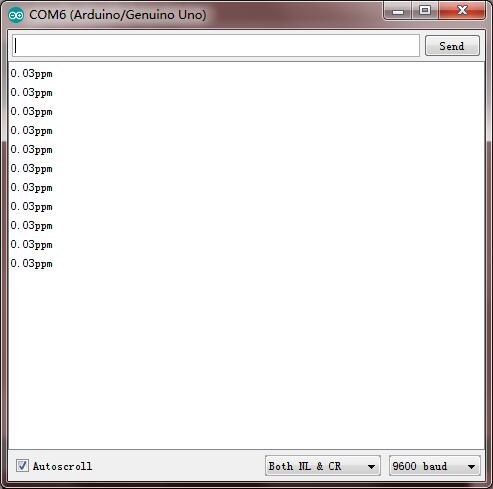
As indicated above, the value will be printed on the serial monitor every second.
Additional Information
- Avoid touching the white sensing film during use.
- Keep the sensor away from high concentrations of hydrogen sulfide, hydrogen, methanol, ethanol, and carbon monoxide, as these gases may affect accuracy and reduce service life.
- We recommend priming the module by powering it for 5 minutes on first use.
- Avoid exposure to organic solvents, coatings, medicines, oils, and high-concentration gases.
- Do not plug or unplug the sensor from the module, and do not modify any components on the PCB.
- Avoid excessive impact or vibration.
- Do not use the module in systems related to human safety.
- Do not operate the module in environments with strong air convection.
- Do not expose the module to high concentrations of organic gases for extended periods.9. Do not expose the module to high concentrations of organic gases for extended periods.
Was this article helpful?