
Example Code for Arduino-Read Environmental Data Without IAQ
Last revision 2025/12/17
Program Function: read data from BME680 sensor and serial printing(without IAQ).
Hardware Preparation
- DFRduino UNO R3 (or similar) x 1
- DFRobot Gravity BME680 environmental sensor x1
- Gravity 4Pin Sensor wire (or Dupont wires) x1
Software Preparation
- Arduino IDE (V1.0.x or V1.8.x), Click to Download Arduino IDE from Arduino®
- Download and install the BME680 Library. How to install the library?
Wiring Diagram
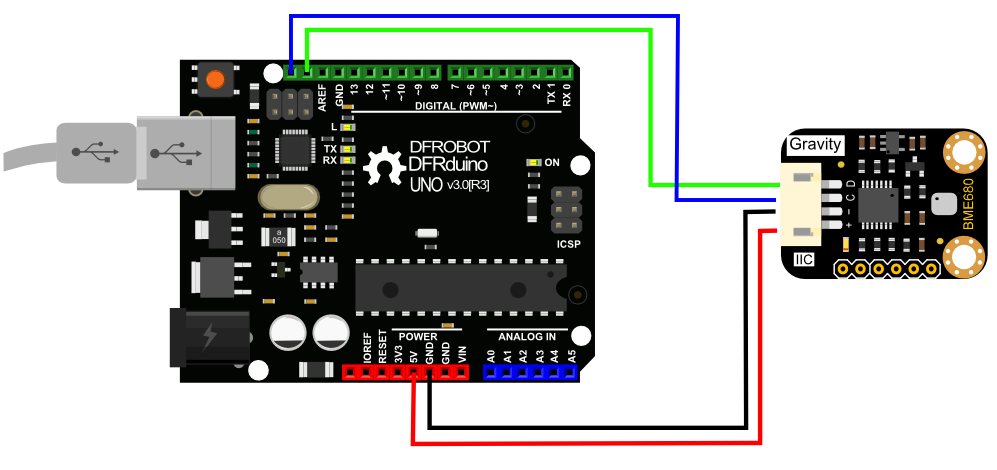
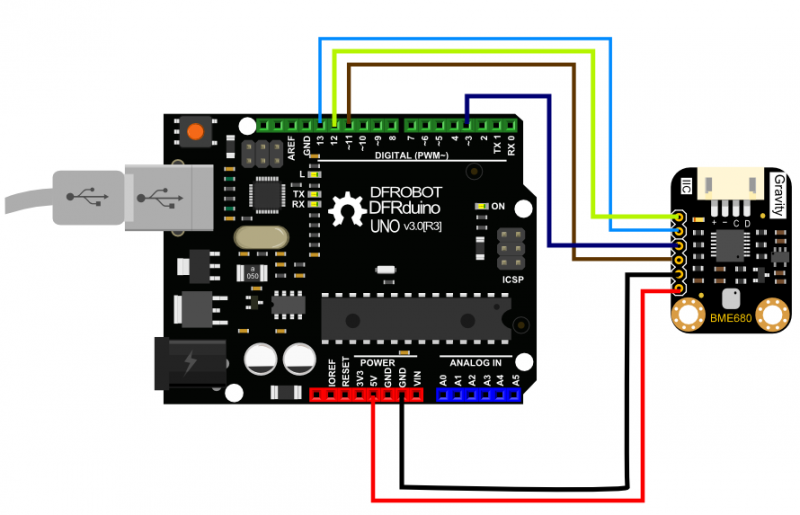
This product supports both IIC and SPI wiring connector. Please select suitable connector according to the wiring. Below is the connection diagram for your reference.
IIC wiring connector is recommended, since it is plug & play and easy to use.
IIC Connection Diagram
You must pay attention to the wiring order, VCC to Power Supply, GND to Ground.
SPI Connection Diagram
You must pay attention to the wiring order, VCC to Power Supply, GND to Ground.
Other Preparation Work
Calibration is needed to monitor altitude value exactly. So that please fill in the sample code with correct local altitude value:
seaLevel = bme.readSeaLevel (your correct local altitude value)
Sample Code
#include "DFRobot_BME680_I2C.h"
#include "Wire.h"
#include "SPI.h"

/*use an accurate altitude to calibrate sea level air pressure*/
#define CALIBRATE_PRESSURE

DFRobot_BME680_I2C bme(0x77);  //0x77 I2C address

float seaLevel;
void setup()
{
  Serial.begin(115200);
  while(!Serial);
  delay(1000);
  Serial.println();
  Serial.print(bme.begin());
  #ifdef CALIBRATE_PRESSURE
  bme.startConvert();
  delay(1000);
  bme.update();
  /*You can use an accurate altitude to calibrate sea level air pressure.
   *And then use this calibrated sea level pressure as a reference to obtain the calibrated altitude.
   *In this case,525.0m is chendu accurate altitude.
   */
  seaLevel = bme.readSeaLevel(525.0);
  Serial.print("seaLevel :");
  Serial.println(seaLevel);
  #endif
}

void loop()
{
  bme.startConvert();
  delay(1000);
  bme.update();
  Serial.println();
  Serial.print("temperature(C) :");
  Serial.println(bme.readTemperature(), 2);
  Serial.print("pressure(Pa) :");
  Serial.println(bme.readPressure());
  Serial.print("humidity(%rh) :");
  Serial.println(bme.readHumidity(), 2);
  Serial.print("gas resistance(ohm) :");
  Serial.println(bme.readGasResistance());
  Serial.print("altitude(m) :");
  Serial.println(bme.readAltitude());
  #ifdef CALIBRATE_PRESSURE
  Serial.print("calibrated altitude(m) :");
  Serial.println(bme.readCalibratedAltitude(seaLevel));
  #endif
}
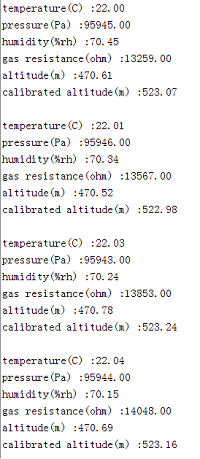
Result
Additional Information
This sample code is based on IIC connector. Please check file: DFRobot_BME680_SPI.ino for sample code for SPI connector in the library file. Because SPI sample code realizes the same function, it will not be shown at here.
Was this article helpful?