
Example Code for Arduino-Temperature Reading
The article guides readers through setting up an Arduino temperature reading system using RS485 Shield and Modbus protocol, including hardware requirements, software setup, and sample code execution.
Hardware Preparation
- Leonardo with Xbee Socket (Arduino Compatible) x 1
- RS485 Shield for Arduino x 1
- 9v- 24v External Power Supply x1
- TC01 Non_contact 16x4 Pixel Infrared Temperature Sensor x1
Software Preparation
- Arduino IDE
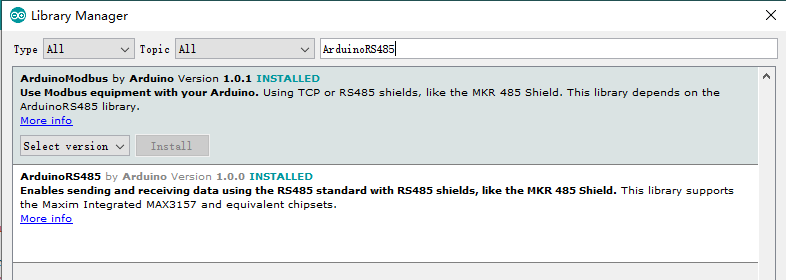
- Download and install the [ArduinoModbus] and [ArduinoRS485] in Library Manager(Ctrl+Shift+I).
(About how to install the library?)
Wiring Diagram

Sample Code
#include <ArduinoModbus.h>
#include <ArduinoRS485.h>

#define baudRate 19200
#define addr 0x0A

float To[64]= {0.0};
float Ta= 0.0;

void getTa()
{
    if (!ModbusRTUClient.requestFrom(addr, HOLDING_REGISTERS, 0x45,1))
    {
        Serial.println("error: ");
        Serial.println(ModbusRTUClient.lastError());
    }
    else
    {
        Ta= ModbusRTUClient.read()/10.0;
    }
    delay(100);
}

void getTo()
{
  for(uint8_t row=0;row<4;row++)
  {
    if (!ModbusRTUClient.requestFrom(addr, HOLDING_REGISTERS, 0x05+(row*0x10),0x10))
    {
        Serial.print("error: ");
        Serial.println(row);
        Serial.println(ModbusRTUClient.lastError());
    }
    else
    {
        for(uint8_t i=0; i<16; i++)
        {
            To[row*16+i]=ModbusRTUClient.read()/10.0;
        }
    }
    delay(100);
  }
}

void setup() {
    Serial.begin(baudRate);
    ModbusRTUClient.begin(baudRate);
}

void loop() {

    /**********Ta*****************/
    getTa();
    Serial.println("======== Ta ========");
    Serial.println(Ta,1);

    /**********TO**********************/
    getTo();
    Serial.println("======== To ========");
    for(uint8_t i=0; i<64; i++)
    {
        Serial.print(To[i],1);
        Serial.print("  ");
        if((i+1)%16==0)Serial.println();
    }
    delay(100);
}
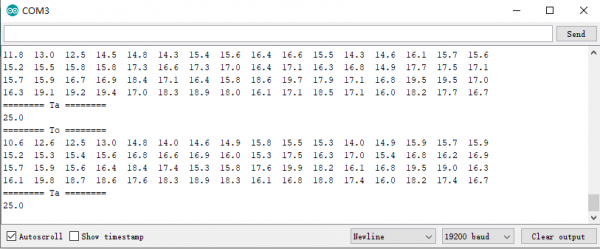
Result
Was this article helpful?