
Example Code for Arduino-Basic Usage
Last revision 2026/01/07
This article offers a comprehensive guide on using Arduino with example code, including hardware and software preparation, wiring instructions, and sample code for integrating a digital shake sensor with Arduino to toggle an LED. It provides insights into interrupt handling, sensor response, and project execution.
Hardware Preparation
- DFRduino UNO R3 (or similar) x 1
- DFRobot Gravity: Digital Shake Sensor x 1
- Gravity 3P digital wire (or Dupont wires) x 1
Software Preparation
Wiring Diagram
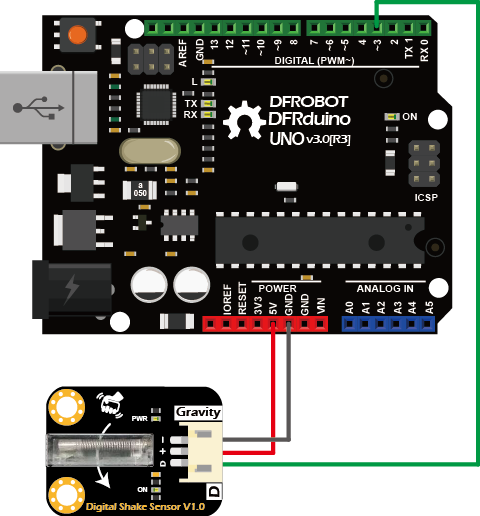
Sample Code
const int interruptPin = 2;  // D2 pin is connected to interrupt pin
const int ledPin = 13;       // D13 pin connected to LED

volatile bool interruptFlag = false;
unsigned long lastInterruptTime = 0;
const unsigned long debounceDelay = 1000;  // Interrupt anti-shake delay time

void setup() {
  pinMode(ledPin, OUTPUT);
  pinMode(interruptPin, INPUT_PULLUP);
  attachInterrupt(digitalPinToInterrupt(interruptPin), handleInterrupt, RISING);
}

void loop() {
  if (interruptFlag) {
    interruptFlag = false;
    if (millis() - lastInterruptTime >= debounceDelay) {
      digitalWrite(ledPin, !digitalRead(ledPin));
      lastInterruptTime = millis();  /
    }
  }
}

void handleInterrupt() {
  interruptFlag = true;
}
Result
- In the direction indicated by the arrow on-board, every time the module is shaken, the ON indicator on the sensor will flash once. The indicator L on the Arduino UNO will be toggled once.
Was this article helpful?