
Example Code for Arduino-Presence Detection
This article offers a detailed tutorial on utilizing Arduino with a microwave radar module for presence detection, including hardware requirements, software setup, wiring diagrams, and sample code for efficient motion sensing.
Hardware Preparation
- DFRduino UNO R3 (or similar) x 1
- 5.8G Microwave Radar Module
Software Preparation
- Arduino IDE
- Download and install the DFRobot_Microwave_Radar_Module. (About how to install the library?)
Wiring Diagram
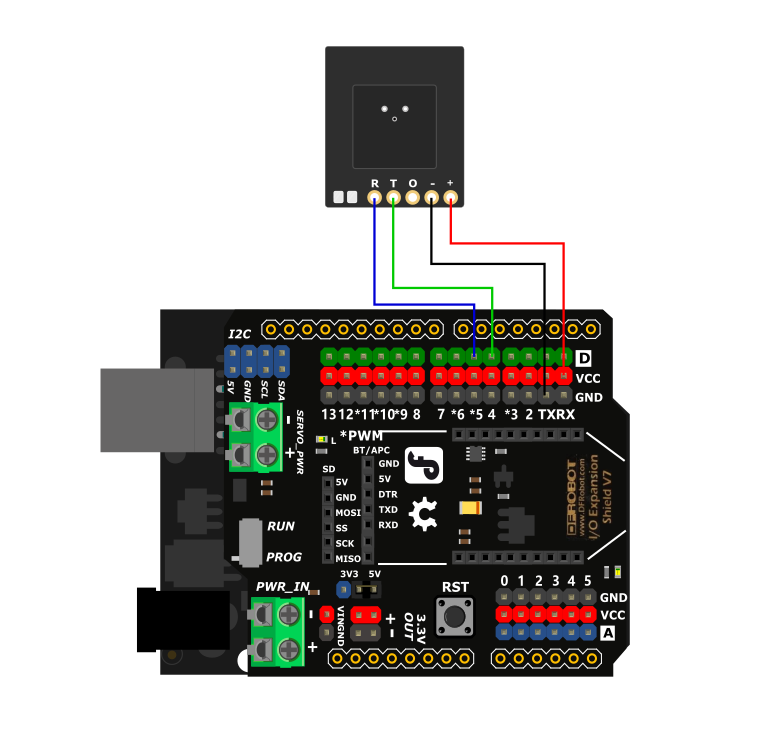
Sample Code
Copy and paste the following code into your Arduino IDE and upload it.
#include "DFRobot_Microwave_Radar_Module.h"

#if (defined(ARDUINO_AVR_UNO) || defined(ESP8266))   // Use soft serial port
SoftwareSerial softSerial(/*rx =*/4, /*tx =*/5);
DFRobot_Microwave_Radar_Module Sensor(/*softSerial =*/&softSerial);
#elif defined(ESP32)   // use hard serial port of the pin with remapping function : Serial1
DFRobot_Microwave_Radar_Module Sensor(/*hardSerial =*/&Serial1, /*rx =*/D3, /*tx =*/D2);
#else   // use hard serial port : Serial1
DFRobot_Microwave_Radar_Module Sensor(/*hardSerial =*/&Serial1);
#endif

int ledPin = 13;

void setup()
{
  Serial.begin(115200);

  //Initialize sensor
  while ( !( Sensor.begin() ) ) {
    Serial.println("Communication with device failed, please check connection");
    delay(3000);
  }
  Serial.println("Begin ok!");

  pinMode(ledPin, OUTPUT);

  /**
     @brief Restore factory settings
  */
  Sensor.factoryReset();

  /**
     @brief Configure detection distance, 0~11m, the default is 6m
  */
  Sensor.detRangeCfg(6);

  /**
     @brief Configure detection sensitivity, 0~9, the larger the value, the higher the sensitivity, default to be 7
  */
  Sensor.setSensitivity(3);

  /**
     @brief Configure output delay time
  */
  Sensor.outputLatency(1, 15);

  /**
     @brief Configure output control signal interface polarity
  */
  Sensor.setGpioMode(1);
}

void loop()
{
  int val = Sensor.readPresenceDetection();
  digitalWrite(ledPin, val);
  Serial.println(val);
}
Result
When the sensor detects the presence of someone, the UNO serial port will output 1 and simultaneously light up the LED on pin D13. When no one is present, it will output 0 and turn off the LED on pin D13.

Was this article helpful?