
Example Code for Arduino-Read Sensor Data via I2C
This example reads rainfall data via the I2C interface. Upload the code to the Arduino UNO, then open the Serial Monitor to view the measured values.
Hardware Preparation
- DFRduino UNO R3 (or similar) x 1
- Gravity: Tipping Bucket Rainfall Sensor x 1
- M-M/F-M/F-F Jumper wires
Software Preparation
- Arduino IDE
- Download and install the Rainfall Library. (About how to install the library?)
Wiring Diagram

Other Preparation Work
- Connect the module to the Arduino according to the wiring diagram above. You may also use the Gravity I/O expansion board to make prototyping easier.
- Set the selection switch (DIP switch) on the sensor to the I2C position.
- Open the Arduino IDE and upload the sample code to the Arduino UNO.
Sample Code
#include "DFRobot_RainfallSensor.h"

//#define MODE_UART
#ifdef MODE_UART //UART communication

   #include "SoftwareSerial.h"
   SoftwareSerial mySerial(/*rx =*/10, /*tx =*/11);
   DFRobot_RainfallSensor_UART Sensor(/*Stream *=*/&mySerial);

#else //I2C communication
  DFRobot_RainfallSensor_I2C Sensor(&Wire);
#endif

void setup(void)
{
#ifdef MODE_UART
    mySerial.begin(9600);
#endif
  Serial.begin(115200);

  delay(1000);
  while(!Sensor.begin()){
    Serial.println("Sensor init err!!!");
    delay(1000);
  }
  Serial.print("vid:\t");
  Serial.println(Sensor.vid,HEX);
  Serial.print("pid:\t");
  Serial.println(Sensor.pid,HEX);
  Serial.print("Version:\t");
  Serial.println(Sensor.getFirmwareVersion());
  //Set the rain accumulated value, unit: mm
  //Sensor.setRainAccumulatedValue(0.2794);
}

void loop()
{
  //Get the sensor working time, unit: hour
  Serial.print("Sensor WorkingTime:\t");
  Serial.print(Sensor.getSensorWorkingTime());
  Serial.println(" H");
  //Get the accumulated rainfall during the sensor working time
  Serial.print("Rainfall:\t");
  Serial.println(Sensor.getRainfall());
  //Get the accumulated rainfall within 1 hour of the system (function parameter optional 1-24)
  Serial.print("1 Hour Rainfall:\t");
  Serial.print(Sensor.getRainfall(1));
  Serial.println(" mm");
  //Get the raw data, the number of tipping buckets for rainfall, unit: times
  Serial.print("rainfall raw:\t");
  Serial.println(Sensor.getRawData());
  delay(1000);
}
Result
Open serial monitor to get the final data.
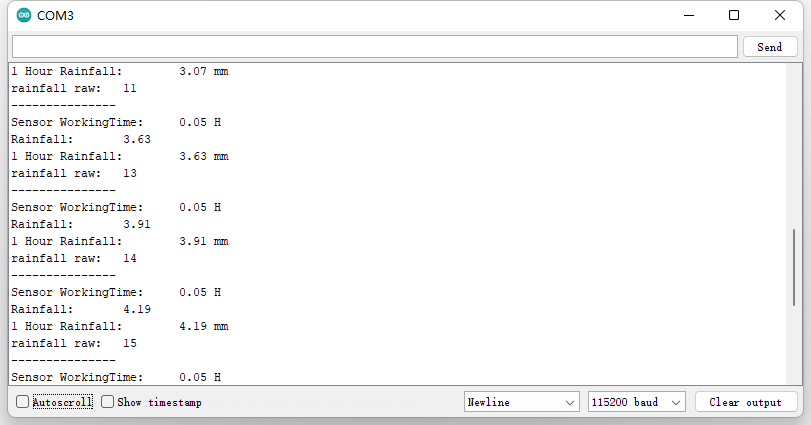
The signal adapter board is not waterproof. Do not expose the signal adapter board to rain.
Was this article helpful?