
Example Code for Arduino-Ultrasonic Ranging
Use the underwater ultrasonic obstacle avoidance sensor with Arduino to measure the distance to obstacles underwater and print the result via serial port.
Hardware Preparation
- DFRduino UNO R3 (or similar) x 1
- Ultrasonic Ranging Sensor(3m) x1
Software Preparation
Wiring Diagram
The sensor needs to be put into water to get data, otherwise the output distance value is 0
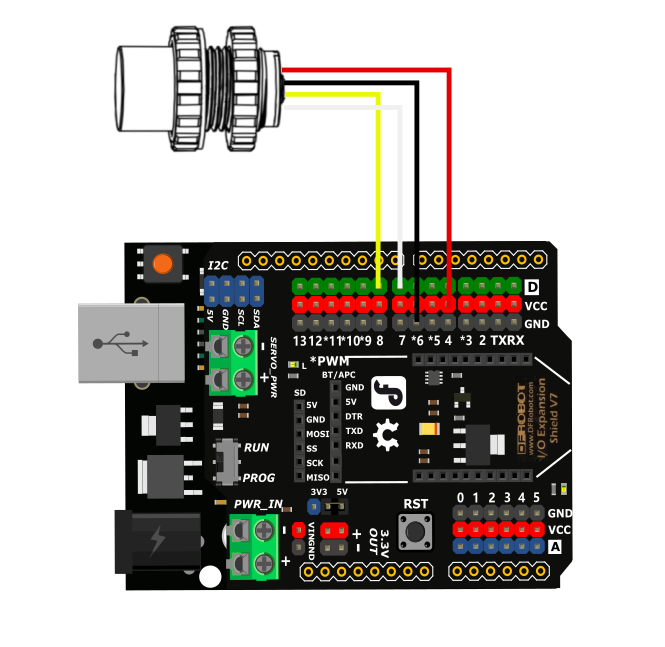
Other Preparation Work
Put the sensor into water before uploading the program to ensure valid data output.
Sample Code
#include <SoftwareSerial.h>
unsigned char buffer_RTT[4] = {0};
uint8_t CS;
#define COM 0x55
int Distance = 0;
SoftwareSerial mySerial(7, 8);
void setup() {
  Serial.begin(115200);
  mySerial.begin(115200);
}
void loop() {
  mySerial.write(COM);
  delay(100);
  if(mySerial.available() > 0){
    delay(4);
    if(mySerial.read() == 0xff){
      buffer_RTT[0] = 0xff;
      for (int i=1; i<4; i++){
        buffer_RTT[i] = mySerial.read();
      }
      CS = buffer_RTT[0] + buffer_RTT[1]+ buffer_RTT[2];
      if(buffer_RTT[3] == CS) {
        Distance = (buffer_RTT[1] << 8) + buffer_RTT[2];
        Serial.print("Distance:");
        Serial.print(Distance);
        Serial.println("mm");
      }
    }
  }
}
Result
Put the sensor into the water, and if there is an obstacle in front, the distance between the sensor and the obstacle will be printed by serial port.

Was this article helpful?