
Reference
The article provides an in-depth exploration of the ModBus-RTU communication protocol, detailing its parameters, data frame formats, and practical examples for reading sensor data, emphasizing correct installation and usage for accurate measurements.
Communication Protocol Description
1. Basic communication parameters
| Interface | Encoding | Data bits | Parity bits | Stop bits | Error checking | Baud rate |
|---|---|---|---|---|---|---|
| RS485 | 8-bit binary | 8 | None | 1 | CRC | 2400bit/s, 4800bit/s, 9600 bit/s configurable, default 9600bit/s |
2. Data frame format definition
Using ModBus-RTU communication protocol, the format is as follows:
- Time for initial structure ≥4 bytes
- Address code = 1 byte
- Function code = 1 byte
- Data area = N bytes
- Error checking = 16-bit CRC code
- Time to end structure ≥4 bytes
- Address code: It is the address of the sensor, which is unique in the communication network (factory default 0x01).
- Function code: Function indication of the command sent by the host. This sensor reads the register function code 0x03 and writes the register function code 0x06
- Data area: The data area is specific communication data. Note that the high byte of 16bits data is first!
- CRC code: two-byte check code.
Host query frame structure:
| Address code | Function code | Register starting address | Register length | Check code low bit | Check code high bit |
|---|---|---|---|---|---|
| 1byte | 1byte | 2byte | 2byte | 1byte | 1byte |
Slave response frame structure:
| Address code | Function code | Number of valid bytes | Data area 1 | Data area 2 | Nth data area | Check code |
|---|---|---|---|---|---|---|
| 1byte | 1byte | 1byte | 2byte | 2byte | 2byte | 2byte |
3. Communication protocol examples and explanations
Example: Read the parameter values of the temperature, humidity and PH three-in-one device (address 0x01)
Inquiry frame (hexadecimal):
| Address code | Function code | Register starting address | Register length | Check code low bit | Check code high bit |
|---|---|---|---|---|---|
| 0x01 | 0x03 | 0x00 0x00 | 0x00 0x04 | 0x44 | 0x09 |
Response frame (hexadecimal):
| Address code | Function code | Return the number of valid bytes | Humidity value | Temperature value | Conductivity value | PH value | Low bit of check code | High bit of check code |
|---|---|---|---|---|---|---|---|---|
| 0x01 | 0x03 | 0x08 | 0x02 0x92 | 0xFF 0x9B | 0x00 0x00 | 0x00 0x38 | 0x57 | 0xB6 |
Humidity calculation:
- Humidity: 0292 H (hex) = 658 = 65.8%RH
Temperature calculation:
- When the temperature is lower than 0°C, the temperature data is uploaded in complement form.
- Temperature: FF9B H (hex) = -101 => Temperature = -10.1°C
PH:
- PH:0038 H(hex)= 56 => PH = 5.6
4. Register address
| Register address | PLC or configuration address | Content | Operation | Definition description |
|---|---|---|---|---|
| 0000H | 40001(decimal) | Moisture content | Read only | Real-time value of moisture content (expanded 10 times) |
| 0001H | 40002(decimal) | Temperature value | Read only | Real-time value of temperature (expanded 10 times) |
| 0003H | 40004(decimal) | PH | Read only | Real-time value of PH (expanded 10 times) |
| 07D0H | 42001(decimal) | Device address | Read and write | 1-254 (factory default 1) |
| 07D1H | 42002(decimal) | Device baud rate | Read and write | 0 represents 2400, 1 represents 4800, 2 represents 9600 |
Other Supplementary Information
How to install and use
1、Quick test method
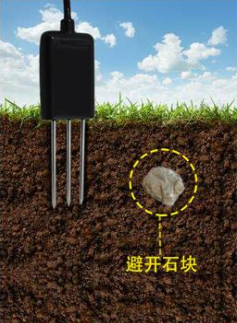
Select a suitable measurement location, avoid stones, and ensure that the steel needle does not touch hard objects. Throw away the topsoil according to the required measurement depth and maintain the original tightness of the soil below. Hold the sensor tightly and insert it vertically into the soil. Do not move left and right when measuring. It is recommended to measure multiple times within a small range of a measuring point and average it.
2、Buried measurement method
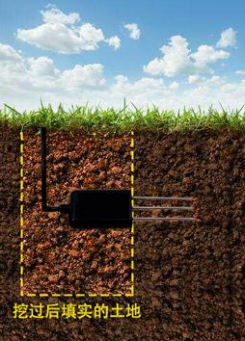
Dig a pit with a diameter >20cm vertically, insert the sensor steel needle horizontally into the pit wall at a predetermined depth, fill the pit tightly, and after a period of stabilization, measurements and recordings can be made for days, months or even longer.
3、Things to note
- The steel needle must be fully inserted into the soil during measurement.
- Avoid strong sunlight directly shining on the sensor, which may cause the temperature to be too high. When using in the field, be careful to prevent lightning strikes.
- Do not violently bend the steel needle, do not pull the sensor lead wire forcefully, and do not drop or violently impact the sensor.
- The sensor protection level is IP68, and the entire sensor can be immersed in water.
- Due to the presence of radio frequency electromagnetic radiation in the air, it is not advisable to leave it powered on for a long time in the air.
Soil pH Explanation
Soil pH, also known as "soil reaction". It is an acid-base reaction of the soil solution, which mainly depends on the concentration of hydrogen ions in the soil solution, expressed by the pH value. A solution with a pH value equal to 7 is a neutral solution; a solution with a pH value less than 7 is an acidic reaction; a solution with a pH value greater than 7 is an alkaline reaction. Soil pH can generally be divided into the following levels:
PH value Soil acidity and alkalinity
<4.5 Extremely acidic
4.5-5.5 Strongly acidic
5.5-6.5 acidic
6.5-7.5 Neutral
7.5-8.5 alkaline
8.5-9.5 Strongly alkaline
>9.5 Extremely alkaline
Was this article helpful?