
Example Code for Arduino-Air Velocity Reading
Last revision 2026/01/13
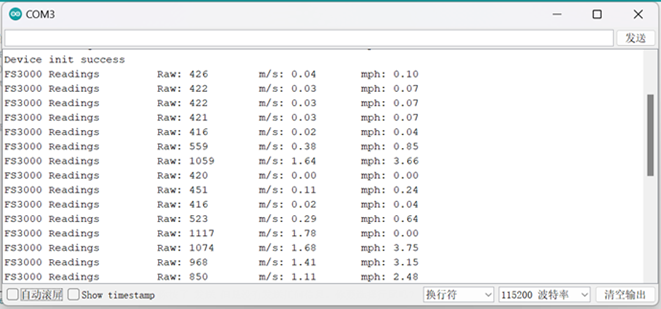
After upload the following sample code, open the serial monitor to view the airflow velocity. Users can learn how to interface the Gravity PAV3015 Air Velocity Sensor with Arduino and read raw, m/s, and mph air velocity data.
Hardware Preparation
- DFRduino UNO+IO Expansion Shield (SKU:DFR0216-2) ×1
- Gravity: PAV3015 Air Velocity Sensor(SKU:SEN0639)×1
- Gravity 4Pin I2C cable (Comes with Gravity: PAV3015 Air Velocity Sensor)
Software Preparation
- Download Arduino IDE: Click to download Arduino IDE
- Download DFRobot_PAV3000 library:DFRobot PAV3000 Github
- Arduino IDE V2.0.0 (or above) can search
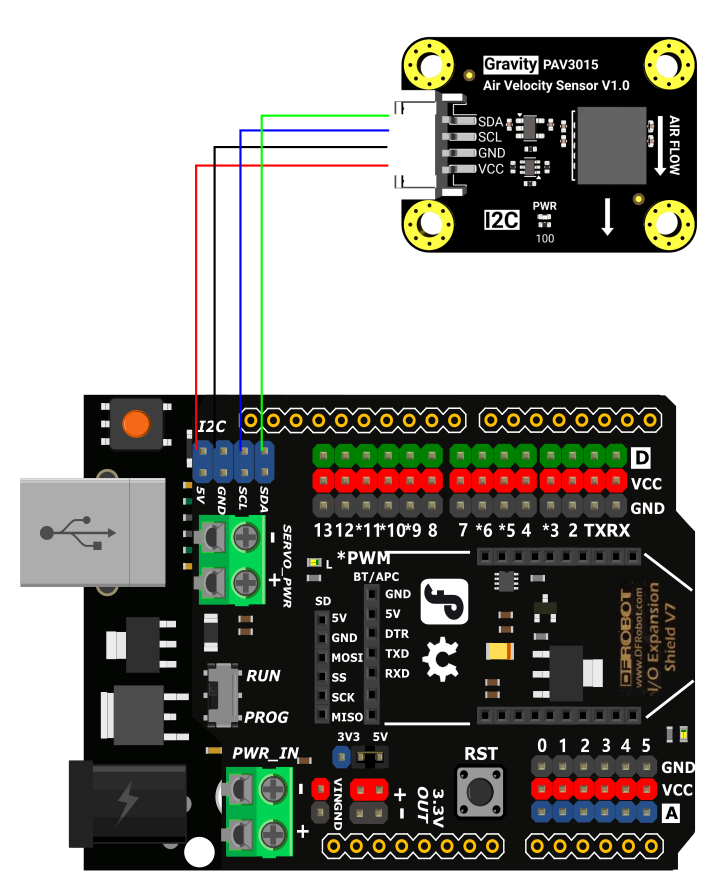
Wiring Diagram
Other Preparation Work
- Install the DFRobot_PAV3000 library into the Arduino IDE (follow Arduino IDE library installation guidelines).
- Ensure the sensor is connected correctly via the Gravity 4Pin I2C cable.
Sample Code
/*!
 * @file PAV3000_1015.ino
 * @brief This is the example code for the PAV3000_1015 air velocity sensor.
 * @copyright Copyright (c) 2024 DFRobot Co.Ltd (http://www.dfrobot.com)
 * @license The MIT License (MIT)
 * @author [tangjie](jie.tang@dfrobot.com)
 * @version V1.0
 * @date 2024-12-2
 * @url https://github.com/DFRobot/DFRobot_PAV3000
 */

#include "DFRobot_PAV3000.h"

DFRobot_PAV3000 fs;

void setup()
{
    Serial.begin(115200);

    while(!fs.setRange(AIRFLOW_RANGE_15_MPS)){
        Serial.println("Device init error");
        delay(100);
    }
    Serial.println("Device init success");

}


void loop()
{
    Serial.print("PAV3000 Readings \tRaw: ");
    Serial.print(fs.readRaw());

    Serial.print("\tm/s: ");
    Serial.print(fs.readMeterPerSec());

    Serial.print("\tmph: ");
    Serial.println(fs.readMilePerHour());


    delay(1000);

}
Result
Was this article helpful?