
Example Code for Arduino-Read Ambient Light Value
The article guides users through the process of using Arduino with RS485 sensors to read ambient light values. It includes necessary hardware and software preparations, a wiring diagram, and sample code to capture and display light data, making it ideal for educational and DIY projects.
Hardware Preparation
- DFRduino UNO R3 (or similar) x 1
- Gravity: Active Isolated RS485 to UART Signal Adapter Module x1
- RS485 Waterproof Ambient Light Sensor(0-200klux) x1
Software Preparation
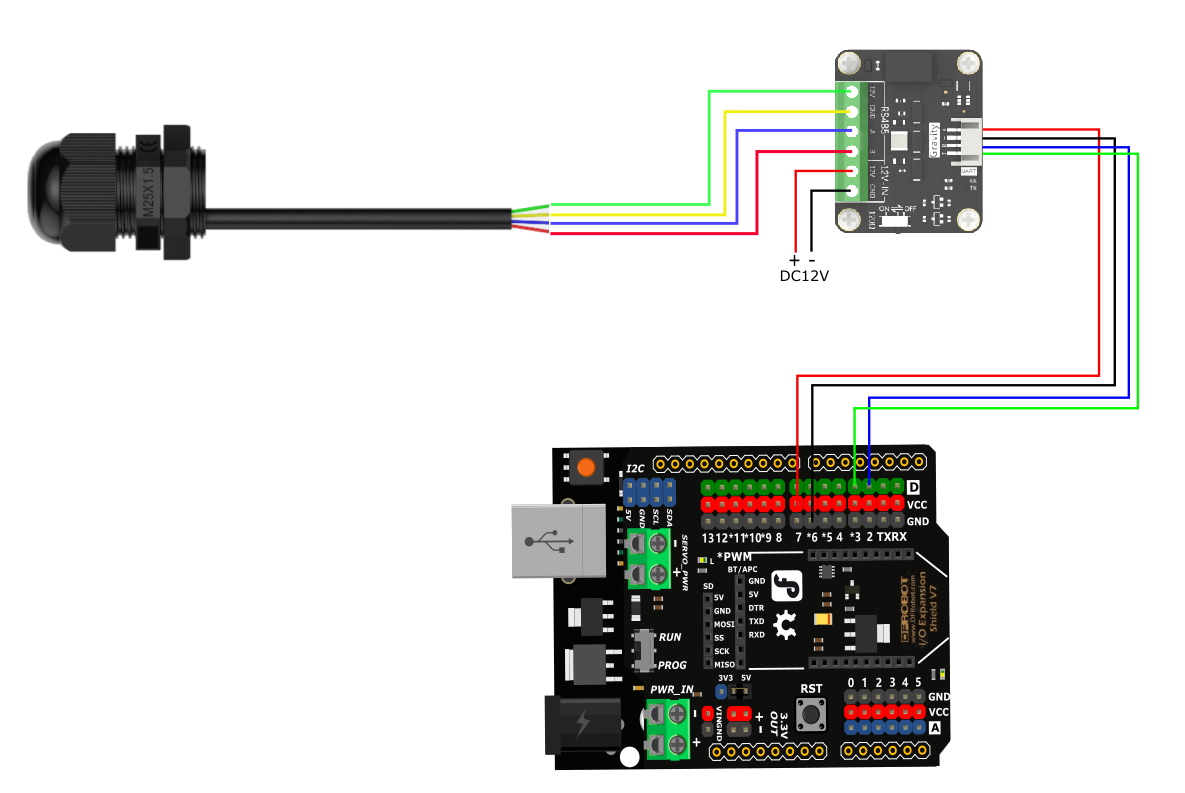
Wiring Diagram
If the power of the RS485 device is small and the required current is less than 12V-160mA, the RS485 to UART signal conversion module does not require a 12V external power supply, making wiring more convenient.
Sample Code
#include <SoftwareSerial.h>
SoftwareSerial mySerial(2,3);
uint8_t Com[8] = { 0x01, 0x03, 0x00, 0x02, 0x00, 0x02, 0x65, 0xCB };
float LUX;
void setup() {
  Serial.begin(9600);
  mySerial.begin(9600);
}
void loop() {
  readLux();
  Serial.print("Lux = ");
  Serial.print(LUX, 3);
  Serial.println(" (lux)  ");
  delay(1000);
}
void readLux(void) {
  uint8_t Data[10] = { 0 };
  uint8_t ch = 0;
  bool flag = 1;
  while (flag) {
    delay(100);
    mySerial.write(Com, 8);
    delay(10);
    if (readN(&ch, 1) == 1) {
      if (ch == 0x01) {
        Data[0] = ch;
        if (readN(&ch, 1) == 1) {
          if (ch == 0x03) {
            Data[1] = ch;
            if (readN(&ch, 1) == 1) {
              if (ch == 0x04) {
                Data[2] = ch;
                if (readN(&Data[3], 6) == 6) {
                  if (CRC16_2(Data, 7) == (Data[7] * 256 + Data[8])) {
                    LUX = (Data[3] * 0x1000000 + Data[4] * 0x10000 + Data[5] * 0x100 + Data[6]) / 1000.000;
                    flag = 0;
                  }
                }
              }
            }
          }
        }
      }
    }
    mySerial.flush();
  }
}

uint8_t readN(uint8_t *buf, size_t len) {
  size_t offset = 0, left = len;
  int16_t Tineout = 500;
  uint8_t *buffer = buf;
  long curr = millis();
  while (left) {
    if (mySerial.available()) {
      buffer[offset] = mySerial.read();
      offset++;
      left--;
    }
    if (millis() - curr > Tineout) {
      break;
    }
  }
  return offset;
}

unsigned int CRC16_2(unsigned char *buf, int len) {
  unsigned int crc = 0xFFFF;
  for (int pos = 0; pos < len; pos++) {
    crc ^= (unsigned int)buf[pos];
    for (int i = 8; i != 0; i--) {
      if ((crc & 0x0001) != 0) {
        crc >>= 1;
        crc ^= 0xA001;
      } else {
        crc >>= 1;
      }
    }
  }

  crc = ((crc & 0x00ff) << 8) | ((crc & 0xff00) >> 8);
  return crc;
}
Result
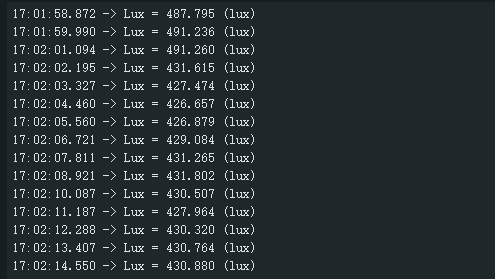
Print the collected light values
Was this article helpful?