
Example Code for Arduino-Get CH4 Concentration
Get methane (CH4) concentration and ambient temperature data, and learn to communicate with the Gravity: Laser CH4 Sensor via I2C/UART using Arduino.
Hardware Preparation
- DFRduino UNO+IO Expansion board (SKU:DFR0216-2) * 1
- Gravity: Laser CH4 Sensor(SKU:SEN0654) * 1
- Gravity I2C Sensor Cable(Come with Gravity: Laser CH4 Sensor)
Software Preparation
- Download Arduino IDE: Click to download Arduino IDE
- Download DFRobot_MHZ9041A library and install .zip library manully:DFRobot MHZ9041A Github
- Or Search and install "DFRobot_MHZ9041A" library in the library manager
Wiring Diagram
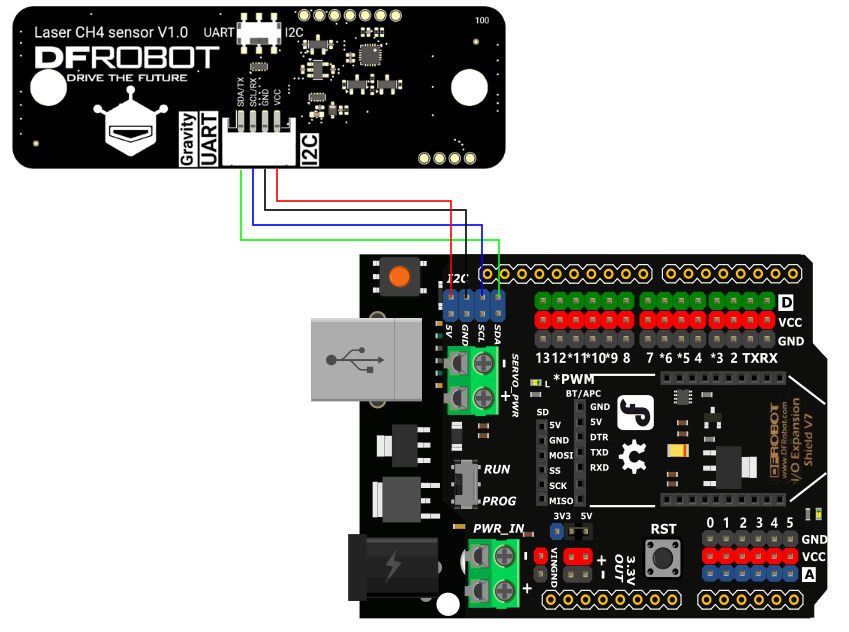
Other Preparation Work
- Ensure the dip switch on CH4 sensor is on the I2C side
Sample Code
 /*!
  * @file  get conncentration.ino
  * @brief get ch4 conncentration
  * @copyright Copyright (c) 2025 DFRobot Co.Ltd (http://www.dfrobot.com)
  * @license The MIT License (MIT)
  * @author ZhixinLiu(zhixin.liu@dfrobot.com)
  * @version V1.0.0
  * @date 2025-04-24
  * @url https://github.com/DFRobot/DFRobot_MHZ9041A
  */

#include "DFRobot_MHZ9041A.h"

#define I2C_COMMUNICATION  //use I2C for communication, but use the serial port for communication if the line of codes were masked

#ifdef  I2C_COMMUNICATION
  DFRobot_MHZ9041A_I2C ch4(&Wire ,0x34);
#else
/* -----------------------------------------------------------------------------------------------------
 * |  Sensor  | Connect line | Leonardo/Mega2560/M0 |    UNO    | ESP8266 | ESP32 |  microbit  |   m0  |
 * |   VCC    |=============>|        VCC           |    VCC    |   VCC   |  VCC  |     X      |  vcc  |
 * |   GND    |=============>|        GND           |    GND    |   GND   |  GND  |     X      |  gnd  |
 * |   RX     |=============>|     Serial1 TX1      |     5     |   5/D6  |  D2   |     X      |  tx1  |
 * |   TX     |=============>|     Serial1 RX1      |     4     |   4/D7  |  D3   |     X      |  rx1  |
 * ----------------------------------------------------------------------------------------------------*/
/* Baud rate cannot be changed */
  #if defined(ARDUINO_AVR_UNO) || defined(ESP8266)
    SoftwareSerial mySerial(4, 5);
    DFRobot_MHZ9041A_UART ch4(&mySerial, 115200);
  #elif defined(ESP32)
    DFRobot_MHZ9041A_UART ch4(&Serial1, 115200 ,/*rx*/D2 ,/*tx*/D3);
  #else
    DFRobot_MHZ9041A_UART ch4(&Serial1, 115200);
  #endif
#endif

void setup()
{
  Serial.begin(115200);
  while(!ch4.begin()){
    Serial.println("NO Deivces !");
    delay(1000);
  } Serial.println("Device connected !");

  //ch4.reset();
  ch4.setMode(ePassivityMode); // set Passivity mode
}

void loop()
{
  float ch4Concentration = ch4.getCH4Concentration(); // get CH4 concentration
  float temperature = ch4.getTemperature(); // get temperature
  eFaultCode_t errorCode = ch4.getErrorMsg(); // get error code
  String sourceData = ch4.getSourceData(); // get source data
  Serial.print("CH4 Concentration: ");
  Serial.print(ch4Concentration, 2); // print CH4 concentration
  Serial.println("%LEL");
  Serial.print("Temperature: ");
  Serial.print(temperature, 2); // print temperature
  Serial.println("C");
  Serial.print("Error Code: ");
  Serial.println(errorCode); // print error code
  Serial.print("Source Data: ");
  Serial.println(sourceData); // print source data
  Serial.println("===================================");
  delay(20);
}
Result
Open the serial monitor, methane concentration, module temperature, and related data would show up.

Was this article helpful?