
Example Code for Arduino-Temperature Reading
This article provides a comprehensive guide for reading temperature using Arduino and a K-Type thermocouple, including hardware setup, software preparation, wiring diagrams, and sample code to display real-time temperature readings through Arduino IDE.
Hardware Preparation
- DFRduino UNO+Gravity IO Expansion Board * 1
- Gravity: CT1780 1-Wire K-Type Thermocouple Amplifier * 1
Software Preparation
- Arduino IDE , Click to download Arduino IDE
- Download DFRobot_CT1780 library and install .zip library manully:Click to download
- Or Search and install "DFRobot_CT1780" library in the library manager
Wiring Diagram
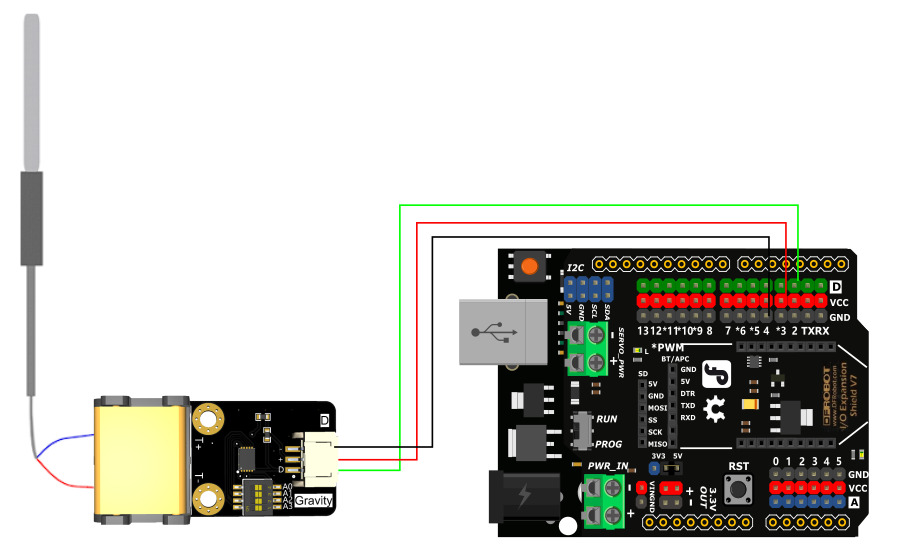
Other Preparation Work
- Upload the following code via Arduino IDE
- Open the Arduino IDE serial monitor
Sample Code
/*!
 * @file  readTemp.ino
 * @brief Obtain the temperature value
 * @copyright   Copyright (c) 2021 DFRobot Co.Ltd (http://www.dfrobot.com)
 * @license     The MIT License (MIT)
 * @author      [fary](feng.yang@dfrobot.com)
 * @version     V1.0
 * @date        2024-12-16
 * @url         https://github.com/DFRobor/DFRobot_CT1780
 */
#include "DFRobot_CT1780.h"
DFRobot_CT1780 CT1780(2);
void setup() {
    Serial.begin(9600);
    Serial.println("初始化 CT1780...");
    uint8_t address[8];
    if (!CT1780.begin()) {
        while (1) {
            delay(1000);
        }
    }
    // Gets the 64-bit unique address of CT1780,return: Address data (array)
	uint8_t *uniqueAddr = CT1780.getUniqueAddr();
    // Get the user-configured address of CT1780 (in ScratchPad)
	uint8_t configAddr = CT1780.getConfigAddr();
    Serial.print("unique addr is: ");
    for(uint8_t i=0;i<8;i++){
        Serial.print(uniqueAddr[i],HEX);
        Serial.print(" ");
    }
    Serial.println();
    Serial.print("config addr is: ");
    Serial.println(configAddr,HEX);
}

void loop() {
    // Read probe temperature data
    Serial.print("Temperature : ");
	Serial.print(CT1780.getCelsius());
    Serial.println(" C");
    delay(1000);
}
Result
- The Arduino prints the current temperature of a K-type thermocouple probe to the serial port every 1 second.

Was this article helpful?