
Example Code for Arduino-7-in-1 Weather Station Data Reading
This project demonstrates how to use an Arduino board with the RS485 7-in-1 Weather Station Sensor to read and print meteorological parameters including wind speed, wind direction, temperature, humidity, atmospheric pressure, light intensity, and rainfall. Users will learn how to establish RS485 communication using a Modbus-RTU protocol, send sensor-specific commands, and parse the returned data to obtain meaningful environmental measurements.
Hardware Preparation
- DFRduino UNO R3 (or similar) x 1
- Gravity: Active Isolated RS485 to UART Signal Adapter Module x 1
- RS485 7-in-1 Weather Station Sensor x 1
Software Preparation
Wiring Diagram
If the power of the RS485 device is small and the required current is less than 12V-160mA, the RS485 to UART signal conversion module does not require a 12V external power supply, making wiring more convenient.
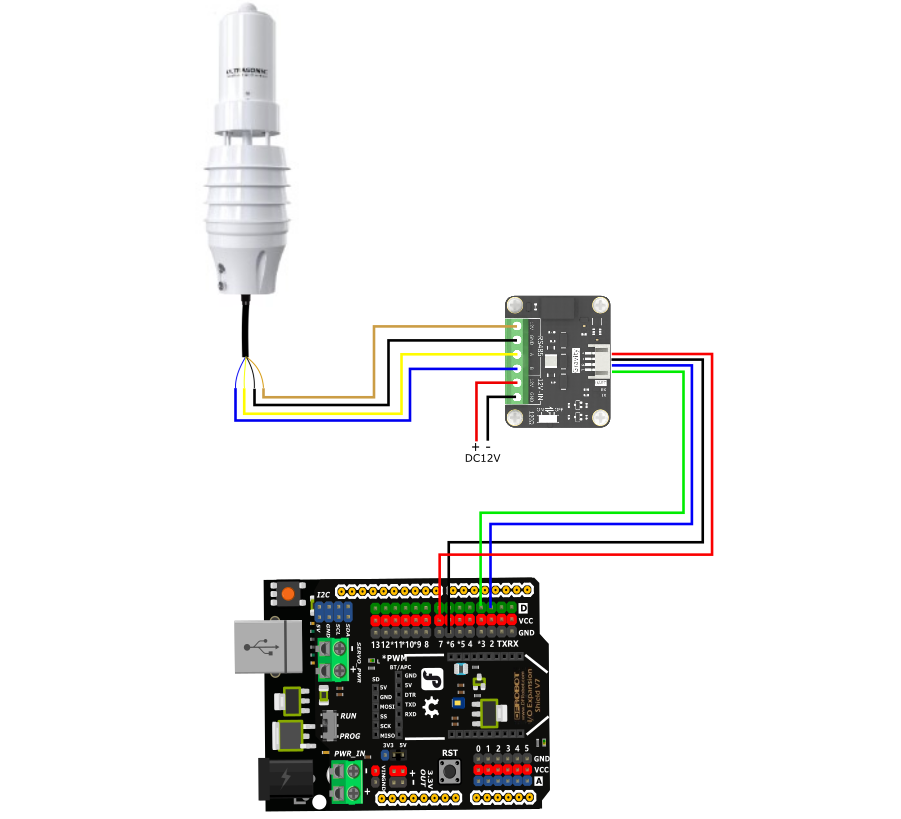
| Sensor | RS485 to UART Module |
|---|---|
| Brown wire | 12V |
| Black wire | GND |
| Yellow wire | A |
| Blue wire | B |
| RS485 to UART Module | Arduino UNO | Mega2560 | ESP32 |
|---|---|---|---|
| Red wire(+) | 5V | 5V | 5V |
| Black wire(-) | GND | GND | GND |
| Blue wire (RX) | D2 | D19 | D16 |
| Green wire (TX) | D3 | D18 | D17 |
Other Preparation Work
- Ensure the RS485 7-in-1 Weather Station Sensor is powered with DC10~30V.
- Connect the RS485 lines correctly: 485-A (Yellow line) from the sensor to the A terminal of the RS485 to UART module, and 485-B (Blue line) to the B terminal.
- Verify that the Arduino IDE is installed correctly and the board is recognized by the computer.
- This sample code is compatible with UNO R3, Mega2560, and ESP32 development boards.
Sample Code
// ---------------- Cross-Platform Serial Configuration ----------------
#if defined(__AVR_ATmega2560__)
// Arduino Mega 2560: Use hardware serial port Serial1
// Sensor TX connects to Mega Pin 18
// Sensor RX connects to Mega Pin 19
#define sensorSerial Serial1

#elif defined(ESP32)
// ESP32: Manually instantiate hardware serial port; compatible with all models including C3/S2/S3/WROOM, etc.
#include <HardwareSerial.h>
HardwareSerial mySensorSerial(1); // Consistently use internal UART 1
#define sensorSerial mySensorSerial

#else
// Arduino UNO: Software serial port
// Sensor TX connects to UNO Pin 3
// Sensor RX connects to UNO Pin 2
#include <SoftwareSerial.h>
SoftwareSerial mySerial(2, 3);
#define sensorSerial mySerial
#endif
// ------------------------------------------------


uint8_t Com[8] = { 0x01, 0x03, 0x01, 0xF4, 0x00, 0x04, 0x04, 0x07 };   //Wind speed and wind direction
uint8_t Com1[8] = { 0x01, 0x03, 0x01, 0xF8, 0x00, 0x02, 0x44, 0x06 };  //Temperature and humidity
uint8_t Com2[8] = { 0x01, 0x03, 0x01, 0xFD, 0x00, 0x03, 0x95, 0xC7 };  //Atmospheric pressure, light
uint8_t Com3[8] = { 0x01, 0x03, 0x02, 0x01, 0x00, 0x01, 0xD4, 0x72 };  //rainfall
float tem, hum, ws, ap ,rain;
int wd, wdangle, lux;

void setup() {
Serial.begin(115200);

// Print a line of plain English text for testing. If this line appears clearly and without garbled characters,
// it indicates that communication between the computer and the development board is fully functional! Serial.println("");
Serial.println("--- System Start ---");

// Initialize the sensor serial port for different development boards
// (The sensor's baud rate must remain at 4800—do not change it)
#if defined(ESP32)
// ESP32 specific pins: RX connected to 16, TX connected to 17;
// pins can be customized based on the specific board model
sensorSerial.begin(4800, SERIAL_8N1, 16, 17);
#else
// UNO and Mega 2560
sensorSerial.begin(4800);
#endif
}

void loop() {
  readhumiture();
  Serial.print("TEM = ");
  Serial.print(tem, 1);
  Serial.print("°C  ");
  Serial.print("HUM = ");
  Serial.print(hum, 1);
  Serial.print("%RH  ");

  readAtmosphericPressure_Light();
  Serial.print("AP = ");
  Serial.print(ap, 1);
  Serial.print("Kpa  ");
  Serial.print("Lux = ");
  Serial.print(lux);
  Serial.print("(lux)  ");

  readRainfall();
  Serial.print("Rain = ");
  Serial.print(rain, 1);
  Serial.println("mm  ");

  readWindSpeed_WindDirection();
  Serial.print("Wind Speed = ");
  Serial.print(ws, 1);
  Serial.print("m/s  ");
  Serial.print("Wind Direction = ");
  Serial.print(wd);
  Serial.print(" WindDirection_Angle = ");
  Serial.print(wdangle);
  Serial.println("° ");
  Serial.println(" ");
  delay(2000);
}

void readWindSpeed_WindDirection(void) {
  uint8_t Data[12] = { 0 };
  uint8_t ch = 0;
  bool flag = 1;
  long timeStart = millis();
  long timeStart1 = 0;
  while (flag) {

    if ((millis() - timeStart1) > 100) {
      while (sensorSerial.available() > 0) {
        sensorSerial.read();
      }
      sensorSerial.write(Com, 8);
      timeStart1 = millis();
    }

    if ((millis() - timeStart) > 1000) {
      Serial.println("Time out");
      return;
    }

    if (readN(&ch, 1) == 1) {
      if (ch == 0x01) {
        Data[0] = ch;
        if (readN(&ch, 1) == 1) {
          if (ch == 0x03) {
            Data[1] = ch;
            if (readN(&ch, 1) == 1) {
              if (ch == 0x08) {
                Data[2] = ch;
                if (readN(&Data[3], 10) == 10) {
                  if (CRC16_2(Data, 11) == (Data[11] * 256 + Data[12])) {
                    ws = (Data[3] * 256 + Data[4]) / 10.00;
                    wd = Data[7] * 256 + Data[8];
                    wdangle = Data[9] * 256 + Data[10];
                    flag = 0;
                  }
                }
              }
            }
          }
        }
      }
    }
  }
}


void readhumiture(void) {
  uint8_t Data[10] = { 0 };
  uint8_t ch = 0;
  bool flag = 1;
  long timeStart = millis();
  long timeStart1 = 0;
  while (flag) {

    if ((millis() - timeStart1) > 100) {
      while (sensorSerial.available() > 0) {
        sensorSerial.read();
      }
      sensorSerial.write(Com1, 8);
      timeStart1 = millis();
    }

    if ((millis() - timeStart) > 1000) {
      Serial.println("Time out1");
      return;
    }

    if (readN(&ch, 1) == 1) {
      if (ch == 0x01) {
        Data[0] = ch;
        if (readN(&ch, 1) == 1) {
          if (ch == 0x03) {
            Data[1] = ch;
            if (readN(&ch, 1) == 1) {
              if (ch == 0x04) {
                Data[2] = ch;
                if (readN(&Data[3], 6) == 6) {
                  if (CRC16_2(Data, 7) == (Data[7] * 256 + Data[8])) {
                    hum = (Data[3] * 256 + Data[4]) / 10.00;
                    tem = (Data[5] * 256 + Data[6]) / 10.00;
                    flag = 0;
                  }
                }
              }
            }
          }
        }
      }
    }
  }
}


void readAtmosphericPressure_Light(void) {
  uint8_t Data[10] = { 0 };
  uint8_t ch = 0;
  long timeStart = millis();
  long timeStart1 = 0;
  bool flag = 1;
  while (flag) {

    if ((millis() - timeStart1) > 100) {
      while (sensorSerial.available() > 0) {
        sensorSerial.read();
      }
      sensorSerial.write(Com2, 8);
      timeStart1 = millis();
    }


    if ((millis() - timeStart) > 1000) {
      Serial.println("Time out2");
      return;
    }

    if (readN(&ch, 1) == 1) {
      if (ch == 0x01) {
        Data[0] = ch;
        if (readN(&ch, 1) == 1) {
          if (ch == 0x03) {
            Data[1] = ch;
            if (readN(&ch, 1) == 1) {
              if (ch == 0x06) {
                Data[2] = ch;
                if (readN(&Data[3], 8) == 8) {
                  if (CRC16_2(Data, 9) == (Data[9] * 256 + Data[10])) {
                    ap = (Data[3] * 256 + Data[4]) / 10.00;
                    lux = Data[5] << 24 | Data[6] << 16 | Data[7] << 8 | Data[8];
                    flag = 0;
                  }
                }
              }
            }
          }
        }
      }
    }
  }
}

void readRainfall(void) {
  uint8_t Data[10] = { 0 };
  uint8_t ch = 0;
  long timeStart = millis();
  long timeStart1 = 0;
  bool flag = 1;
  while (flag) {

    if ((millis() - timeStart1) > 100) {
      while (sensorSerial.available() > 0) {
        sensorSerial.read();
      }
      sensorSerial.write(Com3, 8);
      timeStart1 = millis();
    }


    if ((millis() - timeStart) > 1000) {
      Serial.println("Time out3");
      return;
    }

    if (readN(&ch, 1) == 1) {
      if (ch == 0x01) {
        Data[0] = ch;
        if (readN(&ch, 1) == 1) {
          if (ch == 0x03) {
            Data[1] = ch;
            if (readN(&ch, 1) == 1) {
              if (ch == 0x02) {
                Data[2] = ch;
                if (readN(&Data[3], 4) == 4) {
                  if (CRC16_2(Data, 5) == (Data[5] * 256 + Data[6])) {
                    rain = (Data[3] * 256 + Data[4]) / 10.00;
                    flag = 0;
                  }
                }
              }
            }
          }
        }
      }
    }
  }
}


uint8_t readN(uint8_t *buf, size_t len) {
  size_t offset = 0, left = len;
  int16_t Tineout = 500;
  uint8_t *buffer = buf;
  long curr = millis();
  while (left) {
    if (sensorSerial.available()) {
      buffer[offset] = sensorSerial.read();
      offset++;
      left--;
    }
    if (millis() - curr > Tineout) {
      break;
    }
  }
  return offset;
}

unsigned int CRC16_2(unsigned char *buf, int len) {
  unsigned int crc = 0xFFFF;
  for (int pos = 0; pos < len; pos++) {
    crc ^= (unsigned int)buf[pos];
    for (int i = 8; i != 0; i--) {
      if ((crc & 0x0001) != 0) {
        crc >>= 1;
        crc ^= 0xA001;
      } else {
        crc >>= 1;
      }
    }
  }

  crc = ((crc & 0x00ff) << 8) | ((crc & 0xff00) >> 8);
  return crc;
}
Result
When the code is uploaded and the circuit is powered, the Arduino IDE's Serial Monitor (set to 115200 baud) will print the collected meteorological data in the following format:
TEM = 25.5°C  HUM = 60.2%RH  AP = 101.3Kpa  Lux = 5000(lux)  Rain = 0.0mm
Wind Speed = 2.3m/s  Wind Direction = 2 WindDirection_Angle = 90°

TEM = 25.6°C  HUM = 60.1%RH  AP = 101.3Kpa  Lux = 5005(lux)  Rain = 0.0mm
Wind Speed = 2.2m/s  Wind Direction = 2 WindDirection_Angle = 90°
The output includes temperature (°C), humidity (%RH), atmospheric pressure (Kpa), light intensity (lux), rainfall (mm), wind speed (m/s), and wind direction (gear and angle).
Was this article helpful?