
Example Code for Arduino-UART Mode Distance Measurement
This project uses the TF-NOVA Line Laser LiDAR Sensor in UART mode to measure the distance to a target object and the signal strength of the reflected laser, then outputs these values via the Arduino’s serial port.
Hardware Preparation
- DFRduino UNO R3 (or similar) x 1
- Gravity: IO Expansion Shield for Arduino V7.1 x 1
- TF-NOVA Line Laser LiDAR Sensor x 1
- 1.25mm-to-2.54mm Dupont Cable (20cm) x 1
Software Preparation
- Arduino IDE
- Download the DFRobot_TFmini library, which is a general library for TF series single-point LiDAR.
Wiring Diagram
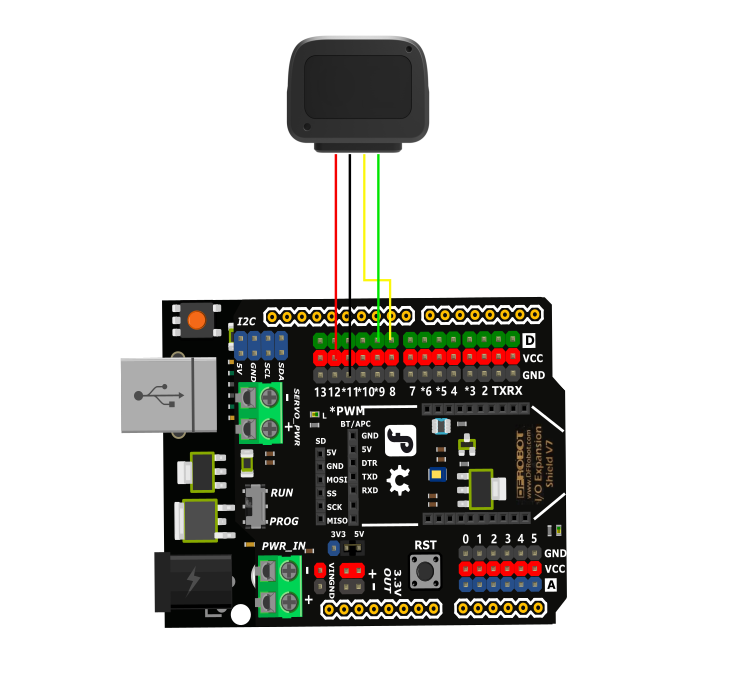
Other Preparation Work
TF-NOVA switches the output mode through instructions and registers. The default is UART output. For detailed instructions on switching modes, please refer to the user manual.
To switch to I2C output mode, uncomment the following lines in the setup() function:
// mySerial.print(COM);
// delay(200);
// mySerial.print(COM1);
Sample Code
#include <DFRobot_TFmini.h>
SoftwareSerial mySerial(8, 9); // RX, TX
DFRobot_TFmini TFmini;
char COM[6] = { 0x5A, 0x06, 0x0A, 0x01, 0x01, 0x6C }; //I2C mode command
char COM1[4] = { 0x5A, 0x04, 0x11, 0x6F }; //Save setup command
uint16_t distance, strength;

void setup() {
Serial.begin(9600);
TFmini.begin(mySerial);
/*
* Send command, open when switching to I2C output mode
*/
// mySerial.print(COM);
// delay(200);
// mySerial.print(COM1);
}

void loop() {
if (TFmini.measure()) {
distance = TFmini.getDistance();
strength = TFmini.getStrength();
Serial.print("Distance = ");
Serial.print(distance);
Serial.println("cm");
Serial.print("Strength = ");
Serial.println(strength);
delay(100);
}
delay(100);
}
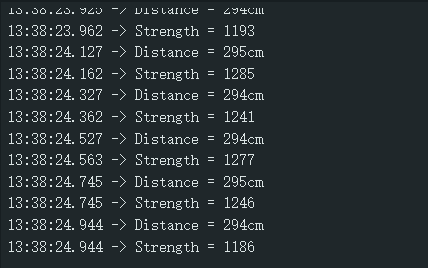
Result
Print the collected distance value and signal strength value.
Was this article helpful?