
Example Code for Arduino-UART Ranging
This article presents example code for Arduino-UART ranging, guiding users to measure and print distance and signal strength values effectively.
Hardware Preparation
- DFRduino UNO R3 (or similar) x 1
- Gravity: IO Expansion Shield for Arduino V7.1 x1
- TFS20-L LiDAR x1
- 0.8mm-to-2.54mm Dupont Cable (20cm) x1
Software Preparation
- Arduino IDE
- Download the DFRobot_TFmini library, which is a general library for TF series single-point LiDAR.
Wiring Diagram
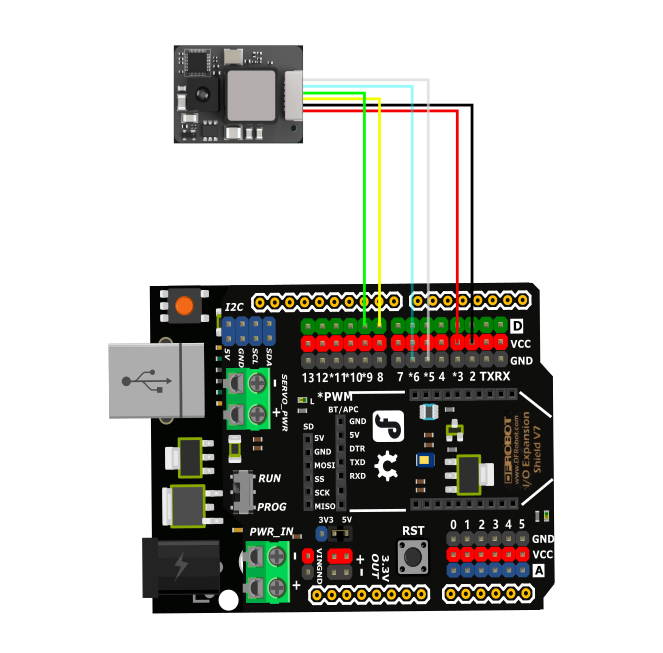
Connect pin 5 of TFS20-L to GND for UART mode. Adjust the VCC voltage of Arduino UNO R3 development board to 3.3V. Do not power TFS20-L with 5V. It will get hot if powered with 5V for a long time.
Other Preparation Work
Adjust the VCC voltage of Arduino UNO R3 development board to 3.3V. Do not power TFS20-L with 5V. It will get hot if powered with 5V for a long time.
Sample Code
#include <DFRobot_TFmini.h>
SoftwareSerial mySerial(8, 9); // RX, TX
DFRobot_TFmini  TFmini;
uint16_t distance, strength;

void setup() {
  Serial.begin(9600);
  TFmini.begin(mySerial);
}

void loop() {
  if (TFmini.measure()) {
    distance = TFmini.getDistance();
    strength = TFmini.getStrength();
    Serial.print("Distance = ");
    Serial.print(distance);
    Serial.println("cm");
    Serial.print("Strength = ");
    Serial.println(strength);
    delay(100);
  }
  delay(100);
}
Result
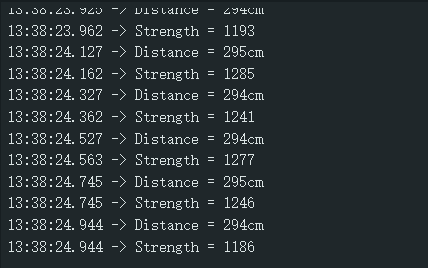
Print the collected distance value and signal strength value.
Was this article helpful?