
Getting Started
Installation Guide
With the HUSKYLENS 2 powered off, unscrew the screws on both sides of the camera and remove the original camera.

Align the module with the white connector and insert the camera module with adjustable feet.

Secure it with the screws, then remove the lens cover.
Note: Failure to secure it with screws may result in poor contact, which could damage the camera module.

Note
If you have purchased both the SEN0728 (focusable lens) and the SEN0729 (focusable night vision lens), they look very similar, which may make them difficult to distinguish.
You can tell them apart by loosening the focus ring on the lens; you will see a small red dot on the threads of the night vision lens’s focus ring.
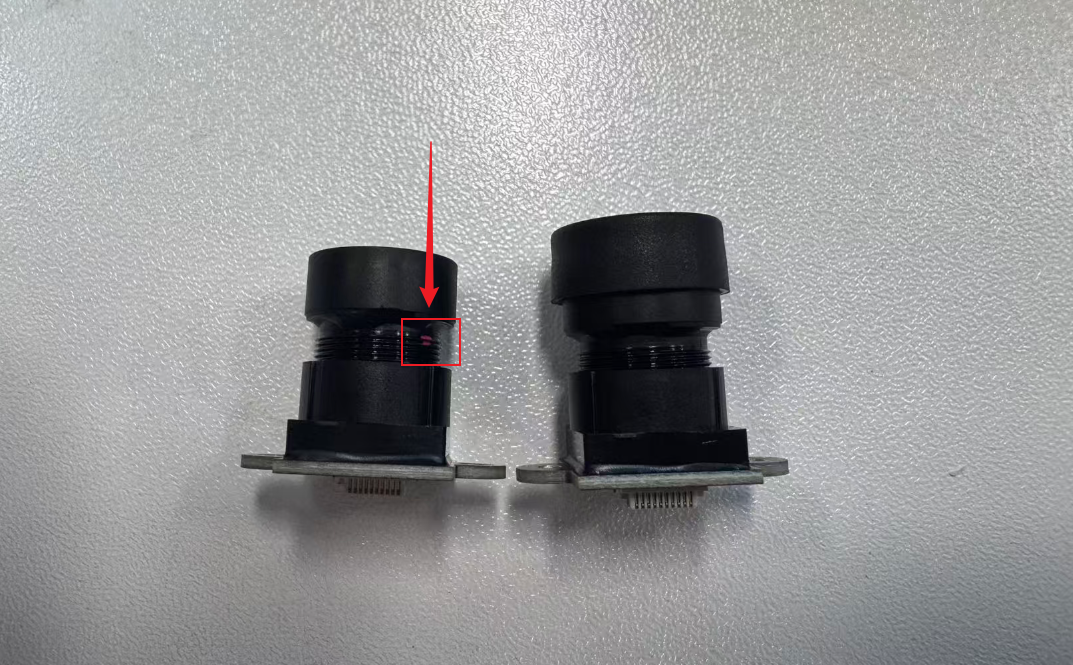
The focus ring can be unscrewed. Please be careful to protect the lens’s CMOS sensor after unscrewing it, and ensure that no foreign objects enter and cause damage.
Was this article helpful?