
Example Code for Arduino-Algorithm Mode 1 Processing Value Output Liquid Level Detection
Arduino ultrasonic liquid level detection demo for Algorithm Mode 1 using DFRduino UNO R3 or compatible board, Gravity IO Expansion Shield and ultrasonic level sensor. Power the sensor from 5V and GND, connect RX/TX to the defined pins, set installation height in millimeters, then upload the cross‑platform sketch via Arduino IDE at 115200 baud to get stable real‑time liquid level data for DIY smart water tanks and STEM teaching.
Hardware Preparation
- DFRduino UNO R3 (or similar) x 1
- Gravity: IO Expansion Shield for Arduino V7.1 x 1
- Ultrasonic Level Sensor x 1
- 4PIN sensor adapter cable x 1
Software Preparation
Wiring Diagram
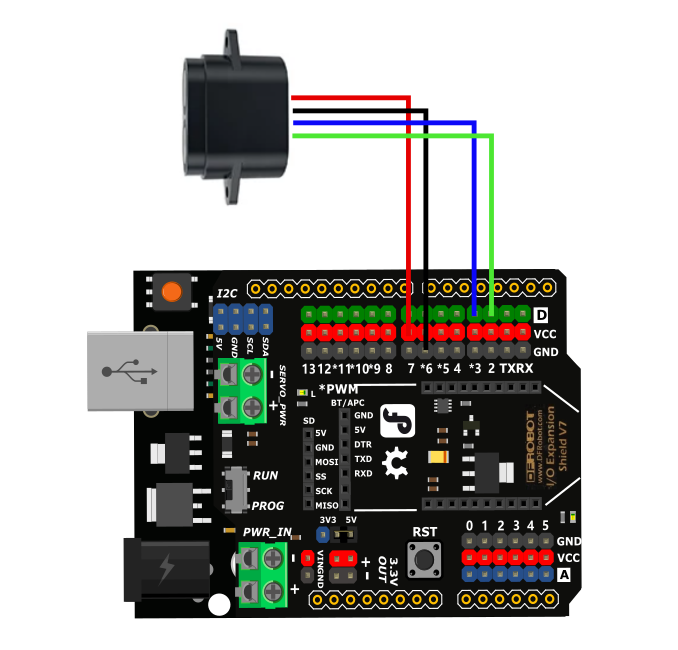
| Sensor + 4P adapter cable | Arduino UNO | Mega2560 | ESP32 |
|---|---|---|---|
| Red wire(+) | 5V | 5V | 5V |
| Black wire(-) | GND | GND | GND |
| Blue wire (RX) | D3 | D18 | D17 |
| Green wire (TX) | D2 | D19 | D16 |
Other Preparation Work
- Before burning the code, the actual installation height needs to be modified. The default installation height is 2m. The output value of this example code is processed by algorithm mode 1 and can monitor the liquid level in real time. The data is stable, but the response speed is slow, about ≥2s. It is suitable for liquid level detection scenarios with liquid surface sloshing.
- This sample code is compatible with UNO R3, Mage2560, and ESP32 development boards.
Sample Code
// ---------------- Cross-Platform Serial Configuration ----------------
#if defined(__AVR_ATmega2560__)
// Arduino Mega 2560: Use hardware serial port Serial1
// Sensor TX connects to Mega Pin 19
// Sensor RX connects to Mega Pin 18
#define sensorSerial Serial1

#elif defined(ESP32)
// ESP32: Manually instantiate hardware serial port; compatible with all models including C3/S2/S3/WROOM, etc.
#include <HardwareSerial.h>
HardwareSerial mySensorSerial(1);  // Consistently use internal UART 1
#define sensorSerial mySensorSerial

#else
// Arduino UNO: Software serial port
// Sensor TX connects to UNO Pin 2
// Sensor RX connects to UNO Pin 3
#include <SoftwareSerial.h>
SoftwareSerial mySerial(2, 3);
#define sensorSerial mySerial
#endif
// ------------------------------------------------

uint8_t Com[8] = { 0x01, 0x03, 0x01, 0x00, 0x00, 0x03, 0x04, 0x37 };  //处理值、算法模式1
int stallationHeight = 2000, emptyHeight, WaterLevel;
float tem;

void setup() {
  Serial.begin(115200);
// Initialize the sensor serial port for different development boards
// (The sensor's baud rate must remain at 115200—do not change it)
#if defined(ESP32)
  // ESP32 specific pins: RX connected to 17, TX connected to 16;
  // pins can be customized based on the specific board model
  sensorSerial.begin(115200, SERIAL_8N1, 16, 17);
#else
  // UNO and Mega 2560
  sensorSerial.begin(115200);
#endif
}

void loop() {
  Read_Processing();
  Serial.print(" TEM: ");
  Serial.print(tem, 1);
  Serial.println(" °C");
  Serial.print(" Installation height: ");
  Serial.print(stallationHeight);
  Serial.println(" mm");
  Serial.print(" Empty height: ");
  Serial.print(emptyHeight);
  Serial.println(" mm");
  Serial.print(" Liquid level height: ");
  Serial.print(WaterLevel);
  Serial.println(" mm");
  Serial.println(" ");
  delay(2000);
}

void Read_Processing(void) {
  uint8_t Data[12] = { 0 };
  uint8_t ch = 0;
  bool flag = 1;
  long timeStart = millis();
  long timeStart1 = 0;
  while (flag) {

    if ((millis() - timeStart1) > 100) {
      while (sensorSerial.available() > 0) {
        sensorSerial.read();
      }
      sensorSerial.write(Com, 8);
      timeStart1 = millis();
    }

    if ((millis() - timeStart) > 1000) {
      Serial.println("Time out");
      return;
    }

    if (readN(&ch, 1) == 1) {
      if (ch == 0x01) {
        Data[0] = ch;
        if (readN(&ch, 1) == 1) {
          if (ch == 0x03) {
            Data[1] = ch;
            if (readN(&ch, 1) == 1) {
              if (ch == 0x06) {
                Data[2] = ch;
                if (readN(&Data[3], 8) == 8) {
                  if (CRC16_2(Data, 9) == (Data[9] * 256 + Data[10])) {
                    emptyHeight = Data[3] * 256 + Data[4];
                    tem = (Data[7] * 256 + Data[8]) / 10.0;
                    WaterLevel = stallationHeight - emptyHeight;
                    flag = 0;
                  }
                }
              }
            }
          }
        }
      }
    }
  }
}

uint8_t readN(uint8_t *buf, size_t len) {
  size_t offset = 0, left = len;
  int16_t Tineout = 500;
  uint8_t *buffer = buf;
  long curr = millis();
  while (left) {
    if (sensorSerial.available()) {
      buffer[offset] = sensorSerial.read();
      offset++;
      left--;
    }
    if (millis() - curr > Tineout) {
      break;
    }
  }
  return offset;
}

unsigned int CRC16_2(unsigned char *buf, int len) {
  unsigned int crc = 0xFFFF;
  for (int pos = 0; pos < len; pos++) {
    crc ^= (unsigned int)buf[pos];
    for (int i = 8; i != 0; i--) {
      if ((crc & 0x0001) != 0) {
        crc >>= 1;
        crc ^= 0xA001;
      } else {
        crc >>= 1;
      }
    }
  }

  crc = ((crc & 0x00ff) << 8) | ((crc & 0xff00) >> 8);
  return crc;
}
Result
Select the 115200 serial monitor and print the collected empty height, liquid level, and temperature values.

Was this article helpful?