
Reference
Last revision 2026/01/22
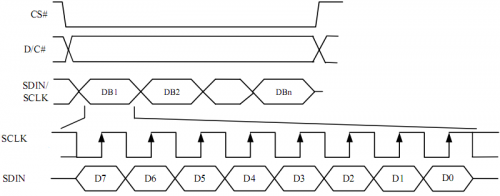
SPI Sequence Diagram
Commands List
The address of rows and columns and the display mode can be changed by setting command. For more detail refer to SSD1351.pdf page 32~46.
We will simply explain these above-mentioned commands through the example Set Re-map / Color Depth (Display RAM to Panel) in Page 32 :
A[7:6] Set Color Depth
00b 256 color
01b 65K color,[reset]
10b 262k color, 8/18-bit,16 bit (1stoption) MCU interface
11b 262k color, 16 - bit MCU interface (2ndoption)
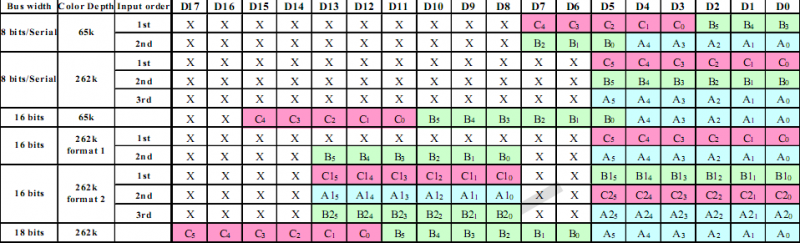
With different mode, there are different bits for each pixel data as you can see below (refer to SSD1351.pdf Page 21,22)
For example: if written A[7:6]=01b to choose 65K color mode,we use 2 8-bit data to determine a pixel in which C0~C4 represents R、B0~B5 represents G,A0~A4 represents B.
A[2] Set Color Sequence
A[2]=0b, Color sequence: A-B-C [reset]
A[2]=1b, Color sequence is swapped: C-B-A
So , in depth 65k color with sequence C-B-A(RGB) mode , we can write data 0xf8,0x00 to make the screen red; and in sequence A-B-C(BGR) with same depth ,write 0x00,0x1f to make screen red.
Was this article helpful?