
Example Code for Arduino-Temperature Measurement
This project demonstrates how to interface the TMP100 temperature sensor with an Arduino board to read and output temperature values in Celsius via the serial monitor. Users will learn I2C communication basics, sensor configuration (resolution/address), and real-time data reading.
Hardware Preparation
Software Preparation
- Development Tool: Arduino IDE (Version 1.8.x or later), Download Link: Arduino Software
- Library: Wire library (pre-installed with Arduino IDE, no additional setup required)
Wiring Diagram
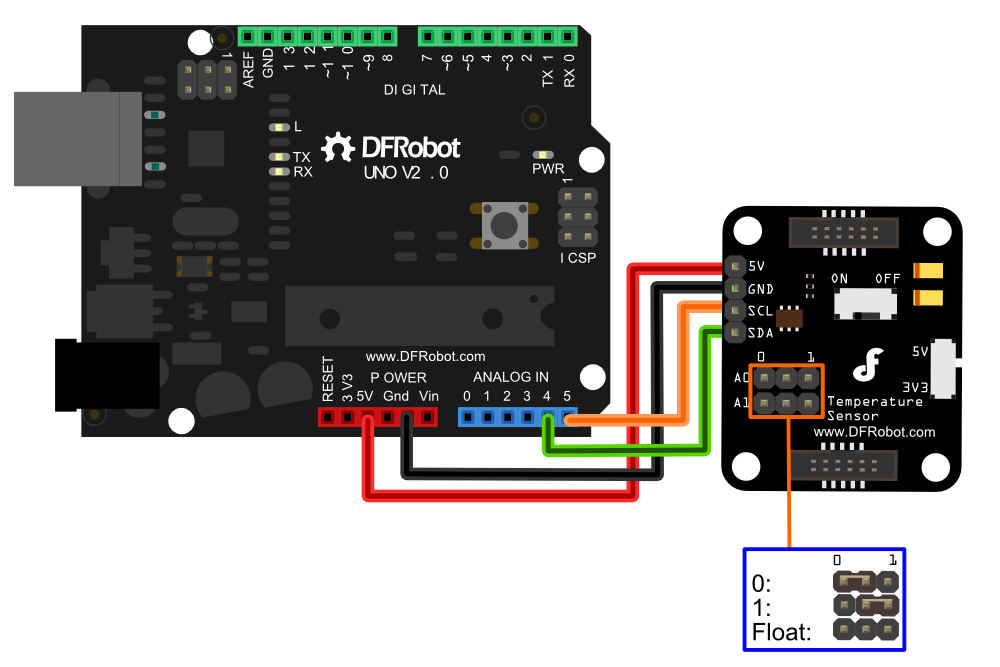
Sample Code
/*
 Sample code for the TMP100 Temperature sensor
 website:www.DFRobot.com

 Connection:

 VCC-5V
 GND-GND
 SDA-Analog pin 4
 SCL-Analog pin 5
*/

#include <Wire.h>
int tmpAddress = B1001011; //Slave Addresses set
int ResolutionBits = 10;   //Resolution set
void setup()
{
  Wire.begin();        // join i2c bus (address optional for master)
  Serial.begin(9600);  // start serial for output
  SetResolution();
}

void loop()
{
  getTemperature();
  delay(200);
}

float getTemperature()
{
  Wire.requestFrom(tmpAddress,2);
  byte MSB = Wire.read();
  byte LSB = Wire.read();
  int TemperatureSum = ((MSB << 8) | LSB) >> 4;
  float celsius = TemperatureSum*0.0625;
  Serial.print("Celsius: ");
  Serial.println(celsius);
}

void SetResolution(){
  if (ResolutionBits < 9 || ResolutionBits > 12) exit;
  Wire.beginTransmission(tmpAddress);
  Wire.write(B00000001); //addresses the configuration register
  Wire.write((ResolutionBits-9) << 5); //writes the resolution bits
  Wire.endTransmission();
  Wire.beginTransmission(tmpAddress); //resets to reading the temperature
  Wire.write((byte)0x00);
  Wire.endTransmission();
}
Result
Open the Arduino IDE Serial Monitor (baud rate: 9600) to view continuous temperature readings in Celsius. Example output:
Celsius: 25.125
Celsius: 25.25
Celsius: 25.375
Was this article helpful?