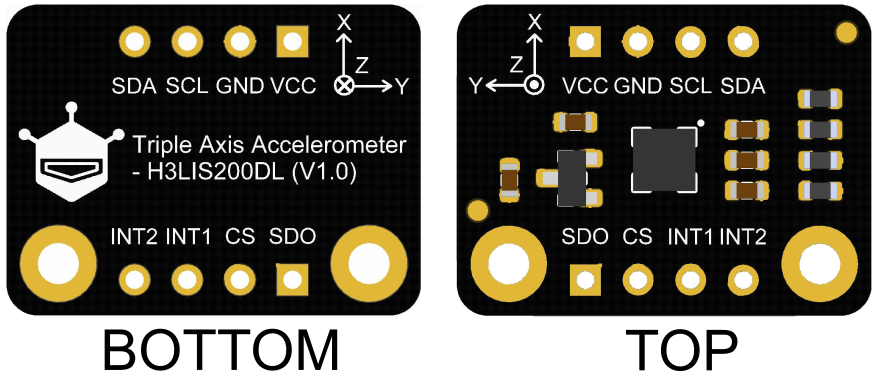
Fermion: I2C H3LIS200DL Triple Axis Accelerometer

SKU: SEN0408

H3LIS200DL Triple Axis Accelerometer, a low-power liner accelerometer with low noise and large scale ranges, features ultra-low-power operational modes that can realize smart sleep to wake-up function that allows advanced power saving. Moreover, as this sensor comes with two built-in independent programmable interrupt generators, users can generate a custom interrupt to wake up interrupt. Besides, it has a selectable range scale of ±100 g or ±200 g, capable of measuring acceleration at output data rates from 0.5 Hz to 1 kHz.

Front of H3LIS200DL 3-axis accelerometer module with labeled pins and microcontroller for Arduino-DFRobot product sku:SEN0408 image.
  • Docs
  • Tech Specs
  • 1. Example Code for Arduino-Wakeup Function

    Use wake-up function. Phenomenon: To use this function, you need to turn the module into low-power mode first, and the measurement rate will be very slow at this time. When an interrupt event set up before occurs, the module will enter normal mode, in which the measurement rate will be accelerated to save power and provide sampling rate. When using SPI, chip select pin can be modified by changing the value of macro H3LIS200DL_CS.

    2. Example Code for Arduino-Read Acceleration

    Get the acceleration in the three directions of xyz, the range can be ±100g or ±200g. When using SPI, chip select pin can be modified by changing the value of macro H3LIS200DL_CS.

    3. Example Code for Arduino-External Interrupt

    Interrupt detection. In this example, the enable eZHigherThanTh interrupt event means when the acceleration in the Z direction exceeds the threshold set by the program, the interrupt level can be detected on the interrupt pin int1/int2 we set, and the level change on the interrupt pin can be used to determine whether the interrupt occurs. The following are the 6 settable interrupt events:eXHigherThanTh, eXLowerThanTh, eYHigherThanTh, eYLowerThanTh, eZHigherThanTh, eZLowerThanTh. For a detailed explanation of each of them, please look up the comments of the enableInterruptEvent() function. This example needs to connect the int2/int1 pin of the module to the interrupt pin of the motherboard. Default UNO(2), Mega2560(2), Leonardo(3), microbit(P0),FireBeetle-ESP8266(D6),FireBeetle-ESP32((D6),FireBeetle-M0(6).

    4. Example Code for Raspberry Pi-Read Acceleration

    Read the acceleration in the three directions of xyz.

    5. Example Code for Raspberry Pi-Wakeup Function

    Use wake-up function (Only available for Breakout Version).

    6. Example Code for Raspberry Pi-External Interrupt

    External interrupt function.

    Reference

    Specification


    Parameter Specification
    Operating Voltage 3.3 V
    Operating Current minimum 10 μA (low-power mode) / 0.3 mA-0.4 mA (normal mode)
    Interface I2C/SPI
    I2C Address 0×19 (Default) / 0×18 (Optional)
    Selectable Scale ±100 g / ±200 g
    Frequency 0.5Hz ~ 1KHz
    Data Output 8-bit
    Function Wake-up function
    Impact Resistance 10 thousand grams of high impact resistance
    Compliance ECOPACK®RoHS and “Green” compliant
    Operating Temperature -40 °C ~ ﹢85 °C
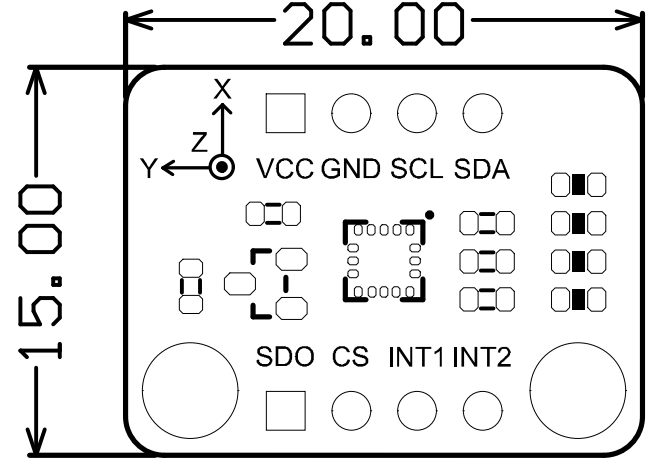
    Module Size 15 × 20 mm/ 0.59 × 0.78"
    Mounting Hole Size Inner diameter 3.1 mm (0.12") /Outer diameter 6 mm (0.24")

    Pinout


    Num Label Description
    1 VCC 3V3
    2 GND GND
    3 SCL I2C/SPI Clock Line
    4 SDA I2C/SPI Data Line
    5 INT2 Interrupt Pin 2
    6 INT1 Interrupt Pin 1
    7 CS SPI chip-select line
    8 SDO I2C Address Select Pin/SPI Data Line

    Was this article helpful?

    TOP