
Example Code for Raspberry Pi-Read Acceleration
Last revision 2025/12/18
Read the acceleration in the three directions of xyz.
Hardware Preparation
- Raspberry Pi 4B (or similar) × 1
- H3LIS200DL Triple Axis Acce Accelerometer × 1
- Jumper wires
Software Preparation
- Raspberry Pi Official OS
- Download and install the LIS Series Python Library.
Wiring Diagram
Connect the module to the Raspberry Pi according to the connection diagram. The default I2C address is 0x19

Other Preparation Work
-
Enable the I2C interface of the Raspberry Pi. If it is already enabled, you can skip this step. Open Terminal, type the following command, and press Enter:
sudo raspi-configThen use the up and down keys to select "5 Interfacing Options", press Enter, select "P5 I2C", and press Enter to confirm "YES". Restart the Raspberry Pi main control board.
-
To install Python dependent libraries and git, the Raspberry Pi needs to be connected to the Internet. If it is already installed, you can skip this step. In the terminal, type the following commands in sequence, and press Enter:
sudo apt-get updatesudo apt-get install build-essential python-dev python-smbus git -
Download the LIS series driver library. In the terminal, type the following commands in sequence and press Enter:
cd Desktopgit clone https://github.com/DFRobot/DFRobot_LIS
Sample Code
In the terminal, type the following command and press Enter, run the sample code:
cd DFRobot_LIS/python/raspberrypi/examples/H3LIS200DL
cd get_acceleration
python get_acceleration.py
Result
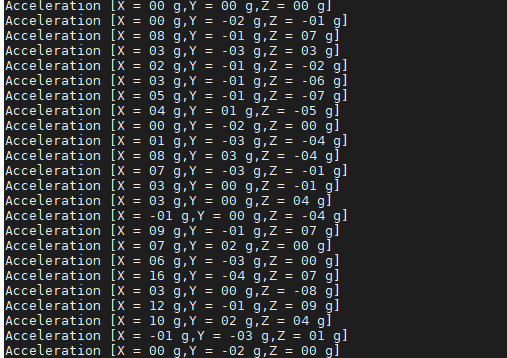
The result of shaking the sensor is shown in the figure
- Note: If the situation as shown in the picture below appears, please check whether the I2C address is correct.

Was this article helpful?