
The Wireless Joystick v1.1
This Wiki documents a legacy version of the Wireless Joystick v1.1 for Arduino and is provided for reference only.
Specification
- Power supply: "AAA" Battery x3 or 3.3~8v DC power supply
- Programmable inputs:
- 2 analog sticks
- one D-pad
- 8 buttons
- 2 joystick buttons
- Program interface: FTDI
- Bootloader: Arduino Duemilanove w/ ATmega328
- Includes a Turbo button used to reset the controller
- Informational LEDs
- FULL/BAT: indicates that the board and shield are powered
- CH: indicates the presence of a network link for the Xbee
- Includes an Xbee socket
- Supports Xbee, Bluetooth, RF and Wifi
Shipping List
- Wireless Joystick v1.1 for Arduino (1 unit)
PCB View
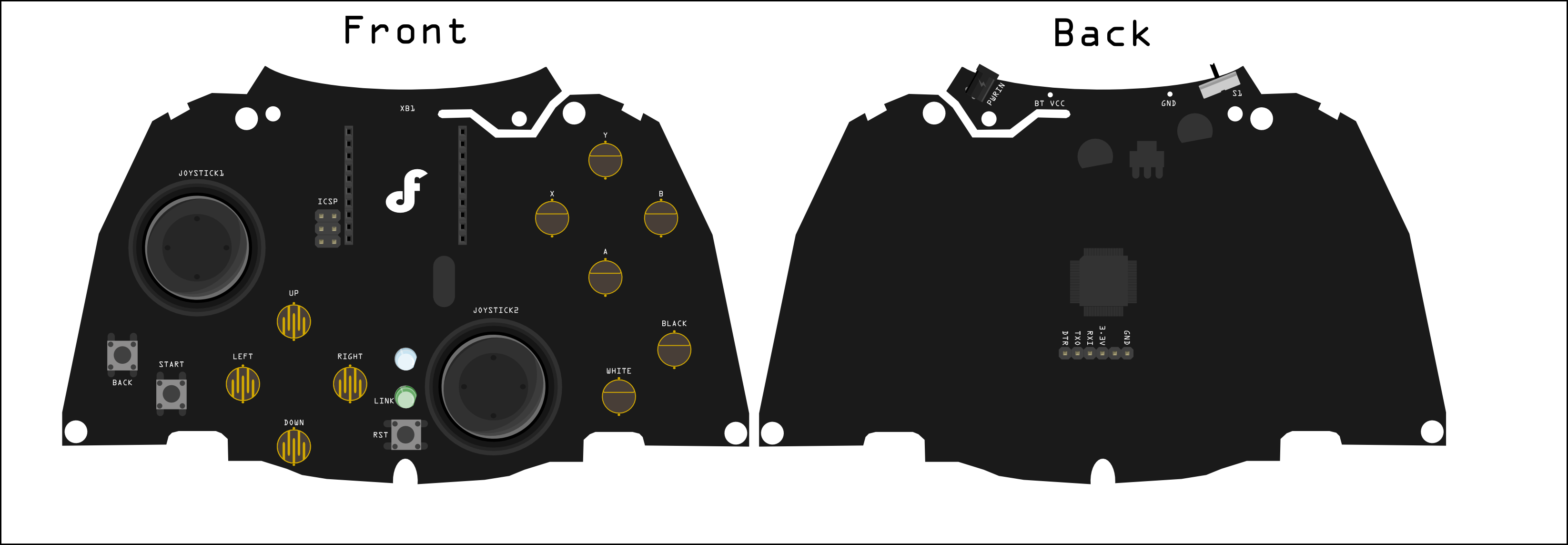
NOTE: To program the controller please select "arduino Duemilanove w/ATMega 328"
Sample Code
/*
// #
// # Editor     : Lauren from DFRobot
// # Date       : 11.04.2012

// # Product name: Wireless Joystick v1.1 for Arduino
// # Product SKU : DFR0182
// # Code Version: 1.0

// # Description:
// # The sketch for using the gamepad and print the button state and the analog values of the gamepad
// #

*/

int buttonState[14];
int joystick[4];
int AnalogButton[2];

void setup()
{
  Serial.begin(57600);  //Init the Serial baudrate
  InitIO();             // Initialize the inputs/outputs and the buffers
}

void InitIO(){
  for(int i = 2; i < 14; i++)  pinMode(i,INPUT);
  for(int i = 0; i < 14; i++)  buttonState[i] = 0;
  for(int i = 0; i < 4; i++)  joystick[i] = 0;
  for(int i = 0; i < 2; i++)  AnalogButton[i] = 0;
}

void loop()
{
  DataUpdate();  //read the buttons and the joysticks data
  printData();   //print the datas and states
  delay(100);
}

void DataUpdate(){

  for(int i = 2; i < 14; i++)  buttonState[i] = digitalRead(i);
  buttonState[0] = analogRead(6);
  buttonState[1] = analogRead(7);
  for(int i = 0; i < 4; i++)  joystick[i] = analogRead(i);
  for(int i = 4; i < 6; i++)  AnalogButton[i-4] = analogRead(i);

}

String Buttons[14] = {
  "S1","S2","Y","X","B","A","White","Black","UP","LEFT","DOWN","RIGHT","BACK","START"};
  // Buttons Names

void printData(){
//  for(int i = 0; i < 14; i++)  Serial.print(buttonState[i]),Serial.print(" ");
//  for(int i = 0; i < 4; i++)  Serial.print(joystick[i]),Serial.print(" ");
//  for(int i = 0; i < 2; i++)  Serial.print(AnalogButton[i]),Serial.print(" ");
//  Serial.println("");
  Serial.print("Button Pressed:");
  for(int i = 0; i < 2; i++)  if(buttonState[i] < 100)  Serial.print(Buttons[i]),Serial.print(",");
  for(int i = 2; i < 14; i++)  if(buttonState[i] == 0)  Serial.print(Buttons[i]),Serial.print(",");
  Serial.println("");
  Serial.print("Analog Sticks:");
  for(int i = 0; i < 4; i++)  Serial.print(joystick[i]),Serial.print(",");
  for(int i = 0; i < 2; i++)  Serial.print(AnalogButton[i]),Serial.print(",");
  Serial.println("");
  Serial.println("");


}
Was this article helpful?