
Example Code for Arduino-Read humidity & temperature Data
Last revision 2025/12/18
This article demonstrates how to use Arduino to read analog values and SHT1x sensor data, including humidity and temperature, using RS485 interface. It provides step-by-step guidance on hardware preparation, software setup, wiring, and implementing sample code for real-time data monitoring, making it ideal for tech enthusiasts seeking to enhance their Arduino projects.
Hardware Preparation
- RS485 IO Expansion Shield for Arduino ×1
- DFRduino UNO R3 (SKU:DFR0216)×1
- RS485 Sensor Node (SKU:DFR0233)×1
- SHT1X Module ×1
Software Preparation
Download Arduino IDE: Click to Download Arduino IDE
Wiring Diagram
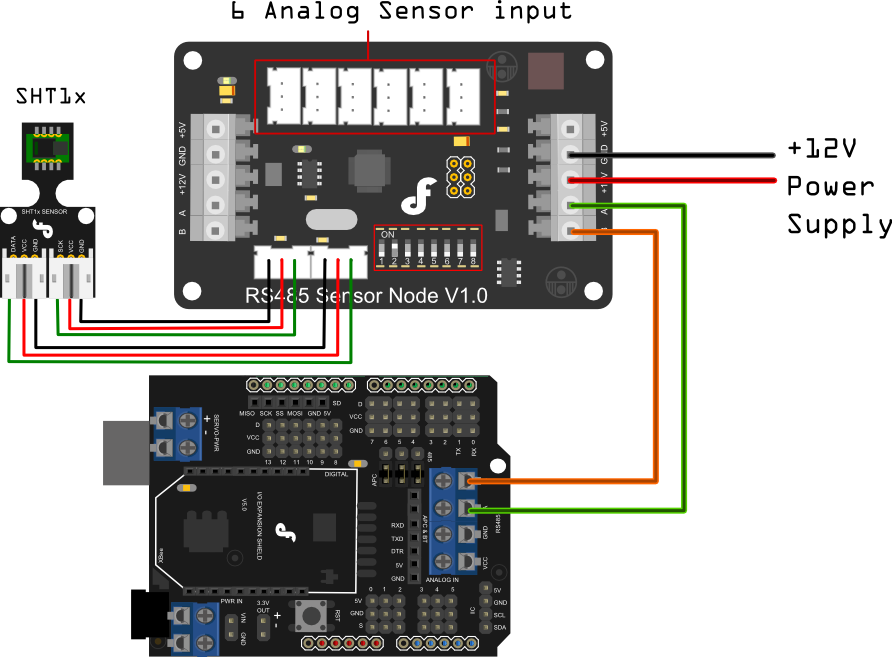
Sample Code
/*
# The Sample code for test the data of Analogue_Test and SHT1X Module

 # Editor : Lisper
 # Date   : 2013.12.9
 # Ver    : 1.3
 # Product: Analogue_Test and SHT1X Module
 # SKU    : DFR0233

 # Description:
 # Read the Analog value and the data of humidity & temperature

 # Hardwares:
 1. Arduino UNO
 2. IO Expansion Shield V5
 3. Analogue_Test and SHT1X Module

 # Interface: RS485
 # Note: Connect the Analogue_Test and SHT1X Module with IO Expansion Shield V5 through RS485
 Set the address of the module in manual,range from 0x02 to 0x7F,take effect after 30 seconds
*/

#define uint    unsigned  int
#define uchar   unsigned  char
#define ulong   unsigned  long
#define addr  0x02     //set address of the device for 0x02
uchar cmd[50];
uchar receive_ACK[100];
int EN = 2;

#if defined(ARDUINO) && ARDUINO >= 100
#include "Arduino.h"
#define printByte(args) Serial.write(args)
#define printlnByte(args)  Serial.write(args),Serial.println()
#else
#include "WProgram.h"
#define printByte(args) Serial.print(args,BYTE)
#define printlnByte(args)  Serial.println(args,BYTE)
#endif

void setup() {
  Serial.begin(9600);
  pinMode(2, OUTPUT); // TTL -> RS485 chip driver pin
}

void loop() {
  static ulong timepoint = 0;
  if (millis() - timepoint > 1000) {
    read_command();
    timepoint = millis();
  }
  if (Serial.available() > 0) data_return();

  //  delay(1000);

}

/************************Send command to Analogue_Test and SHT1X Module*************************/
void read_command()
{
  int i;
  char sum_cmd = 0;
  digitalWrite(EN, HIGH); // Turn the drvier pin to HIGH -> Turn on code transmitting mode for the RS485 interface
  // Turn the driver pin to LOW  -> Turn on reading mode for the RS485 interface
  delay(10);
  cmd[0] = 0x55;
  cmd[1] = 0xaa;
  cmd[2] = addr;
  cmd[3] = 0x00;
  cmd[4] = 0x21;
  for (i = 0; i < 5; i++) {
    sum_cmd += cmd[i];
  }
  cmd[5] = sum_cmd;

  for (i = 0; i < 6; i++) {

    printByte(cmd[i]);// command send to device
#if defined(ARDUINO) && ARDUINO >= 100
    Serial.flush();// complete the transmission of outgoing serial data
#endif
    delay(10);
  }
  digitalWrite(EN, LOW);
}
/************Feedback data of the Analog value and humidity & temperature ************/\


void data_return()
{
  digitalWrite(EN, LOW); // Turn the driver pin to LOW  -> Turn on reading mode for the RS485 interface
  delay(10);
  int i = 0;

  unsigned long timer = millis();

  while (true) {
    if (Serial.available()) {
      receive_ACK[i] = Serial.read();
      i++;
    }
    if (millis() - timer > 100) {
      break;
      Serial.println("Finish reading!");
    }
  }
  print_data () ;


  /*************************************************************************/
  // Display the original data

  //        for(int j = 0; j < 26; j++){
  //                Serial.print(receive_ACK[j],HEX); // return command
  //                Serial.print(" ");
  //        }
  //        Serial.println(" ");
}

void show_0x21_command(void)
{
  sht1x_data();
  Analog_test_data();

}

/************Deal with datas from Sht1x humidity & temperature sensor************/

void sht1x_data()
{
  uint humidity;
  uint temperature;
  humidity =  receive_ACK[7] * 256 + receive_ACK[8];
  temperature = receive_ACK[9] * 256 + receive_ACK[10];
  Serial.print("H:");
  Serial.print(humidity / 10, DEC);
  Serial.print("  ");
  Serial.print("T:");
  Serial.println(temperature / 10, DEC);
}

/********************Deal with datas from 6 Analog Sensors****************/
void Analog_test_data()
{
  char register_addr;
  uint  Analog_data;
  register_addr = 13;
  Serial.print("Analog Value:");
  for (int n = 1; n < 7; n++) {
    Analog_data = receive_ACK[register_addr] * 256 + receive_ACK[register_addr + 1];
    register_addr = register_addr + 2;
    Serial.print(Analog_data, DEC);
    Serial.print(" ");
  }
  Serial.println(" ");
  delay(1000);
}

/*************************** by lisper *********************************/
//print humidity and temperature
void print_data () {
  if (checksum ()) {        // if check sum is right
    Serial.println ();
    float humidity = read_uint8_t (receive_ACK, 7) / 10.0;
    Serial.print ("humidity=");
    Serial.println (humidity, 2);

    float temperature = (read_uint8_t (receive_ACK, 9) / 10.0);
    Serial.print ("temperature=");
    Serial.println (temperature, 2);
  }
  else {
    Serial.print ("\ncheck sum error! sum=");
    Serial.println (getsum_add (receive_ACK, 25), HEX);
  }
}

//if check sum is ok
boolean checksum () {
  uint8_t checksum = getsum_add (receive_ACK, 25);
  if (checksum == receive_ACK[25])
    return true;
  else
    return false;
}

//read 2 byte to uint16_t
uint16_t read_uint8_t (uint8_t *buffer, uint8_t sub) {        // Big-Endian, first byte is high byte
  return ((uint16_t)(buffer[sub]) << 8) + buffer[sub + 1];
}

//get check sum, add from 0 to length-1
uint8_t getsum_add (uint8_t *buffer, uint8_t length) {
  uint8_t sum;
  for (int i = sum = 0; i < length; i++) {
    sum += buffer[i];
  }
  return sum;
}
/*******************************************************************************/
Result
Open the Arduino Serial Monitor at 9600 baud rate. You will see real-time data updates every second, including:
- Humidity (e.g.,
H: 50orhumidity=50.00) - Temperature (e.g.,
T: 25ortemperature=25.00) - Analog sensor values (e.g.,
Analog Value: 1023 512 345 678 901 234)
Additional Information
Ensure the module's address is set to 0x02 (as defined in the code) in manual mode. The address setting takes effect 30 seconds after being changed.
Was this article helpful?