
Example Code for RGB Light Control
Last revision 2026/01/19
This article offers example code for controlling RGB LEDs using the WS2812B module within the MiniQ 2WD PLUS, showcasing dynamic lighting effects such as color wipes, theater chase, and rainbow animations, which are ideal for enhancing visual feedback in robotics projects.
Introduction
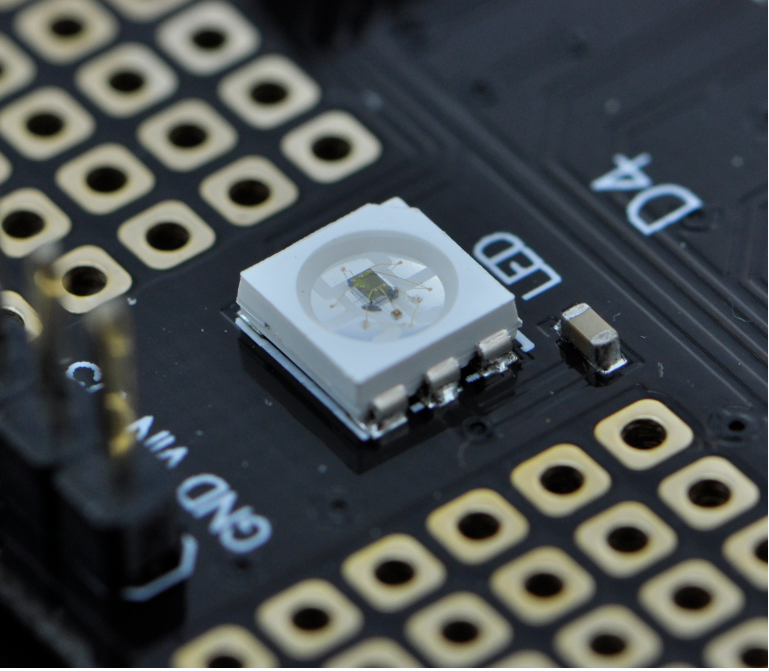
The MiniQ 2WD PLUS features an integrated WS2812B-4 RGB LED module with a built-in WS2811 driver IC. This allows full-color control of the LEDs using a single-wire (1-Wire) communication protocol, eliminating the need for external drivers or complex wiring.
This example demonstrates dynamic lighting effects including color wipes, theater-style chase, and rainbow animations, showcasing the flexibility and visual appeal of programmable RGB lighting.
Hardware Preparation
- MiniQ 2WD PLUS (with built-in WS2812B-4 RGB LEDs)
- USB cable for power and programming
- Arduino-compatible development environment
The RGB LEDs are internally connected to digital pin 4 on the MiniQ 2WD PLUS.
Software Preparation
- Arduino IDE (version 1.8.0 or higher)
- Install the Adafruit NeoPixel library via Library Manager:
- Go to Sketch > Include Library > Manage Libraries…
- Search for “Adafruit NeoPixel” and install
Wiring Diagram
No external wiring is required—the RGB LEDs are pre-installed inside the MiniQ 2WD PLUS and connected internally to Pin 4. Simply power the board via USB or external supply.
Sample Code
    #include <Adafruit_NeoPixel.h>

    #define PIN 4

    Adafruit_NeoPixel strip = Adafruit_NeoPixel(150, PIN, NEO_GRB + NEO_KHZ800);

    void setup() {
      strip.begin();
      strip.show(); // Initialize all pixels to 'off'
    }

    void loop() {
      // Some example procedures showing how to display to the pixels:
      colorWipe(strip.Color(255, 0, 0), 50); // Red
      colorWipe(strip.Color(0, 255, 0), 50); // Green
      colorWipe(strip.Color(0, 0, 255), 50); // Blue
      // Send a theater pixel chase in...
      theaterChase(strip.Color(127, 127, 127), 50); // White
      theaterChase(strip.Color(127,   0,   0), 50); // Red
      theaterChase(strip.Color(  0,   0, 127), 50); // Blue

      rainbow(20);
     // rainbowCycle(20);
     // theaterChaseRainbow(50);
    }

    // Fill the dots one after the other with a color
    void colorWipe(uint32_t c, uint8_t wait) {
      for(uint16_t i=0; i<strip.numPixels(); i++) {
          strip.setPixelColor(i, c);
          strip.show();
          delay(wait);
      }
    }

    void rainbow(uint8_t wait) {
      uint16_t i, j;

      for(j=0; j<256; j++)
      {
        for(i=0; i<strip.numPixels(); i++)
        {
          strip.setPixelColor(i, Wheel((i+j) & 255));
        }
        strip.show();
        delay(wait);
      }
    }

    // Slightly different, this makes the rainbow equally distributed throughout
    void rainbowCycle(uint8_t wait) {
      uint16_t i, j;

      for(j=0; j<256*5; j++) { // 5 cycles of all colors on wheel
        for(i=0; i< strip.numPixels(); i++) {
          strip.setPixelColor(i, Wheel(((i * 256 / strip.numPixels()) + j) & 255));
        }
        strip.show();
        delay(wait);
      }
    }

    //Theatre-style crawling lights.
    void theaterChase(uint32_t c, uint8_t wait) {
      for (int j=0; j<10; j++) {  //do 10 cycles of chasing
        for (int q=0; q < 3; q++) {
          for (int i=0; i < strip.numPixels(); i=i+3) {
            strip.setPixelColor(i+q, c);    //turn every third pixel on
          }
          strip.show();

          delay(wait);

          for (int i=0; i < strip.numPixels(); i=i+3) {
            strip.setPixelColor(i+q, 0);        //turn every third pixel off
          }
        }
      }
    }

    //Theatre-style crawling lights with rainbow effect
    void theaterChaseRainbow(uint8_t wait) {
      for (int j=0; j < 256; j++) {     // cycle all 256 colors in the wheel
        for (int q=0; q < 3; q++) {
            for (int i=0; i < strip.numPixels(); i=i+3) {
              strip.setPixelColor(i+q, Wheel( (i+j) % 255));    //turn every third pixel on
            }
            strip.show();

            delay(wait);

            for (int i=0; i < strip.numPixels(); i=i+3) {
              strip.setPixelColor(i+q, 0);        //turn every third pixel off
            }
        }
      }
    }

    // Input a value 0 to 255 to get a color value.
    // The colours are a transition r - g - b - back to r.
    uint32_t Wheel(byte WheelPos)
    {
      if(WheelPos < 85)
      {
       return strip.Color(WheelPos * 3, 255 - WheelPos * 3, 0);
      }
      else if(WheelPos < 170)
      {
       WheelPos -= 85;
       return strip.Color(255 - WheelPos * 3, 0, WheelPos * 3);
      }
      else
      {
       WheelPos -= 170;
       return strip.Color(0, WheelPos * 3, 255 - WheelPos * 3);
      }
    }
Important: The original code initializes Adafruit_NeoPixel(150, ...) but the MiniQ 2WD PLUS only has 4 physical LEDs. The sample above corrects this to 4 for optimal performance and memory usage.
Result
After uploading the code, the four onboard RGB LEDs will cycle through:
Solid red, green, and blue wipes
White, red, and blue theater chase patterns
A flowing rainbow animation
These effects illustrate how easily the integrated WS2812B LEDs can be controlled for visual feedback, status indication, or aesthetic enhancement in robotics projects.
Was this article helpful?