
Program the Arduino shield using Raspberry Pi B
In this part, we will share how to program your Arduino using Pi. The steps is quite simple what you need is just installing the Arduino on your Pi and run the remote desktop to test it.
Hardware Preparation
- Raspberry Pi B
- Raspberry Pi B Meet Arduino shield
- Micro USB cable (to connect Meet Arduino shield to Pi's USB host)
Software Preparation
- TightVNC Viewer on your PC
- TightVNC on your Pi
- Arduino IDE on your Pi
To install the TightVNC on your Pi, please check the commands below.
root@raspberrypi:/home/pi# sudo apt-get update
root@raspberrypi:/home/pi# sudo apt-get install tightvncserver
And to install the Arduino IDE on your Pi.
root@raspberrypi:/home/pi# sudo apt-get install arduino
Wiring Diagram
Connect the micro usb from Meet Arduino shield to the USB host on the Pi.
Other Preparation Work
Step 1. Launch your VNC server on the Raspberry Pi B .
root@raspberrypi:/home/pi# sudo vncserver
Step 2. Log in the remote desktop to Pi using TightVNC Viewer.
Sample Code
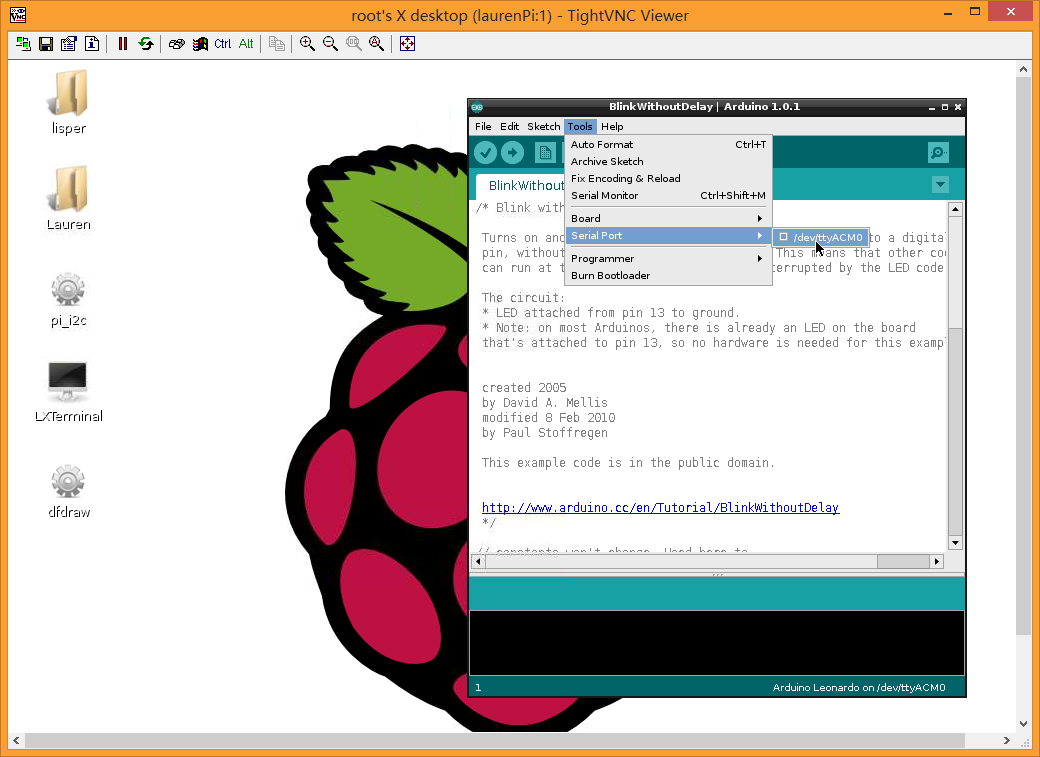
Launch your Arduino IDE. Open the blink sample sketch. Choose the leonardo as the board connected and open the right port as the picture shown.
Result
Click "Upload" to program it.
Additional Information
Was this article helpful?