Ethernet with POE IOT Board

SKU: DFR0342

The W5500 Ethernet with POE IOT Board is a new DFRobot Ethernet family member. Based on ATmega32u4 and W5500 chips, it matches Arduino Leonardo’s footprint, compatible with most Arduino shields/sensors for IoT apps. Unlike W5200 shield, it integrates POE (IEEE 802.3af) and WOL mode. Its 4-layer design solves stackable space waste, plus a professional PD chip ensures power reliability in complex environments.

Angled shot of back of W5500 Ethernet with POE IoT Board showing colored pins-DFRobot product sku:DFR0342 image.

Downloadable Resources

  • Docs
  • Tech Specs
  • Specification

    Parameter Details
    Microcontroller Atmel Atmega32u4 (Arduino Leonardo)
    External Input Voltage Range (recommended) 7V~23V DC
    External Input Voltage Range (limit) <24V DC
    POE Input Voltage 48V AC/DC (802.3af standard compliant PD device)
    Digital I/O Pins 20
    Analog I/O Pins 6
    DC Current per I/O Pin 40mA
    Flash Memory 32KB (ATmega32u4) (4KB used by bootloader)
    SRAM 2KB (ATmega32u4)
    EEPROM 1KB (ATmega32u4)
    Clock Speed 16MHz
    PHY WIZnet W5500
    PHY Clock Speed 25MHz
    Dimension 73.5x53.5x15mm/2.89x2.11x0.59 inches

    Pinout

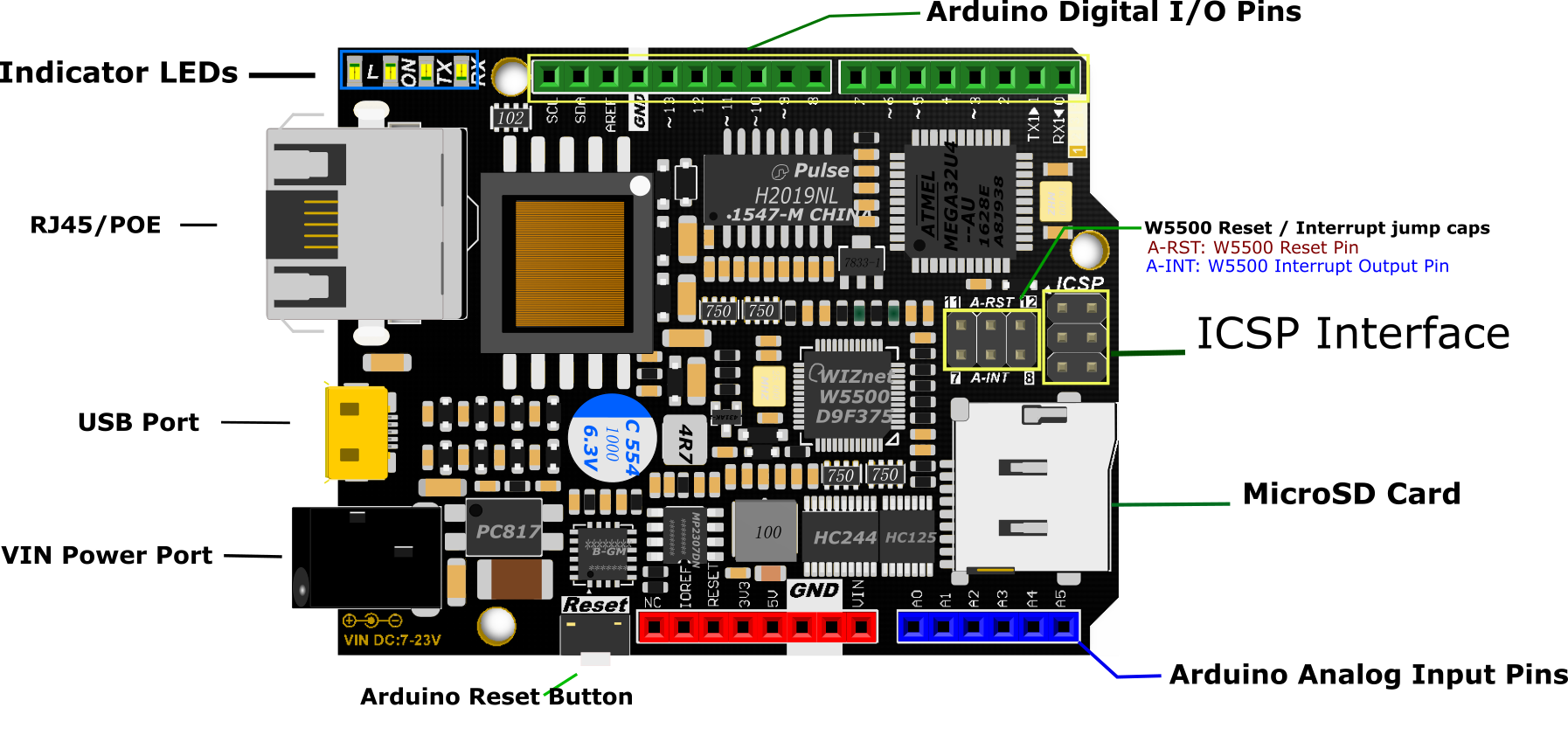
    We recommend that you remove the jumper caps if you don't need to use the W5500 reset and interrupt functions, or pins 7, 8, 11 or 12 may not function properly.

    • L: D13 digital pin level indicator
    • TX: serial data transmitting indicator
    • RX: serial data receiving indicator
    • ON: power indicator

    W5500 Ethernet with POE Mainboard

    FAQ

    • How to use the onboard micro-SD card slot?

      Use it as the normal one using Arduino SD library is ok. Note that because the W5100 and SD card share the SPI bus, only one can be active at a time. For more, please check on Arduino, Arduino Ethernet Shield.

    • About Old Version Library

      The Ethernet library that comes along with Arduino IDE is for W5100 Ethernet shield, which is not compatible with W5500. Hence that you need to replace this library with the new one as instructed.

    • DFR0342, How to set the IP address?

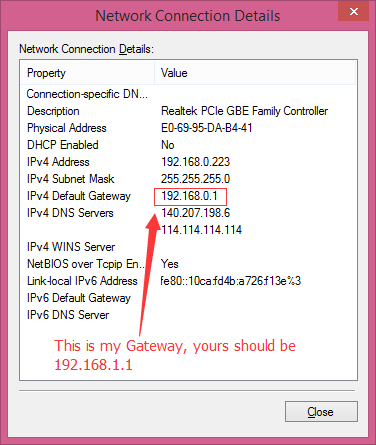
      Open your Network connection properties, and check the IPv4 Address and Gateway. The first three numbers should be set as same as on your board. The last number can be any number between 0-255, as long as it is not occupied by any other devices. DFR0342_Gateway.png

    • So is this 100% interchangable with the Arduino Leonardo ETH model as it also now has w5500 built in. And is compatible with Cheyene IOT system?

      Yes, tested with org IDE ethernet 2 library. works well. And it also support POE function.

    • I have a problem with my board, impossible to reconize the COM port. Windows 7 say : unable to request usb descriptor...
      I want to re-burn bootloader (with USBTinyISP) but the Arduino IDE say : "avrdude: initialization failed, rc=-1"
      I use the board setting : Arduino leonardo
      Is a traditional arduino bootloader inside this board ?

      So, what is about a W5200 Ethernet shield with a Bluno M3, http://www.dfrobot.com/inde... http://www.dfrobot.com/inde...

    Explore More Related Questions >

    Was this article helpful?

    TOP